How does the Istio ingress gateway work?
The Istio ingress gateway is an Envoy-based proxy deployed at the edge of the mesh to handle north-south traffic entering the cluster. Instead of every pod exposing itself publicly, external clients hit the ingress gateway, which then routes requests to internal services according to Istio Gateway and VirtualService configuration.
Operators typically expose the gateway via a Kubernetes Service (often a LoadBalancer), attach TLS certificates, and define which hosts and paths map to which mesh services. Because the gateway is part of the mesh, it can participate in the same observability, auth, and resilience features used for east-west traffic.
Frequently asked questions about Istio ingress gateway
What is the difference between an Istio Gateway and a VirtualService?
A Gateway resource configures the load balancer/ports/hosts the ingress proxy listens on (including TLS settings). A VirtualService defines routing rules—path matches, timeouts, retries, and destination subsets—for traffic that has already entered through that gateway (or for internal mesh traffic).
How is Istio ingress different from a plain Kubernetes Ingress?
Kubernetes Ingress is an API implemented by various controllers with varying feature sets. Istio’s ingress gateway uses mesh-native APIs (Gateway/VirtualService) and Envoy, which can provide richer L7 routing, consistent telemetry with the mesh, and tighter integration with mesh auth policies.
Can Istio ingress terminate TLS?
Yes. Common patterns include TLS termination at the ingress gateway with certificates referenced from Kubernetes secrets, or passing through TLS to upstreams when end-to-end encryption is required. Exact setup depends on your Gateway TLS mode and certificate management process.
When should teams consider alternatives to a classic Istio ingress deployment?
Some platforms prefer a shared gateway fleet, ambient modes, or gateway API–centric workflows for simpler operations. The right pattern depends on whether you need full sidecar meshes, how you manage certificates, and how many clusters you operate—evaluate operational fit rather than chasing a single “best” product ranking.
What is Istio Ingress Gateway?
The Istio Ingress Gateway is a component of the Istio service mesh that provides ingress traffic management for applications running within the mesh. It is responsible for controlling the flow of incoming and outgoing network traffic to and from the mesh, and can be configured to provide features such as load balancing, SSL termination, and authentication.
The Ingress Gateway acts as a single entry point for all incoming traffic, routing it to the appropriate service within the mesh based on the incoming request. This allows Istio to provide a consistent, high-performance traffic management layer across all the services in the mesh.
The history of Istio’s traffic management APIs
Istio is an open source project that was originally developed by Google, IBM, and Lyft. It provides a number of APIs for managing and securing microservices, including APIs for traffic management. The traffic management APIs allow administrators to control the routing of traffic within the mesh, as well as perform tasks such as request rate limiting, fault injection, and traffic splitting.
Istio’s traffic management APIs have evolved over time, with new features and capabilities being added in each release. Some of the key milestones in the development of Istio’s traffic management APIs include:
- In Istio 1.0, the initial version of the traffic management APIs was introduced, including support for routing rules and traffic shifting based on HTTP headers and other request attributes.
- In Istio 1.5, support for traffic mirroring was added, allowing administrators to send a copy of incoming traffic to a separate service for testing or other purposes.
- In Istio 1.7, support for traffic shadowing was added, allowing administrators to send a copy of incoming traffic to a separate service without affecting the original traffic.
- In Istio 1.9, support for weighted routing was added, allowing administrators to specify the percentage of traffic that should be sent to each service in a traffic splitting configuration.
Istio is an actively developed project, and new features and capabilities are regularly added to the traffic management APIs and other components of the platform.
Istio gateways
In Istio, a gateway is a Kubernetes resource that defines a load balancer that operates at the edge of the mesh, receiving incoming requests and forwarding them to the appropriate service within the mesh. There are two types of Istio gateways:
Ingress gateway
An Ingress gateway is a load balancer that handles incoming HTTP and HTTPS traffic to the mesh. It can be used to expose services to the internet, or to enable communication between services within the mesh. The Ingress gateway is implemented using a Kubernetes gateway resource and a set of Envoy proxy instances.
Egress gateway
An Egress gateway is a load balancer that handles outgoing traffic from the mesh to external services. It can be used to enable communication between services within the mesh and external services, or to perform tasks such as TLS termination or request rate limiting on outgoing traffic. Like the Ingress gateway, the Egress gateway is implemented using a Kubernetes gateway resource and a set of Envoy proxy instances.
Istio gateways are configured using gateway resources and VirtualService resources, which define the routing rules for incoming and outgoing traffic. They can be used in combination with other Istio features, such as service mesh policies and service mesh telemetry, to provide a comprehensive platform for managing and securing microservices.
Tutorial: Configuring Istio Ingress Gateway
Here is a high-level tutorial on how to configure the Istio ingress gateway:
- First, make sure that you have Istio installed and running on your Kubernetes cluster. You can use the Istio installation guide to set up Istio if you haven’t already done so.
- Next, create a Kubernetes
ServiceandDeploymentfor your application, and make sure that they are properly labeled so that Istio can identify and route traffic to them. - Create an Istio
VirtualServiceresource that routes traffic to your application’s service. This resource is used to configure the routing rules for incoming traffic to your application. The following is an example of a simpleVirtualServiceresource:
kind: VirtualService
metadata:
name: my-application
spec:
hosts:
- "*"
gateways:
- my-ingress-gateway
http:
- match:
- uri:
prefix: /my-application
route:
- destination:
host: my-application-svc
port:
name: http
- Create an Istio
Gatewayresource that defines the ingress gateway for your cluster. TheGatewayresource tells Istio what ports to open for incoming traffic and what protocols to use for the traffic.
kind: Gateway
metadata:
name: my-ingress-gateway
spec:
selector:
istio: ingressgateway
servers:
- port:
name: http
number: 80
protocol: HTTP
hosts:
- "*"
- Finally, apply the resources to your cluster.
kubectl apply -f my-virtual-service.yaml
kubectl apply -f my-ingress-gateway.yaml
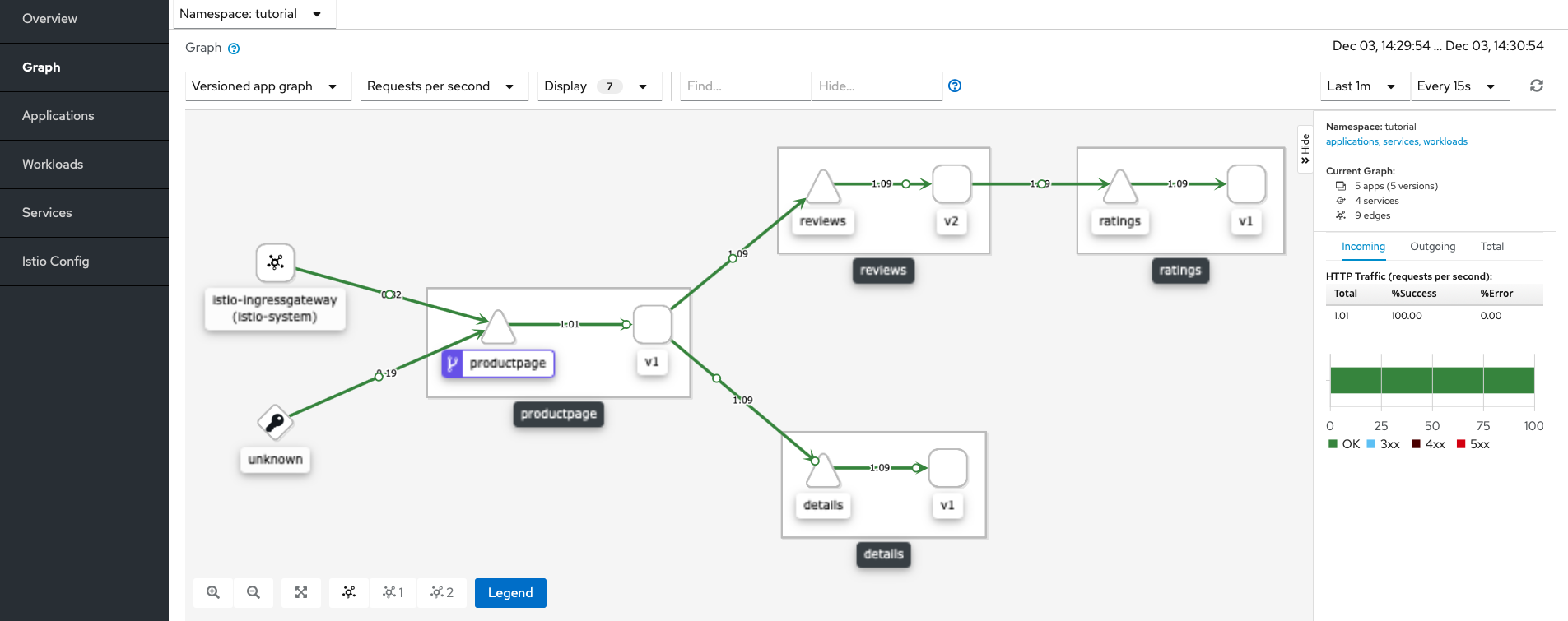
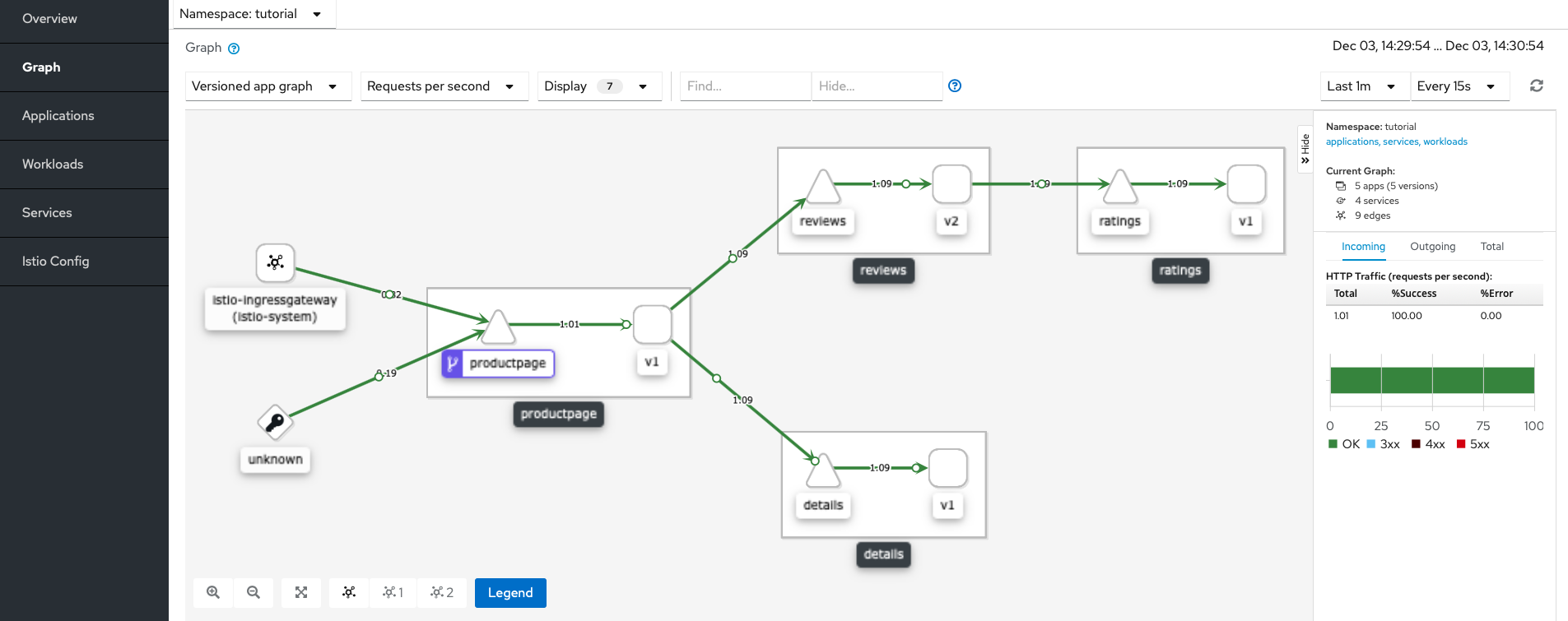
- You can check the namespace graph in Kiali and see if the traffic is being routed as per your configurations. If you find any issues, you can use the Kiali console to debug.
- Once you’ve set up Istio Ingress Gateway, it should be able to handle all requests. As a good practice, it is recommended to delete the Kubernetes Ingress resource because it could conflict with Istio and cause routing issues.
Istio Ingress Gateway with Gloo Mesh / Gloo Gateway
Solo Gloo Platform delivers a unique, integrated architecture, which brings together Istio Service Mesh, advanced multi-cluster management, and API Gateway functionality. This enhances the default Istio Ingress Gateway functionality with robust routing, security, and high availability.


%20(1).png)







%20a%20Bad%20Idea.png)