It seems like the AI world is moving rapidly, and it is, but that doesn’t mean it’s moving at the speed of light that we see on social media for every single organization and engineer. Many people are at the beginning of the AI journey for themselves and the organization they work at.
Because of that, understanding how to get up to speed with the core needs within AI (security, observability, and tool usage) is a great first step to not only learn how it works, but to start thinking about how it will be incorporated within your environment.
The overall goal is to show that the workflow for agentic to get started should be “simple” (but keeping in mind that “simple” is subjective), so in this blog post, you’ll learn how to get started with agentgateway locally
Prerequisites
You need two things:
1. **Docker.** Docker Desktop on your laptop is fine. We're running agentgateway in a container.
2. **A text editor.** Something you can write YAML in.
That's it. No Kubernetes cluster. No cloud account. No "you need to set up a load balancer first." Just your laptop.
Why This Matters Right Now
If you've built anything in the tech space, you know the pattern. The difference between "I read about this and I'm confused" and "I deployed this locally and I own how it works" is huge. This is the key difference between being hands-on and looking at things from a theoretical perspective.
For AI, that gap very much exists.
Engineers need to move at a pace that no one has seen before. Yes, when various cloud providers started coming out and orchestration platforms like Kubernetes became popular, everyone was moving quickly. However, not everyone was adopting the technology. Even after Kubernetes came out, it took a few years for people to start looking at it.
With AI? It’s completely different. It feels like almost the second a new AI protocol or spec comes out, everyone is rushing to adopt it. The world of Agentic is moving faster than anyone could’ve anticipated and getting up to speed with it could potentially be the make or break of someone's career.
With that, let’s dive into agentgateway and MCP from a hands-on perspective.
Step 1: Pull and Run agentgateway Locally
Combing the Docker engine (e.g - Docker Desktop) and agentgateway OSS standalone, let’s deploy agentgateway in a container.
1. Ensure to have a config file in YAML format as that’s how agentgateway OSS standalone retrieves it’s configurations. You can use the example one below. Save it as `everything.yaml`.
binds:
- port: 3000
  listeners:
  - routes:
    - policies:
        cors:
          allowOrigins:
            - "*"
          allowHeaders:
            - "*"
          exposeHeaders:
            - "Mcp-Session-Id"
      backends:
        - mcp:
            targets:
            - name: deepwiki
              mcp:
                host: https://mcp.deepwiki.com/mcp
2. Run the agentgateway container via the command below, which exposes agentgateway so you can reach the UI and loads your config file.
```bash
docker run -v ./streamable-everything.yaml:/streamable-everything.yaml -p 3000:3000 \
  -p 127.0.0.1:15000:15000 -e ADMIN_ADDR=0.0.0.0:15000 \
  cr.agentgateway.dev/agentgateway:latest \
  -f streamable-everything.yaml
```
You’ll see an output similar to the below:
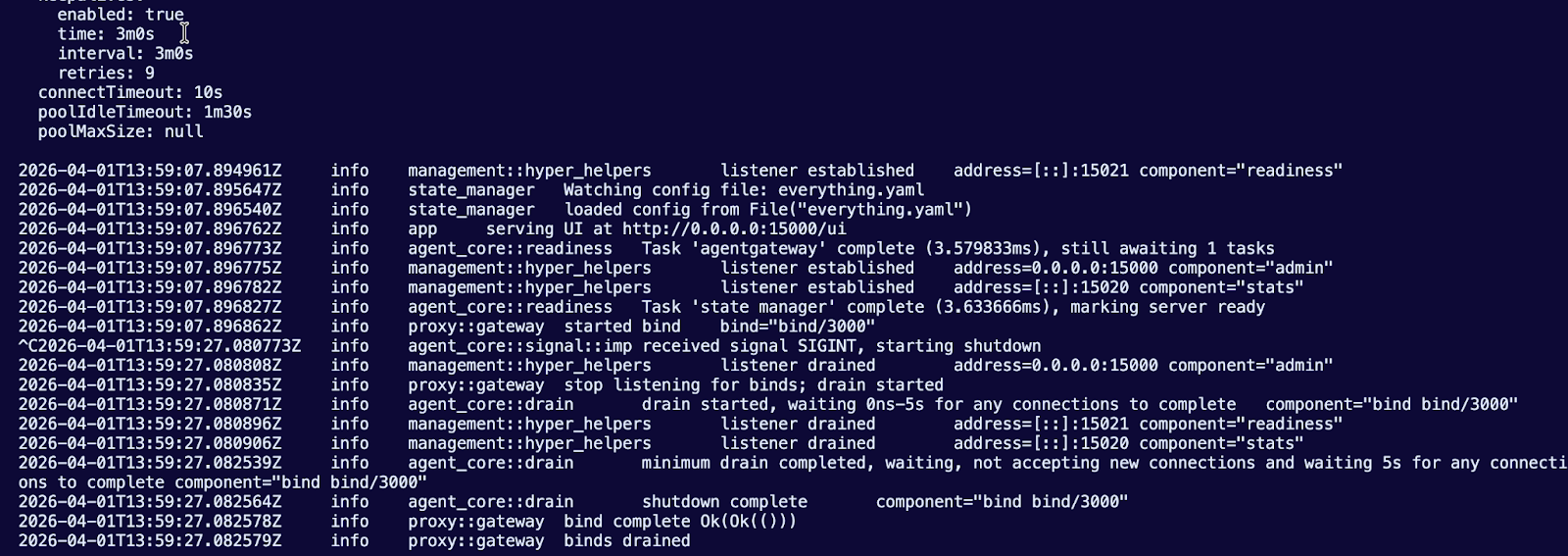
And you can now reach the agentgateway UI via: http://0.0.0.0:15000/ui
Step 2: Accessing an MCP Server Tool
With your configuration that you deployed above up and running, you can now access tools within your MCP Server.
1. Open up your UI and go to the Playground.
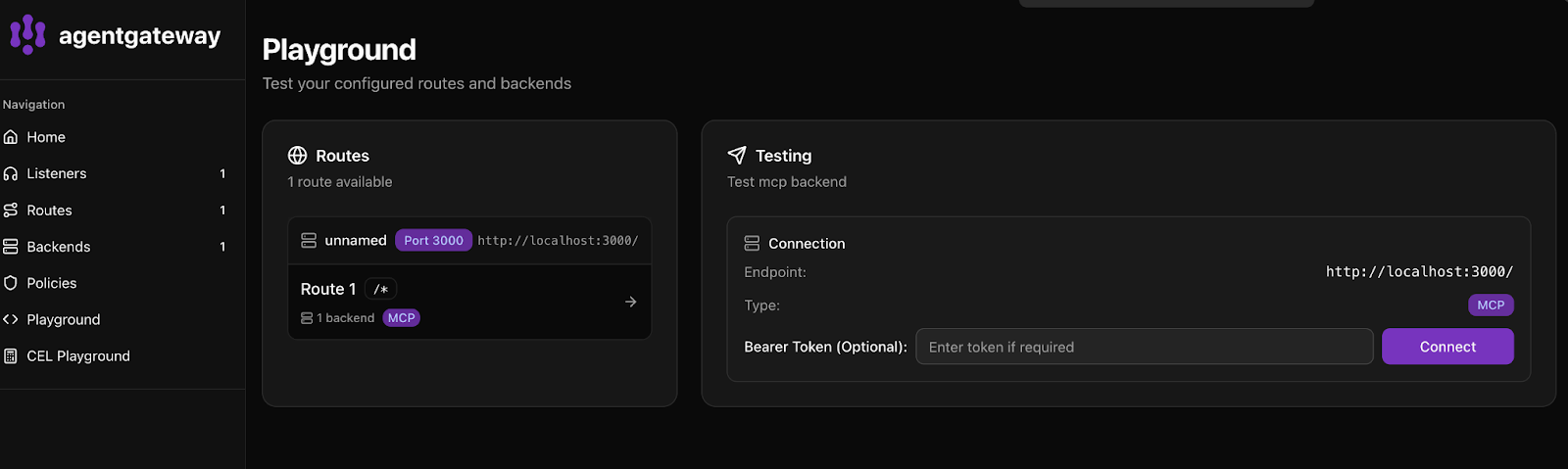
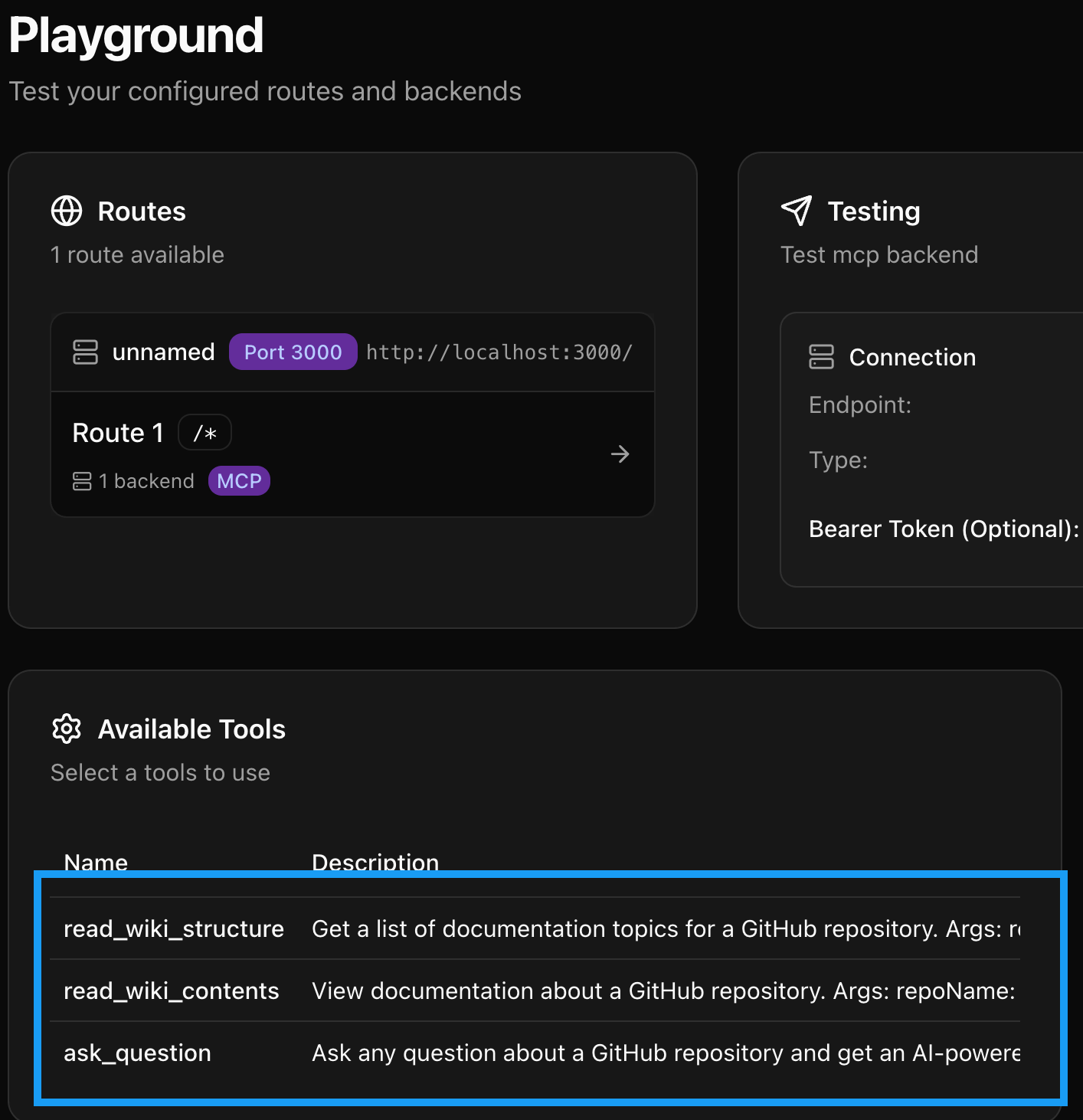
2. Click the purple **Connect** button.
You should now see a few tools readily available.
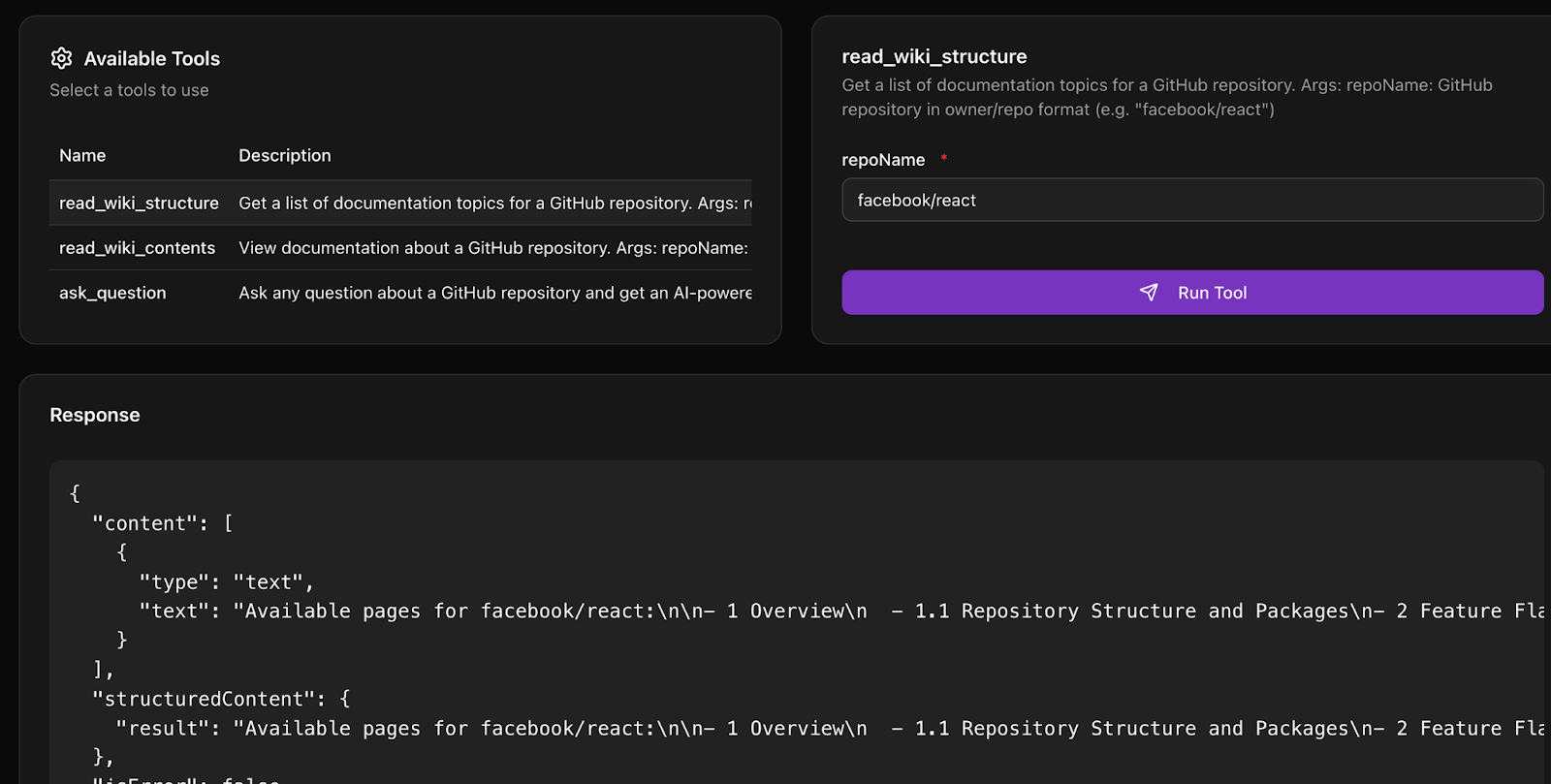
3. To test using one of the tools, click on `read_wiki_structure` and type in `facebook/react`.
Step 3: Rate Limiting with agentgateway
With your gateway and MCP Server up and operational, it’s time to test out a key feature - rate limiting. Many organizations are figuring out how to ensure that tokens and AI workloads used should, in fact, be used in the way that they’re being used. From a cost optimization perspective, finance teams are getting hit with large bills due to AI usage. With those two pieces in mind, let’s implement rate limiting.
1. Update your `everything-streamable.yaml` with rate limiting set to one token every minute. In production, of course, this wouldn’t be the case, but it’s a good test to ensure that rate limiting is working as expected.
```yaml
binds:
- port: 3000
  listeners:
  - routes:
    - policies:
        cors:
          allowOrigins:
            - "*"
          allowHeaders:
            - "*"
          exposeHeaders:
            - "Mcp-Session-Id"
        localRateLimit:
          - maxTokens: 1
            tokensPerFill: 1
            fillInterval: 100s
            type: requests
      backends:
        - mcp:
            targets:
            - name: deepwiki
              mcp:
                host: https://mcp.deepwiki.com/mcp
```
Try running your request again in the Playground. Within the terminal, you’ll see an output similar to the below.

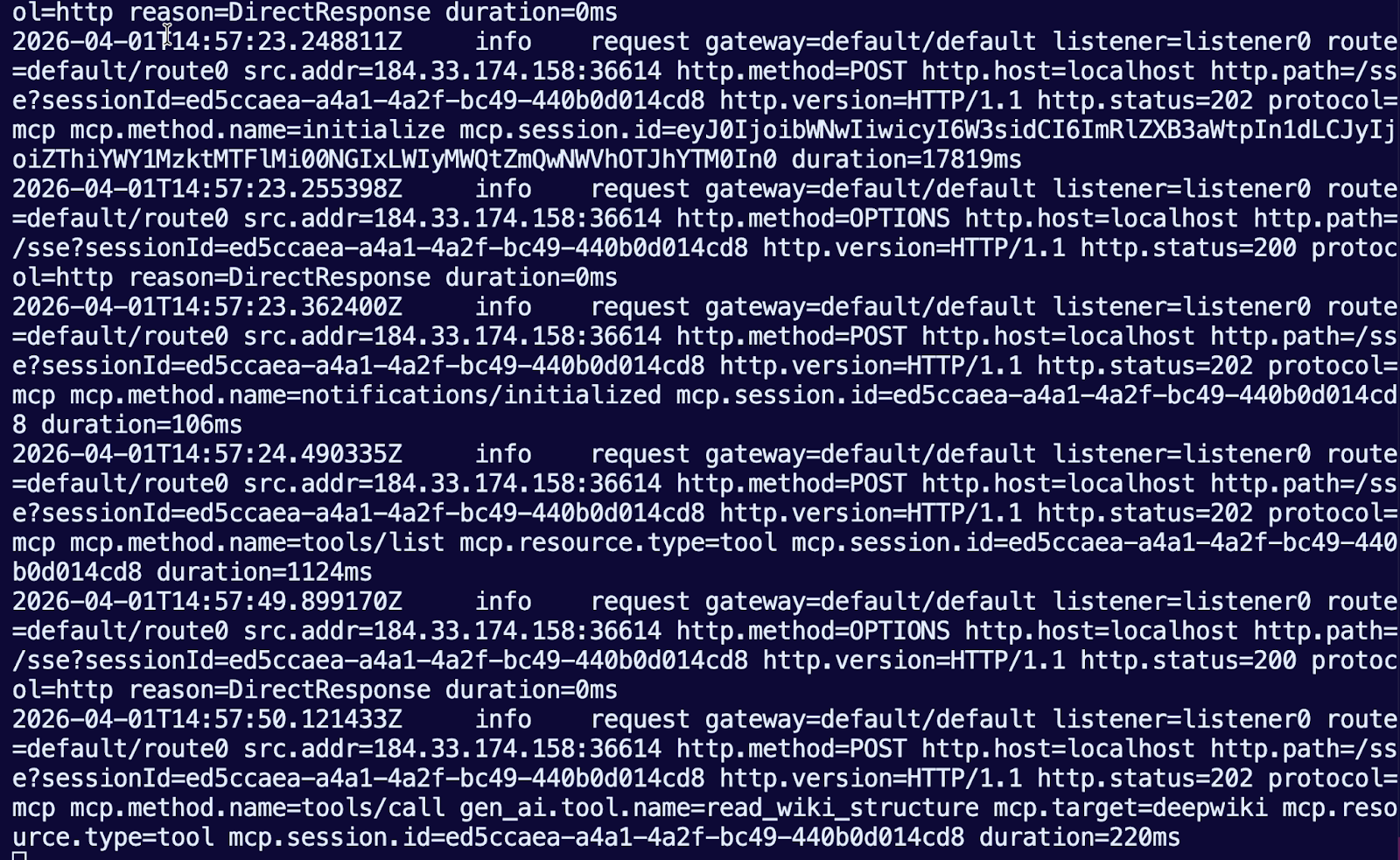
Step 4: Watch the Request Flow in Logs
The real learning happens when you see what's actually moving through the system.
Within your terminal, you will see all of the output from connecting to and using agentgateway to route traffic to an MCP Server that’s a streamable HTTP MCP Server, so the traffic is going over the internet.
Where This Goes from Here
You have the core loop working. That's the hard part. Everything after this is building on what you've done.
When you're evaluating any tool/platform, agentic or otherwise, the test is “did it run in an effective and quick fashion”. Can you prove it works locally? Can you do it fast? Can you understand what's happening?
From here, the next steps are either the tools themselves (make them better, make them secure, make them real) or the infrastructure (scale it, add isolation, add discovery). But you're not fumbling around with a broken quickstart or guessing at configuration options.
You're building, that's the difference.
If you want to run this in Kubernetes instead of Docker, you can use kagent as your agent time. It gives you the same MCP server capabilities your tools stay the same, and combined with agentgateway, it can handle all the orchestration, authN/Z, isolation, and scaling that Kubernetes environments need.
If you want multiple teams to share tools without managing configuration in five different places, that's where agentregistry comes in. Register your tools once. Let agents discover them dynamically. No YAML files, no manual gateway configuration, and shadow AI fully reduced to zero.


%20(1).png)





%20a%20Bad%20Idea.png)