MCP Servers could have one or two tools, but they could also have hundreds (maybe even thousands), and there’s an incredibly high likelihood that you’re only using a few of them. Because of the potential amount of tools that exist within an MCP Server, context windows get bloated and therefore, tokens are wasted before you even get to send your first prompt. This means spending real dollars for virtually no reason and inference speeds are reduced (because of processing needs) due to loading all tool definitions.
The goal is instead to only load the tools you need.
In this blog post, you’ll learn how to do this with progressive disclosure and how to implement progressive disclosure today with agentgateway
What Is Progressive Disclosure
MCP progressive disclosure is a design pattern layered on top of the Model Context Protocol. Instead of loading every tool schema from an MCP server into the context window, the client sees a lightweight index and retrieves each tool's full schema only when it needs it, saving tokens.
“Only load what you need”.
Thinking through MCP Server “tools”, what are they? The tldr is they’re functions/methods just like any other that you’d see within application code. In the world of MCP, these functions/methods are baked into a server (a backend codebase that’s callable locally or over HTTP) that performs actions for a specific use case. The use case could be anything from managing GitHub orgs/repos to interacting with an MCP Server.
The problem when using MCP Servers is all of the tools get loaded into your context window even if you aren’t using them because your Agent is calling out to the MCP Server, and therefore, the tools are loaded in your context (or rather, the tool schemas).
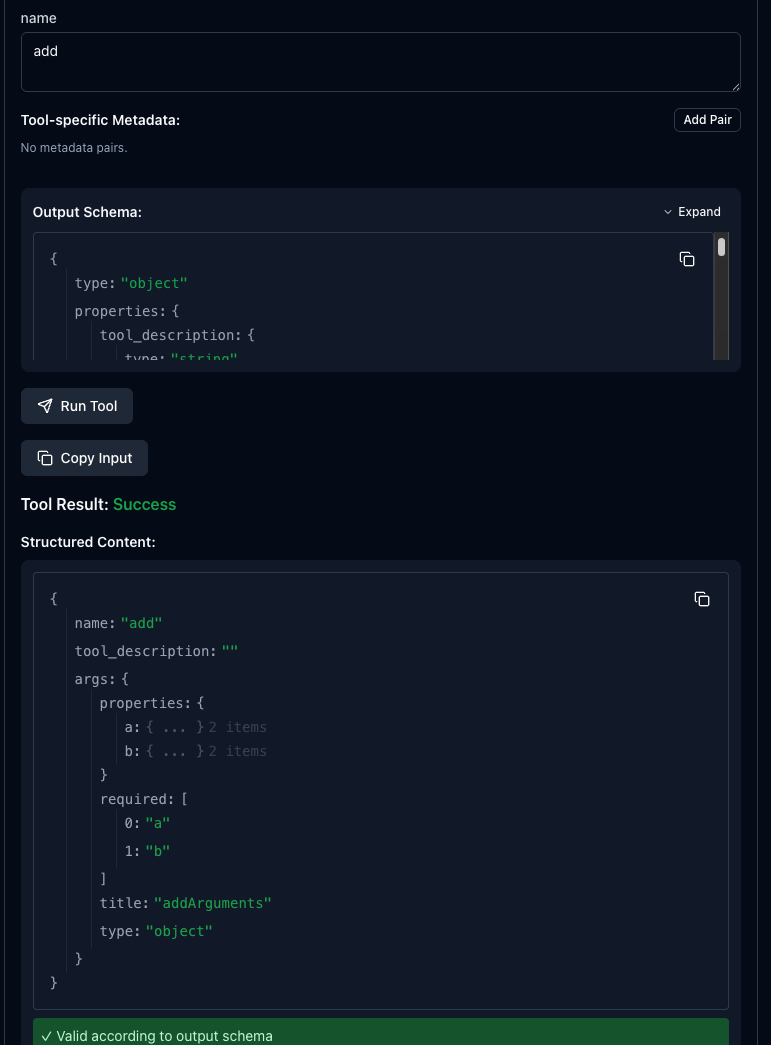
Progressive disclosure loads the full tool set from an MCP Server, but the client (whatever client you're using to access the MCP Server - VSCode, MCP Inspector, etc.) only sees a lightweight index upfront and retrieves the schema (the contract for a tool) on-demand with the `get_tool()` function. The goal here is managing the size of a context window. There's no need to put tools into the context without you actually having to use them. By doing this, you're saving thousands of tokens.
Fully load the tool schemas that you need for the particular action an Agent must take; no more, no less.
How It Works
When any client connects to an MCP Server, it responds with a tools/list that includes every tool that the MCP Server has and the full schema for each. For a small MCP Server, that may not seem like much, but an enterprise MCP Server? That’s 10’s to 100’s of tool schemas loaded within your context, causing faster compaction tools and higher token usage.
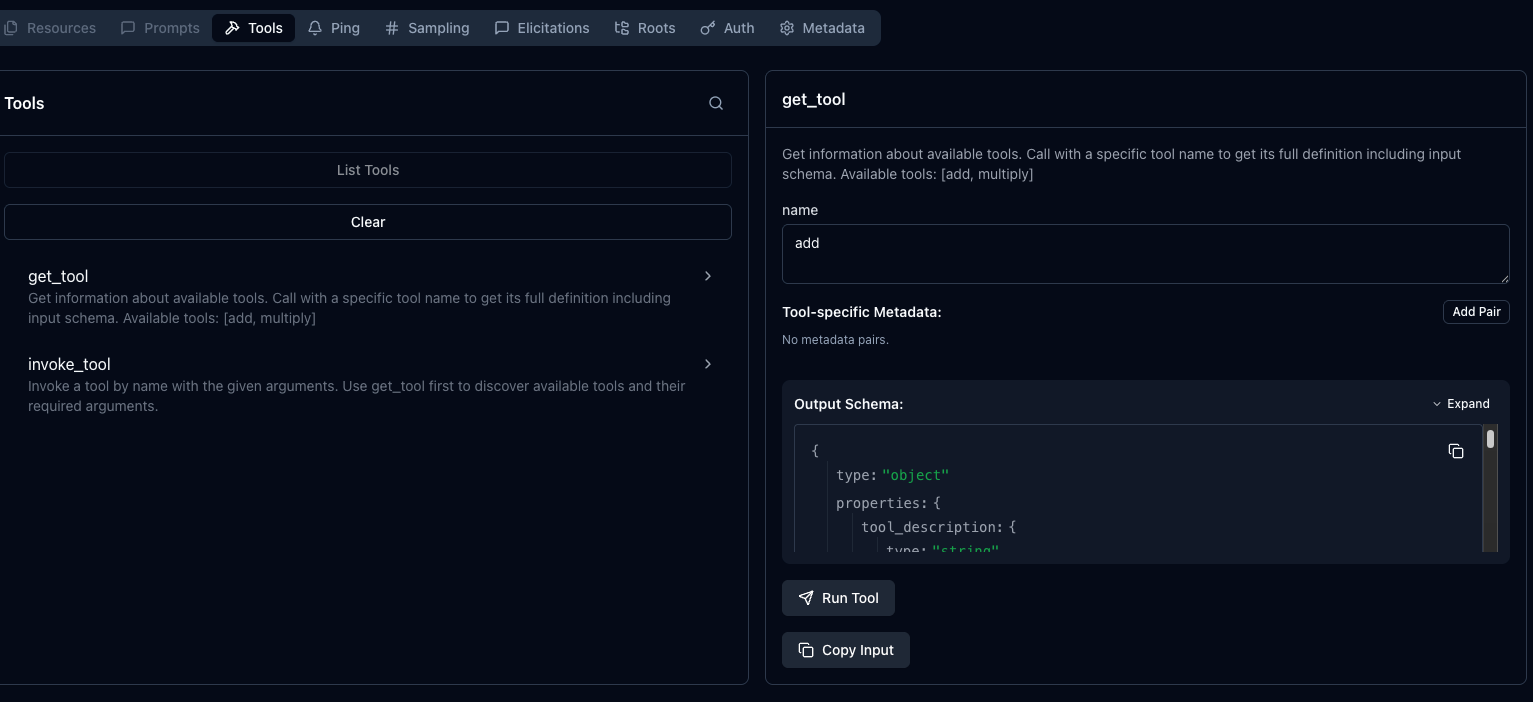
To implement progressive disclosure, there are two functions; get_tool that uses name parameter and invoke_tool, which allows you to pass in a name parameter and option arguments. The `name` parameter is the tool name that you want to call/use within the MCP Server.
It’s important to note that progressive disclosure is not a part of the MCP spec itself. Instead, it’s a design pattern that is built on top of MCP. Within the MCP spec, you still have `tools/list`, tools/call, and notifications/tools/list_changed, but there’s no get_tool(name) function embedded into the spec. Instead, that’s layered on top of the existing spec when implementing progressive discovery. From an MCP Client perspective when routing through agentgateway, it’s not seeing progressive disclosure as some “MCP progressive disclosure mode”. Instead, the client just sees there are two functions called get_tool and invoke_tool.
Progressive Disclosure vs Dynamic Tool Discovery
You may hear progressive disclosure called “dynamic tool discovery”, and although there’s a lot of overlap, there’s a fair amount of difference. Dynamic tool discovery are tools that can appear, disappear, or even change during runtime. The tool list itself is dynamic.
Unlike progressive disclosure being a layer on top of the MCP spec, dynamic tool discovery is within the MCP spec.
Implementing progressive disclosure with agentgateway
With the theory and the “how” around progressive disclosure under our belt, let’s go ahead and see it work in action.
- Run an MCP Server. In this case, you can do it locally on your k8s cluster and expose the server as a Kubernetes Service like in the example below or connect to whatever Streamable HTTP MCP Server you’d like.
kubectl apply -f - <<EOF
apiVersion: v1
kind: ConfigMap
metadata:
  name: mcp-math-script
  namespace: default
data:
  server.py: |
    import uvicorn
    from mcp.server.fastmcp import FastMCP
    from starlette.applications import Starlette
    from starlette.routing import Route
    from starlette.requests import Request
    from starlette.responses import JSONResponse

    mcp = FastMCP("Math-Service")

    @mcp.tool()
    def add(a: int, b: int) -> int:
        return a + b

    @mcp.tool()
    def multiply(a: int, b: int) -> int:
        return a * b

    async def handle_mcp(request: Request):
        try:
            data = await request.json()
            method = data.get("method")
            msg_id = data.get("id")
            result = None

            if method == "initialize":
                result = {
                    "protocolVersion": "2024-11-05",
                    "capabilities": {"tools": {}},
                    "serverInfo": {"name": "Math-Service", "version": "1.0"}
                }

            elif method == "notifications/initialized":
                return JSONResponse({"jsonrpc": "2.0", "id": msg_id, "result": True})

            elif method == "tools/list":
                tools_list = await mcp.list_tools()
                result = {
                    "tools": [
                        {
                            "name": t.name,
                            "description": t.description,
                            "inputSchema": t.inputSchema
                        } for t in tools_list
                    ]
                }

            elif method == "tools/call":
                params = data.get("params", {})
                name = params.get("name")
                args = params.get("arguments", {})

                tool_result = await mcp.call_tool(name, args)

                # Serialize content
                serialized_content = []
                for content in tool_result:
                    if hasattr(content, "type") and content.type == "text":
                        serialized_content.append({
                            "type": "text",
                            "text": content.text
                        })
                    elif hasattr(content, "type") and content.type == "image":
                        serialized_content.append({
                            "type": "image",
                            "data": content.data,
                            "mimeType": content.mimeType
                        })
                    else:
                        serialized_content.append(
                            content if isinstance(content, dict) else str(content)
                        )

                result = {
                    "content": serialized_content,
                    "isError": False
                }

            elif method == "ping":
                result = {}

            else:
                return JSONResponse(
                    {
                        "jsonrpc": "2.0",
                        "id": msg_id,
                        "error": {
                            "code": -32601,
                            "message": "Method not found"
                        }
                    },
                    status_code=404
                )

            return JSONResponse({
                "jsonrpc": "2.0",
                "id": msg_id,
                "result": result
            })

        except Exception as e:
            import traceback
            traceback.print_exc()
            return JSONResponse(
                {
                    "jsonrpc": "2.0",
                    "id": None,
                    "error": {
                        "code": -32603,
                        "message": str(e)
                    }
                },
                status_code=500
            )

    app = Starlette(routes=[
        Route("/mcp", handle_mcp, methods=["POST"]),
        Route("/", lambda r: JSONResponse({"status": "ok"}), methods=["GET"])
    ])

    if __name__ == "__main__":
        print("Starting Fixed Math Server on port 8000...")
        uvicorn.run(app, host="0.0.0.0", port=8000)
---
apiVersion: apps/v1
kind: Deployment
metadata:
  name: mcp-math-server
  namespace: default
spec:
  replicas: 1
  selector:
    matchLabels:
      app: mcp-math-server
  template:
    metadata:
      labels:
        app: mcp-math-server
    spec:
      containers:
      - name: math
        image: python:3.11-slim
        command: ["/bin/sh", "-c"]
        args:
        - |
          pip install "mcp[cli]" uvicorn starlette && \
          python /app/server.py
        ports:
        - containerPort: 8000
        volumeMounts:
        - name: script-volume
          mountPath: /app
        readinessProbe:
          httpGet:
            path: /
            port: 8000
          initialDelaySeconds: 5
          periodSeconds: 5
      volumes:
      - name: script-volume
        configMap:
          name: mcp-math-script
---
apiVersion: v1
kind: Service
metadata:
  name: mcp-math-server
  namespace: default
spec:
  selector:
    app: mcp-math-server
  ports:
  - port: 80
    targetPort: 8000
EOF- Create a Gateway object.
kubectl apply -f - <<EOF
apiVersion: gateway.networking.k8s.io/v1
kind: Gateway
metadata:
  name: mcp-gateway
  namespace: agentgateway-system
  labels:
    app: mcp-math-server
spec:
  gatewayClassName: enterprise-agentgateway
  listeners:
  - name: mcp
    port: 3000
    protocol: HTTP
    allowedRoutes:
      namespaces:
        from: Same
EOF- Implement an agentgateway backend, which is what tells your gateway what to route to. In this case, it’s an MCP Server.
kubectl apply -f - <<EOF
apiVersion: agentgateway.dev/v1alpha1
kind: AgentgatewayBackend
metadata:
  name: demo-mcp-server
  namespace: agentgateway-system
spec:
  mcp:
    targets:
    - name: demo-mcp-server
      static:
        host: mcp-math-server.default.svc.cluster.local
        port: 80
        path: /mcp
        protocol: StreamableHTTP
EOF- Attach an HTTP route with a reference to your agentgateway backend.
kubectl apply -f - <<EOF
apiVersion: gateway.networking.k8s.io/v1
kind: HTTPRoute
metadata:
  name: mcp-route
  namespace: agentgateway-system
  labels:
    app: mcp-math-server
spec:
  parentRefs:
  - name: mcp-gateway
  rules:
  - backendRefs:
    - name: demo-mcp-server
      namespace: agentgateway-system
      group: agentgateway.dev
      kind: AgentgatewayBackend
EOF- Capture the IP of the Gateway so you can use it to connect via your MCP client.
export GATEWAY_IP=$(kubectl get svc mcp-gateway \
  -n agentgateway-system \
  -o jsonpath='{.status.loadBalancer.ingress[0].ip}')

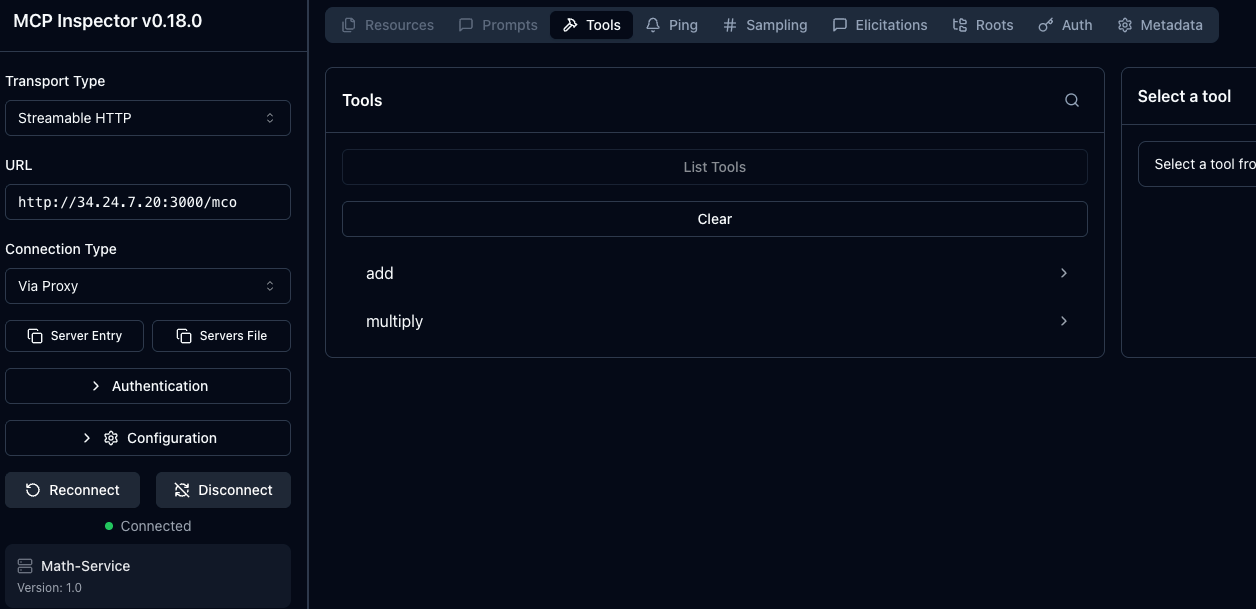
echo $GATEWAY_IP- Use an MCP client to see the tools available within your MCP Server. In this case, MCP Inspector is used.
npx modelcontextprotocol/inspector#0.18.0Notice how you have two tools available if you used the example in step 1, but if you used another MCP Server, you may have many more. This is where progressive disclosure comes into play.
For progressive disclosure, you will want to use `EnterpriseAgentgatewayBackend` instead of `AgentgatewayBackend` with the `spec.entMcp.toolMode: Search`. In Search mode, the gateway replaces the upstream tool list with two meta-tools (`get_tool` and `invoke_tool`) so clients see only a lightweight index and fetch each tool's schema on demand.
- Delete the existing `AgentgatewayBackend` object and deploy the following:
kubectl apply -f - <<EOF
apiVersion: enterpriseagentgateway.solo.io/v1alpha1
kind: EnterpriseAgentgatewayBackend
metadata:
  name: demo-mcp-server
  namespace: agentgateway-system
spec:
  entMcp:
    toolMode: Search
    targets:
    - name: demo-mcp-server
      static:
        host: mcp-math-server.default.svc.cluster.local
        port: 80
        path: /mcp
        protocol: StreamableHTTP
---
apiVersion: gateway.networking.k8s.io/v1
kind: HTTPRoute
metadata:
  name: mcp-route
  namespace: agentgateway-system
  labels:
    app: mcp-math-server
spec:
  parentRefs:
  - name: mcp-gateway
  rules:
  - backendRefs:
    - name: demo-mcp-server
      namespace: agentgateway-system
      group: enterpriseagentgateway.solo.io
      kind: EnterpriseAgentgatewayBackend
EOF- Disconnect from your MCP Server and re-connect. You should now see the two meta tools.
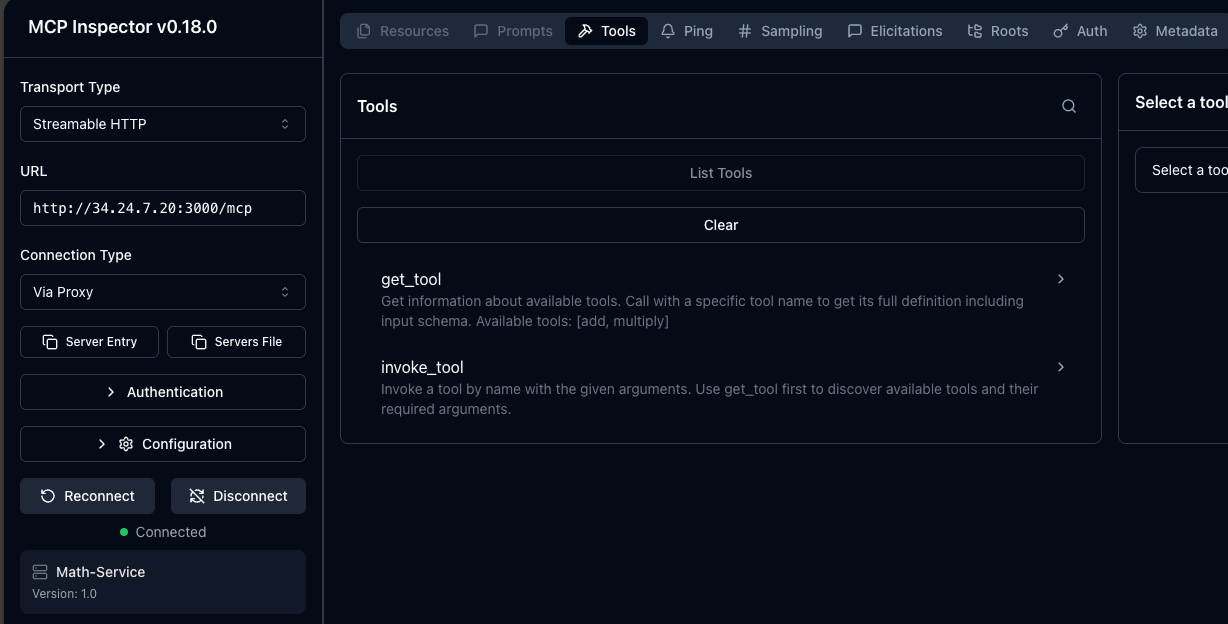
You can then use the `get_tool` Tool to see your `add` tool in the math MCP Server.
FAQ
What is MCP progressive disclosure?
MCP progressive disclosure is a design pattern layered on top of the Model Context Protocol. Instead of loading every tool schema from an MCP server into the context window, the client sees a lightweight index and retrieves each tool's full schema only when it needs it, saving tokens.
How is progressive disclosure different from dynamic tool discovery?
Dynamic tool discovery is part of the MCP spec: the tools a server offers can appear, disappear, or change at runtime, and clients are notified through notifications/tools/list_changed. Progressive disclosure is not part of the spec; it is a design pattern layered on top of MCP that defers loading each tool's schema until the agent needs it.
How do I enable progressive disclosure with agentgateway?
In Solo Enterprise for agentgateway, define the MCP server with an EnterpriseAgentgatewayBackend instead of an AgentgatewayBackend, and set spec.entMcp.toolMode to Search. In Search mode, the gateway replaces the upstream tool list with two meta-tools, get_tool and invoke_tool, so clients see only a lightweight index and fetch each tool's schema on demand.



%20(1).png)










%20a%20Bad%20Idea.png)