How to: Building Agentgateway to support Multi-LLM providers.
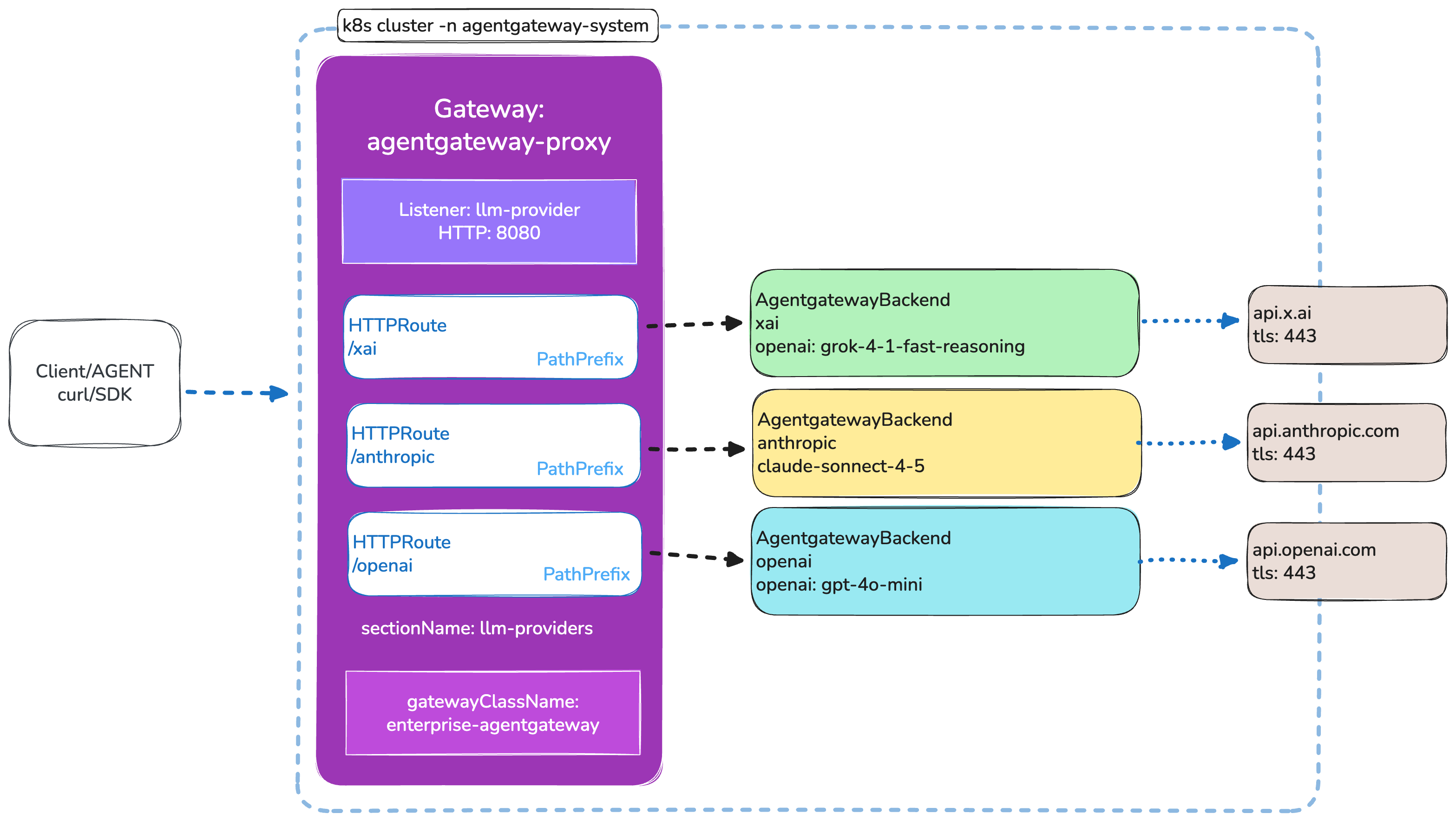
Agentgateway makes it simple to route traffic to multiple LLM providers through a single gateway using the Kubernetes Gateway API. This guide walks through setting up agentgateway OSS on a local Kind cluster with xAI, Anthropic, and OpenAI backends, all routed through a listener named llm-providers.
One of the most common patterns in AI-native infrastructure is routing traffic to multiple LLM providers behind a single entry point. Whether you’re comparing models, building failover strategies, or just want a unified API across providers, agentgateway gives you a clean Kubernetes-native way to do it using the Gateway API and AgentgatewayBackend custom resources.
In this guide, we’ll set up a complete working example on a local Kind cluster with three LLM providers routed via path-based HTTPRoute resources.
What you’ll build
By the end of this guide you’ll have:
- A Kind cluster running the agentgateway control plane
- A
Gatewaywith a listener namedllm-providerson port 8080 - Three
AgentgatewayBackendresources for xAI, Anthropic, and OpenAI - Three
HTTPRouteresources that route/xai,/anthropic, and/openaito their respective backends
Prerequisites
Before getting started, make sure you have the following installed:
- Docker — container runtime for Kind
- Kind — local Kubernetes clusters
- kubectl — Kubernetes CLI (within 1 minor version of your cluster)
- Helm — Kubernetes package manager
You also need API keys for the LLM providers you want to use. Export them as environment variables:
export XAI_API_KEY="your-xai-api-key"
export ANTHROPIC_API_KEY="your-anthropic-api-key"
export OPENAI_API_KEY="your-openai-api-key"
Step 1: Create a Kind cluster
Create a local Kubernetes cluster using Kind. This gives you a lightweight, disposable cluster perfect for testing.
kind create cluster --name agentgateway-demo
Verify it’s running:
kubectl cluster-info --context kind-agentgateway-demo
kubectl get nodes
Step 2: Install agentgateway OSS via Helm
Install the Gateway API CRDs
Agentgateway relies on the Kubernetes Gateway API. Install the standard CRDs:
kubectl apply -f https://github.com/kubernetes-sigs/gateway-api/releases/download/v1.4.0/standard-install.yaml
Install the agentgateway CRDs
Install the custom resource definitions that agentgateway needs (AgentgatewayBackend, AgentgatewayPolicy, etc.):
helm upgrade -i agentgateway-crds \
  oci://ghcr.io/kgateway-dev/charts/agentgateway-crds \
  --create-namespace \
  --namespace agentgateway-system \
  --version v2.2.0-main
Install the agentgateway control plane
helm upgrade -i agentgateway \
  oci://ghcr.io/kgateway-dev/charts/agentgateway \
  --namespace agentgateway-system \
  --version v2.2.0-main \
  --set controller.image.pullPolicy=Always
The --set controller.image.pullPolicy=Always flag is recommended for development builds to ensure you always get the latest image.Verify the pods are running:
kubectl get pods -n agentgateway-system
You should see the controller pod in a Running state.
Step 3: Create the Gateway
The Gateway resource is the entry point for all traffic. It defines a listener named llm-providers on port 8080 that accepts HTTPRoute resources from any namespace.
kubectl apply -f- <<EOF
apiVersion: gateway.networking.k8s.io/v1
kind: Gateway
metadata:
  name: agentgateway-proxy
  namespace: agentgateway-system
spec:
  gatewayClassName: enterprise-agentgateway
  infrastructure:
    parametersRef:
      name: tracing
      group: enterpriseagentgateway.solo.io
      kind: EnterpriseAgentgatewayParameters
  listeners:
  - protocol: HTTP
    port: 8080
    name: llm-providers
    allowedRoutes:
      namespaces:
        from: All
EOF
The listener name llm-providers is the key here. All HTTPRoute resources in the following steps reference this listener via sectionName, so the gateway knows which listener should handle each route.
Step 4: Configure API key secrets
Each LLM provider needs an API key stored as a Kubernetes Secret. The AgentgatewayBackend resources reference these secrets for authentication.
kubectl apply -f- <<EOF
apiVersion: v1
kind: Secret
metadata:
  name: xai-secret
  namespace: agentgateway-system
type: Opaque
stringData:
  Authorization: $XAI_API_KEY
EOF
kubectl apply -f- <<EOF
apiVersion: v1
kind: Secret
metadata:
  name: anthropic-secret
  namespace: agentgateway-system
type: Opaque
stringData:
  Authorization: $ANTHROPIC_API_KEY
EOF
kubectl apply -f- <<EOF
apiVersion: v1
kind: Secret
metadata:
  name: openai-secret
  namespace: agentgateway-system
type: Opaque
stringData:
  Authorization: $OPENAI_API_KEY
EOF
Never commit API keys to source control. Use environment variable substitution or a secrets manager in production.
Step 5: Create agentgateway backends
AgentgatewayBackend resources define the LLM provider endpoints. Each backend specifies the provider type, model, and authentication. Agentgateway automatically rewrites requests to the correct chat completion endpoint for each provider.
xAI backend
xAI uses an OpenAI-compatible API. Because we’re specifying a custom host (api.x.ai) rather than the default OpenAI host, we need to explicitly set the host, port, path, and TLS SNI.
kubectl apply -f- <<EOF
apiVersion: agentgateway.dev/v1alpha1
kind: AgentgatewayBackend
metadata:
  name: xai
  namespace: agentgateway-system
spec:
  ai:
    provider:
      openai:
        model: grok-4-1-fast-reasoning
      host: api.x.ai
      port: 443
      path: "/v1/chat/completions"
  policies:
    auth:
      secretRef:
        name: xai-secret
    tls:
      sni: api.x.ai
EOF
Anthropic backend
Anthropic uses its native provider type. Agentgateway handles the endpoint rewriting automatically — no custom host or TLS configuration needed.
kubectl apply -f- <<EOF
apiVersion: agentgateway.dev/v1alpha1
kind: AgentgatewayBackend
metadata:
  name: anthropic
  namespace: agentgateway-system
spec:
  ai:
    provider:
      anthropic:
        model: "claude-sonnet-4-5-20250929"
  policies:
    auth:
      secretRef:
        name: anthropic-secret
EOF
OpenAI backend
OpenAI also uses its native provider type with the default endpoint.
kubectl apply -f- <<EOF
apiVersion: agentgateway.dev/v1alpha1
kind: AgentgatewayBackend
metadata:
  name: openai
  namespace: agentgateway-system
spec:
  ai:
    provider:
      openai:
        model: gpt-4o-mini
  policies:
    auth:
      secretRef:
        name: openai-secret
EOF
Step 6: Create HTTPRoutes
HTTPRoute resources connect incoming request paths to the AgentgatewayBackend resources. Each route references the llm-providers listener on the Gateway via sectionName, and matches a path prefix to direct traffic to the correct backend.
RoutePathBackendProviderxai/xaixaixAI (Grok)anthropic/anthropicanthropicAnthropic (Claude)openai/openaiopenaiOpenAI (GPT)
xAI route
kubectl apply -f- <<EOF
apiVersion: gateway.networking.k8s.io/v1
kind: HTTPRoute
metadata:
  name: xai
  namespace: agentgateway-system
  labels:
    route-type: llm-provider
spec:
  parentRefs:
    - name: agentgateway-proxy
      namespace: agentgateway-system
      sectionName: llm-providers
  rules:
  - matches:
    - path:
        type: PathPrefix
        value: /xai
    backendRefs:
    - name: xai
      namespace: agentgateway-system
      group: agentgateway.dev
      kind: AgentgatewayBackend
EOF
Anthropic route
kubectl apply -f- <<EOF
apiVersion: gateway.networking.k8s.io/v1
kind: HTTPRoute
metadata:
  name: anthropic
  namespace: agentgateway-system
  labels:
    route-type: llm-provider
spec:
  parentRefs:
    - name: agentgateway-proxy
      namespace: agentgateway-system
      sectionName: llm-providers
  rules:
  - matches:
    - path:
        type: PathPrefix
        value: /anthropic
    backendRefs:
    - name: anthropic
      namespace: agentgateway-system
      group: agentgateway.dev
      kind: AgentgatewayBackend
EOF
OpenAI route
kubectl apply -f- <<EOF
apiVersion: gateway.networking.k8s.io/v1
kind: HTTPRoute
metadata:
  name: openai
  namespace: agentgateway-system
  labels:
    route-type: llm-provider
spec:
  parentRefs:
    - name: agentgateway-proxy
      namespace: agentgateway-system
      sectionName: llm-providers
  rules:
  - matches:
    - path:
        type: PathPrefix
        value: /openai
    backendRefs:
    - name: openai
      namespace: agentgateway-system
      group: agentgateway.dev
      kind: AgentgatewayBackend
EOF
The key fields that tie everything together:
parentRefs.sectionName: llm-providers— binds the route to the specific Gateway listenerbackendRefs.group: agentgateway.dev— tells the Gateway API to look forAgentgatewayBackendresources (not standard KubernetesServiceobjects)backendRefs.kind: AgentgatewayBackend— references the custom backend typelabels.route-type: llm-provider— optional label useful for filtering and grouping
Step 7: Verify and test
Once all resources are applied, verify everything is connected and working.
Check resource status
# Verify the Gateway is accepted
kubectl get gateway -n agentgateway-system# Verify backends exist
kubectl get agentgatewaybackend -n agentgateway-system# Verify routes are attached
kubectl get httproute -n agentgateway-system
Port-forward and test
Forward the gateway port to your local machine and send a test request:
kubectl port-forward -n agentgateway-system \
  svc/agentgateway-proxy 8080:8080 &
Test the OpenAI route:
curl -s http://localhost:8080/openai \
  -H "Content-Type: application/json" \
  -d '{
    "model": "gpt-4o-mini",
    "messages": [{"role": "user", "content": "Hello"}]
  }'
Test the Anthropic route:
curl -s http://localhost:8080/anthropic \
  -H "Content-Type: application/json" \
  -d '{
    "model": "claude-sonnet-4-5-20250929",
    "messages": [{"role": "user", "content": "Hello"}]
  }'
Test the xAI route:
curl -s http://localhost:8080/xai \
  -H "Content-Type: application/json" \
  -d '{
    "model": "grok-4-1-fast-reasoning",
    "messages": [{"role": "user", "content": "Hello"}]
  }'
Agentgateway automatically rewrites requests to each provider’s chat completion endpoint, so you use a unified request format regardless of the backend provider.
Cleanup
When you’re done, remove everything:
# Remove routes and backends
kubectl delete httproute xai anthropic openai -n agentgateway-system
kubectl delete agentgatewaybackend xai anthropic openai -n agentgateway-system
kubectl delete secret xai-secret anthropic-secret openai-secret -n agentgateway-system
kubectl delete gateway agentgateway-proxy -n agentgateway-system
# Uninstall Helm charts
helm uninstall agentgateway agentgateway-crds -n agentgateway-system# Delete the Kind cluster
kind delete cluster --name agentgateway-demo
What’s next
Now that you have path-based LLM routing working, there’s a lot more you can do with agentgateway:
- Multiple providers on one route — group backends for automatic load balancing and failover. Agentgateway picks two random providers and selects the healthiest one.
- Prompt guarding — add
AgentgatewayPolicyresources for regex-based prompt filtering or webhook-based validation before requests hit your LLM. - Rate limiting — protect your API keys and budgets with local or remote rate limiting policies.
- Observability — enable full OpenTelemetry support for metrics, logs, and distributed tracing across all your LLM traffic.
Check out the agentgateway docs for more, or come chat with us on Discord.
With a single Gateway listener and a few YAML resources, you get a unified, Kubernetes-native control point for all your LLM traffic. That’s the power of agentgateway.


%20(1).png)






%20a%20Bad%20Idea.png)