A very common pattern for MCP servers in the enterprise is to wrap existing APIs. We’ve invested 20+ years in building useful, reusable, valuable APIs, should we really be reinventing everything just because a fancy new protocol showed up? Is that even practical? The answer is no. We need to be practical and recognize some fundamental challenges mapping APIs to MCP tools. With agentgateway, we have three ways to expose OpenAPI operations via MCP: direct exposure, custom exposure with optional API chaining, or an AI model-controlled “code mode”.
Wrapping an API
How to wrap an API with MCP is up for debate. A naive approach is to expose the entire API and all of its operations 1:1 as tools. The truth is, APIs were written for “humans”. Humans evaluate which APIs exist, the goal of the integration/software they’re writing, how to discern ambiguities among API endpoints, and what order to call them. APIs are “resource” oriented. The humans know what the task is.
AI agents don’t operate the same way. The AI agent figures out task steps on the fly, and not always the same way twice. Chaining API calls through the model is brittle in practice. Outputs are often massive: pumping a 10,000-row response through the context window just to feed the next call wastes tokens and increases error rates. Identifiers don't always line up: a "customer ID" in the CRM isn't the same shape as the one in billing. And when something fails, the agent's recovery is non-deterministic.
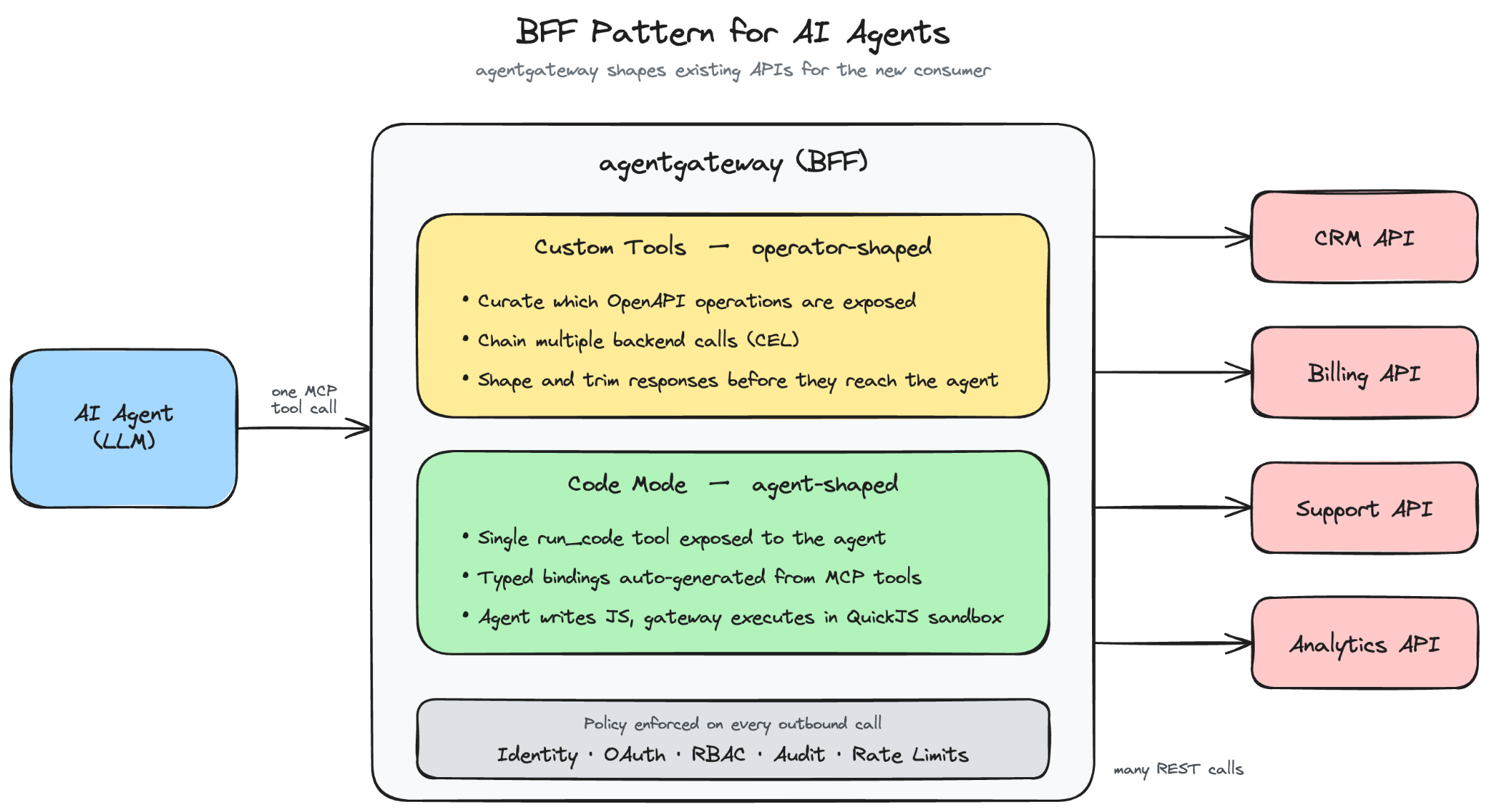
What we need is a “Backend For Frontend” layer for the AI agent that is more task aware and can safely orchestrate multiple backend calls. This BFF can handle large responses, whittle down the important pieces, pipeline them to additional calls, and then focus on the salient points of the response to give back to the AI agent. MCP gives us a uniform way to expose tools to agents, but it doesn't tell us what shape those tools should take.
Agentgateway gives you two ways to build this BFF layer for your APIs. The first is to shape it yourself. The second is to let the agent shape it on the fly.
OpenAPI as Custom MCP Tools
We’ve been able to expose OpenAPI Spec (OAS) directly as MCP tools 1:1 since the early releases of agentgateway. After working with our enterprise customers, we’ve found they need a better way to do this. We start with an OpenAPI Spec document and through CLI/UI tooling, we can curate which endpoints to select and expose.
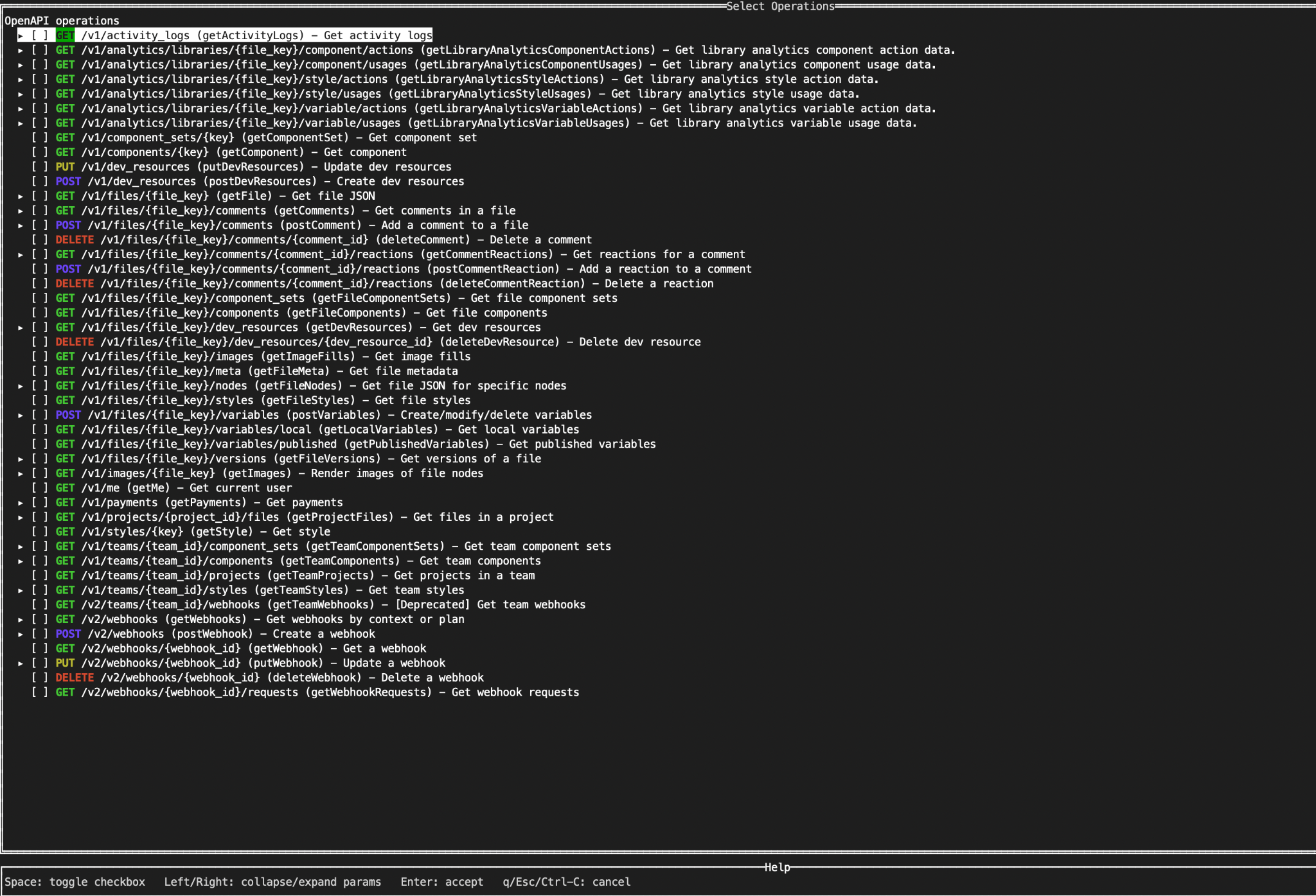
We can customize the tool/operation names and descriptions explicitly. We also do things like flatten the OpenAPI spec parameters so that things like “path”, “query”, “header” and body parameters aren’t nested like you see in OAS. Additionally, we don’t let the AI model see/handle any of the details about securely calling the API (e.g, API keys, OAuth tokens, etc). The agentgateway abstracts all of that. Finally, and importantly, we can control exactly what the response from the API looks like. CEL is used heavily in agentgateway and can be used here too: we can use CEL to transform/shape the body of the response.
We can also chain API calls together. We can use the output from a particular API call as input to the next call in a chain. Again, we use CEL to express what to pass. This allows us to wrap a mutli-step API call chain as a single tool. This gives us some power over the behavior of the API calls. This is getting us down the path of building a true BFF for the AI agent.
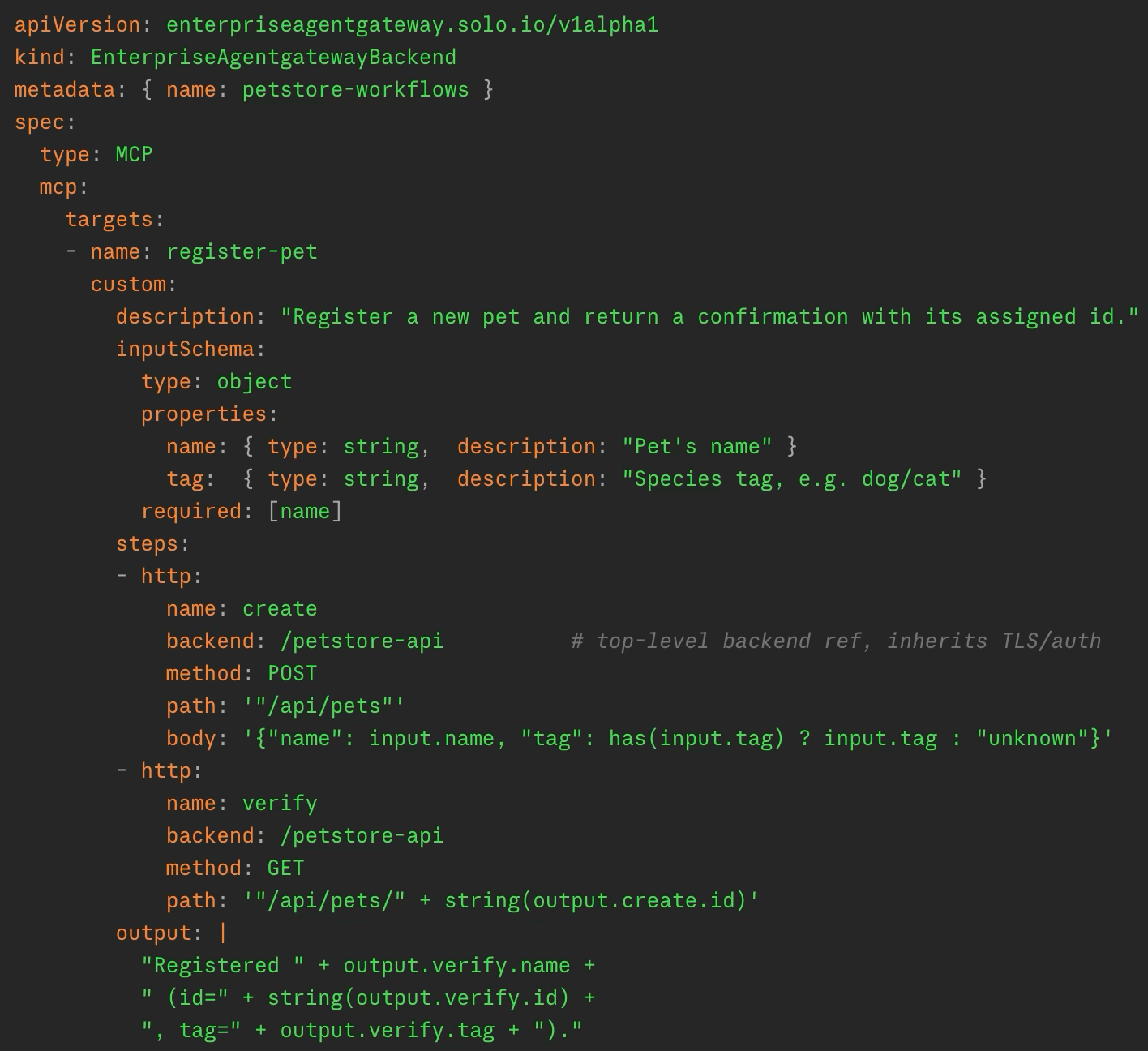
See Demo:
We can take this chaining a step further: instead of pre-computing the chain, and pushing the boundaries of CEL and yaml config, we can have the AI agent compose the chain itself as code and run this in the gateway. Agentgateway supports “code mode” for this. Let’s take a closer look.
OpenAPI as Code Mode Tools
Custom MCP tools work great when you know the workflow ahead of time. You pick the operations, decide which fields pass between them, and shape the response. But not every task is like that. Some need the agent to inspect a result before knowing the next step. Some need to loop over a list whose length you don't know in advance. Some need to reconcile two systems that disagree on what a "customer ID" looks like. You can't pre-define all of those.
Agentgateway, through a very simple configuration option, can support a “code mode” to expose OpenAPI operations through MCP tools. Code mode takes a different approach. Instead of exposing a fixed set of MCP tools, agentgateway exposes one MCP tool: run_code. The agent writes a short JavaScript program in the tool call itself, and agentgateway executes it inside an embedded runtime sandbox. All the underlying MCP tools, including anything derived from your OpenAPI specs, show up as async functions the script can call. Whatever the script returns is what gets sent back to the agent.

The agent makes one tool call to run_code and gets the result. The orchestration happens inside agentgateway in a single execution: looping, branching, stitching IDs together across systems, all of it. Intermediate API responses never cross the model's context window.
To make this work, agentgateway auto-generates a typed API description from the tools the agent is authorized to call, and injects it into the run_code tool description. The agent sees something like:
// Retrieve a Figma file by key
async function get_file(input: { file_key: string, depth?: number, version?: string }): object

// List comments on a file
async function get_comments(input: { file_key: string, as_md?: boolean }): object
The AI model sees these function descriptions, and writes code against that API the way a developer would write against an SDK:
const files = await get_project_files({ project_id: input.project_id });
const details = await Promise.all(
  files.map(f => get_file({ file_key: f.key, depth: 1 }))
);
details.map(f => ({ key: f.key, name: f.name, last_modified: f.lastModified }))
The loop problem is solved: iteration is just a .map(). So is branching, error handling, and reconciling mismatched schemas. Anything you'd normally write code for, the agent can write code for.
See Demo:
The execution environment is intentionally constrained. Code runs sandboxed inside agentgateway with a memory cap, a limit on tool calls per execution, and a configurable timeout (default 60 seconds). Host, filesystem, and network access are restricted. For making backend API calls, RBAC policies are enforced at two levels: a denied tool is filtered out of the generated API the agent sees (so it doesn't know to call it), and if it somehow tries anyway at runtime, the call is rejected. The agent can only do what it's authorized to do, even in code.
What you end up with is a BFF that's shaped at runtime, by the agent, for the task in front of it, but inside the boundaries the operator has set. The operator decides which APIs are reachable, how they authenticate, and what policies apply. The agent decides how to use them.
Wrapping Up
Agentgateway is a powerful LLM, MCP, and inference gateway. Working with customers we’ve found a lot of the pain points and solved them. OpenAPI to MCP is a big one.
Pick custom tools when the workflow is stable and you want determinism. Pick code mode when the task is exploratory and you want flexibility. Most enterprises will end up with a mix, and that's fine. Exposing all API endpoints 1:1 with tools is likely not a good path. Building a real BFF for AI agents doesn't mean rewriting your APIs, standing up new MCP servers, or giving up the governance you spent 15 years putting in place. It means giving the agent the right shape of what you already have.
Agentgateway Enterprise
- Product page - learn more about Solo Enterprise for agentgateway
- Free trial - try agentgateway in your environment
- agentgateway OSS on GitHub - star the repo, open issues, contribute


%20(1).png)






%20a%20Bad%20Idea.png)