MCP is a powerful way to connect actions and data to AI agents, but they come with a significant cost: the more a model knows about what tools it has available, the more the agent needs to include the details of the tools such as descriptions, inputSchemas, etc. Doing this for 10s or 100s of tools consumes a massive amount of the context window.
In this blog post, you’ll learn how to utilize one of agentgateway’s latest features, progressive disclosure, to de-bloat context and keep tokens in check.
The “why”
Before even sending your first prompt to an Agent, you may see that a massive amount of tokens have already been used. This is because when using an MCP Server, all of the tool schemas (definitions, system instructions, API data, etc.) are in the prompt window on every interaction. Because of this, there have been reports on large MCP Servers (SQL, GitHub, Slack, etc.) consuming 100K tokens before a single question is answered.
From a financial perspective, many organizations are thinking about how to optimize MCP spend. They’re aware they need to use MCP as it’s the de facto standard for agentic communication, but what about the cost?
Luckily, you don’t have to get rid of MCP or throw away your authentication, authorization, and observability implementations for MCP because of the massive use of tokens and context (this is arguably the biggest reason why people want to walk around from MCP). Instead, you can implement progressive disclosure.
Progressive disclosure loads one tool schema at a time (all of them technically do get loaded, but only a small meta/router tool for interacting with the other tools, not the whole schema, which is where all of the token usage comes from) to ensure that an Agent is only using the MCP Server tools it actually needs to perform a particular task.
Implementing Progressive Disclosure
With any gateway implementation based on the Kubernetes Gateway API CRDs for this specific task, you will need the following:
- A Gateway object
- An HTTPRoute object
- An EnterpriseAgentgatewayBackend object
To deploy these configurations within your Kubernetes environment, you can use this example that outlines everything you need.
The key implementation to point out is the EnterpriseAgentgatewayBackend, which gives the ability to enable progressive disclosure. Below is an example:
apiVersion: enterpriseagentgateway.solo.io/v1alpha1
kind: EnterpriseAgentgatewayBackend
metadata:
  name: github-mcp-server
  namespace: agentgateway-system
spec:
  entMcp:
    toolMode: Search
    targets:
      - name: github-copilot
        static:
        host: api.githubcopilot.com
          port: 443
          path: /mcp/
          protocol: StreamableHTTP
          policies:
          	tls: {}
            auth:
            	secretRef:
                name: github-pat
The way that progressive disclosure is implemented within agentgateway is by using a parameter to enable a tool mode. The gist is with the `toolMode` parameter, you can specify whether or not you want to turn on progressive disclosure by turning on `Standard` or `Search`. `Search` is for progressive disclosure and `Standard` is if you don’t want to use progressive disclosure.
spec:
  entMcp:
    toolMode: Standard/Search
    targets:
      - name: github-copilot
        static:
          host: api.githubcopilot.com
          port: 443
          path: /mcp/
          protocol: StreamableHTTP
This ensures only two tools are exposed to the model; `get_tool` and `invoke_tool`. The `get_tool` lists all of the available tools in its description, but does not return full descriptions or inputSchema. The model can decide what tools it may want to see in more detail by calling `get_tool`. The `get_tool` function retrieves the full schema for a tool and `invoke_tool` runs in.
Testing LLM and MCP Traffic
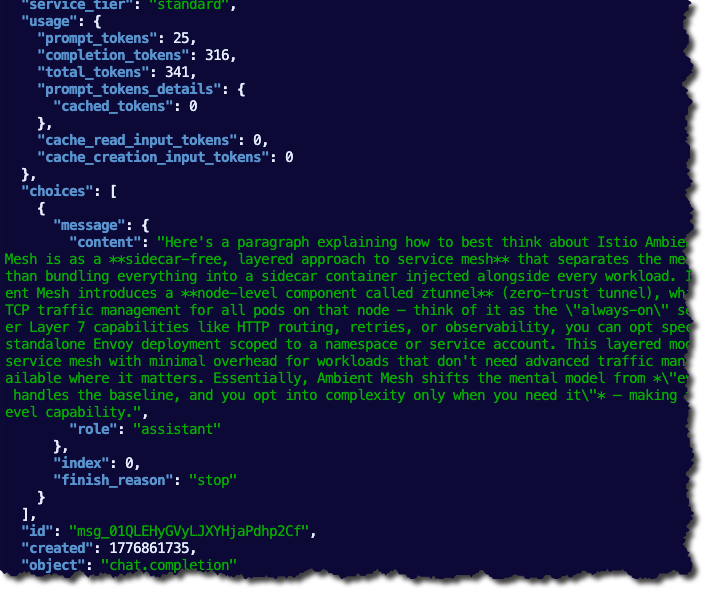
You can quickly test and confirm that the backends and routes are working as expected before moving on to test token usage.
- Capture your gateways public ALB IP. If you’re running agentgateway locally in something like a Kind or Minikube cluster, you can use `localhost` instead of an IP address for the testing.
export GATEWAY_IP=$(kubectl get svc mcp-gateway -n agentgateway-system -o jsonpath='{.status.loadBalancer.ingress[0].ip}')
echo $GATEWAY_IP- Run a `curl` to your gateway and route to ensure LLM routing (replace `$GATEWAY_IP` with `localhost` if you’re running locally).
curl "http://$GATEWAY_IP:3000/anthropic" \
  -H "content-type: application/json" \
  -H "anthropic-version: 2023-06-01" \
  -d '{
    "system": "You are a skilled cloud-native network engineer.",
    "messages": [
      {
        "role": "user",
        "content": "Write me a paragraph containing the best way to think about Istio Ambient Mesh"
      }
    ]
  }' | jq
You will see an output similar to the screenshot below.
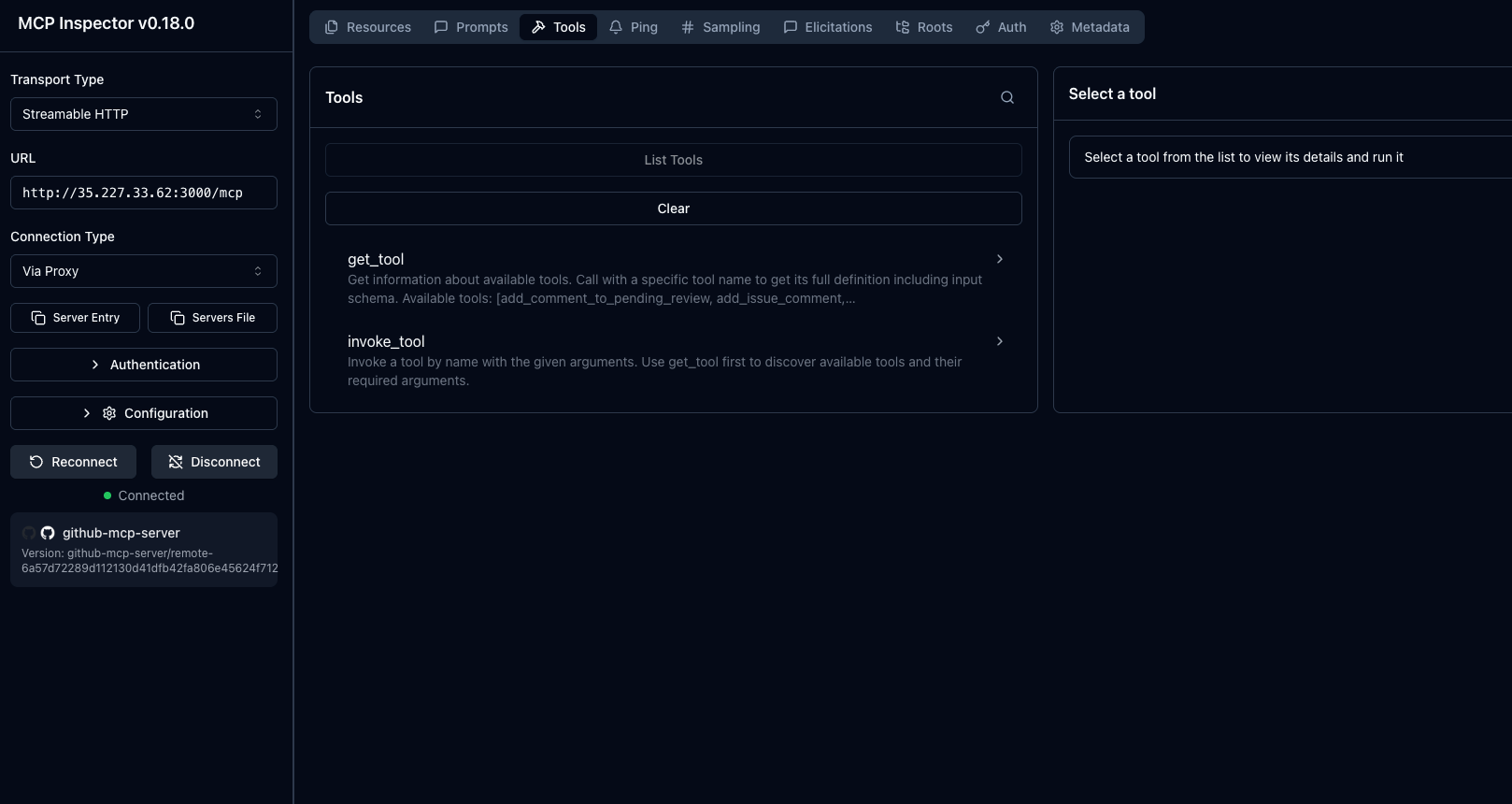
- Next, test your MCP connectivity with MCP Inspector as the client.
npx modelcontextprotocol/inspector#0.18.0- Within MCP Inspector, change the protocol to Streamable HTTP and put in the following:
http://YOUR_ALB_IP:3000/mcpYou should see an output similar to the screenshot below:
Now that we know both the MCP Gateway and LLM Gateway are working as expected, we can move onto the “main event”, which is to test if progressive disclosure, in fact, saves on token and context.
With and Without Progressive Disclosure
The goal in this section is to ensure that we understand what the baseline is (how many tokens are used by default with MCP Servers) and know how many tokens we can save when implementing progressive disclosure.
To ensure that we have everything we need, let’s do a few things.
- First, get the agentgateway ALB IP like when you ran the tests in the previous section. If you don’t have an IP because you’re running locally, you can use `localhost` instead of `$GATEWAY_IP`.
export GATEWAY_IP=$(kubectl get svc mcp-gateway -n agentgateway-system -o jsonpath='{.status.loadBalancer.ingress[0].ip}')
echo "$GATEWAY_IP"
An optional step is if you want to confirm the result from agentgateway, you can port-forward the metrics endpoint in a separate terminal.
POD=$(kubectl get pod -n agentgateway-system -l gateway.networking.k8s.io/gateway-name=mcp-gateway -o jsonpath='{.items[0].metadata.name}')
kubectl port-forward -n agentgateway-system pod/$POD 15020:15020
Without Progressive Disclosure
The first test to see token usage will be without progressive disclosure. That way, we can get a proper baseline.
- Patch the enterpriseagentgatewaybackend to use `Standard` as the tool mode, which turns off progressive disclosure.
kubectl patch enterpriseagentgatewaybackend github-mcp-server \
  -n agentgateway-system \
  --type merge \
-p '{"spec":{"entMcp":{"toolMode":"Standard"}}}'- Fetch the MCP Server tool payload and save it into the `tools.standard.json` format.
BASE="http://$GATEWAY_IP:3000/mcp"

curl -sD /tmp/h -o /dev/null -X POST "$BASE" \
  -H 'accept: application/json, text/event-stream' -H 'content-type: application/json' \
  -d '{"jsonrpc":"2.0","id":1,"method":"initialize","params":{"protocolVersion":"2024-11-05","capabilities":{},"clientInfo":{"name":"curl","version":"0"}}}'
SID=$(awk -F': ' 'tolower($1)=="mcp-session-id"{print $2}' /tmp/h | tr -d '\r\n')

curl -s -X POST "$BASE" -H "mcp-session-id: $SID" \
  -H 'accept: application/json, text/event-stream' -H 'content-type: application/json' \
  -d '{"jsonrpc":"2.0","method":"notifications/initialized"}' > /dev/null

curl -s -X POST "$BASE" -H "mcp-session-id: $SID" \
  -H 'accept: application/json, text/event-stream' -H 'content-type: application/json' \
  -d '{"jsonrpc":"2.0","id":2,"method":"tools/list"}' \
  | sed 's/^data: //' | tr -d '\n' \
  | jq '.result.tools | map({type:"function", function:{name:.name, description:.description, parameters:.inputSchema}})' \
  > tools.standard.json

jq 'length' tools.standard.json
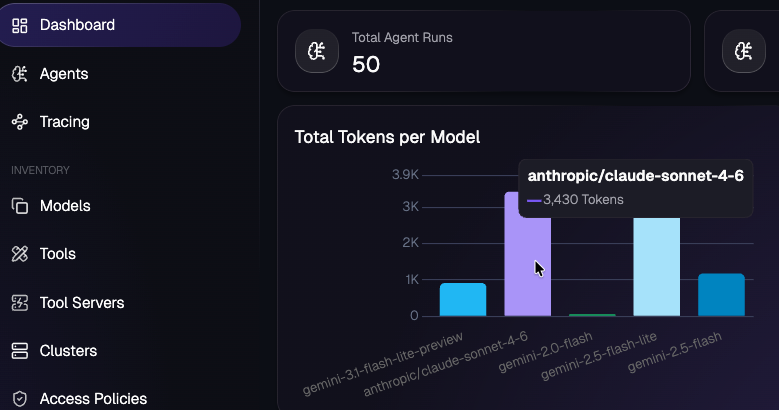
wc -c tools.standard.json- Send a request to the LLM with the tool payload, a max token count for the LLM, and the token usage reported by the provider (in this case, Anthropic).
jq -n --slurpfile t tools.standard.json '{model:"claude-sonnet-4-6", max_tokens:64, messages:[{"role":"user","content":"List the 3 most recent open issues on the agentgateway/agentgateway repo."}], tools:$t[0]}' \
  | curl -sS -X POST "http://$GATEWAY_IP:3000/anthropic" \
    -H 'content-type: application/json' \
    -H 'anthropic-version: 2023-06-01' \
    -d @- \
  | tee standard-response.json \
  | jq '.usage'

jq '.usage.prompt_tokens' standard-response.json
You can see the token output based on the prompt that you send through agentgateway.
Next, let's run the same exact test with progressive disclosure.
With Progressive Disclosure
The commands you’ll see below for testing are identical:
- Patch the backend with progressive disclosure (vs without).
- Fetch the tool payload.
- Send the LLM request.
kubectl patch enterpriseagentgatewaybackend github-mcp-server \
  -n agentgateway-system \
  --type merge \
  -p '{"spec":{"entMcp":{"toolMode":"Search"}}}'
BASE="http://$GATEWAY_IP:3000/mcp"
curl -sD /tmp/h -o /dev/null -X POST "$BASE" \
-H 'accept: application/json, text/event-stream' -H 'content-type: application/json' \
-d '{"jsonrpc":"2.0","id":1,"method":"initialize","params":{"protocolVersion":"2024-11-05","capabilities":{},"clientInfo":{"name":"curl","version":"0"}}}'
SID=$(awk -F': ' 'tolower($1)=="mcp-session-id"{print $2}' /tmp/h | tr -d '\r\n')
curl -s -X POST "$BASE" -H "mcp-session-id: $SID" \
-H 'accept: application/json, text/event-stream' -H 'content-type: application/json' \
-d '{"jsonrpc":"2.0","method":"notifications/initialized"}' > /dev/null
curl -s -X POST "$BASE" -H "mcp-session-id: $SID" \
-H 'accept: application/json, text/event-stream' -H 'content-type: application/json' \
-d '{"jsonrpc":"2.0","id":2,"method":"tools/list"}' \
| sed 's/^data: //' | tr -d '\n' \
| jq '.result.tools | map({type:"function", function:{name:.name, description:.description, parameters:.inputSchema}})' \
> tools.search.json
jq 'length' tools.search.json
wc -c tools.search.jsonjq -n --slurpfile t tools.search.json '{model:"claude-sonnet-4-6", max_tokens:64, messages:[{"role":"user","content":"List the 3 most recent open issues on the agentgateway/agentgateway repo."}], tools:$t[0]}' \
| curl -sS -X POST "http://$GATEWAY_IP:3000/anthropic" \
-H 'content-type: application/json' \
-H 'anthropic-version: 2023-06-01' \
-d @- \
| tee search-response.json \
| jq '.usage'
jq '.usage.prompt_tokens' search-response.jsonWith both tests done, let’s dive into the results.
The Results
The test measures prompt-token overhead. Each test does an MCP handshake against `/mcp`, fetches `tools/list`, converts it into an OpenAI-style tools array, then sends a single Anthropic request to `/anthropic` with that tools array inlined in the request body and `reads usage.prompt_tokens` from the response.
To get the results, run the following which will query the token usage metric within agentgateway.
standard_prompt_tokens=$(jq '.usage.prompt_tokens' standard-response.json)
search_prompt_tokens=$(jq '.usage.prompt_tokens' search-response.json)

echo "standard_prompt_tokens=$standard_prompt_tokens"
echo "search_prompt_tokens=$search_prompt_tokens"
awk -v standard="$standard_prompt_tokens" -v search="$search_prompt_tokens" 'BEGIN {print "prompt_token_savings=" standard-search}'
The verified token results:
- With Progressive Disclosure: usage.prompt_tokens = 970
- Without Progressive Disclosure: usage.prompt_tokens = 10877
That’s a 91.1% token reduction, which is insane.
With this blog post, you should be able to take all of the code configurations and run the same test within your environment. Please feel free to reach out if you do because I’d love to hear your results!
Sidenote: With Progressive Disclosure, depending on the model you’re using, you may need to be more direct in terms of which tool to use.
Wrapping Up
Before MCP Servers, Agents could still make tool/API calls. This was never something they couldn’t do post-generative-ai when Agentic AI became real. The problem was that there wasn’t a protocol/spec around it, which means there was zero standard that was securable or observable. That means MCP is a good thing. The problem was, however, the cost… until now.
Thanks so much for reading and feel free to reach out if you have any questions!


%20(1).png)






%20a%20Bad%20Idea.png)