Kubernetes and containerization gave the industry a new, efficient way to run workloads. Instead of having an app on a VM wasting 50-70% of free resources, said app could be containerized and orchestrated in k8s to save on resources along with having a standard for deploying microservices.
In the world of AI, we need those same primitives, but for agentic workflows. That’s where Agent Substrate and kagent come into play.
In this blog post, you’ll learn about what Substrate is, how it integrates with kagent, and the installation/configuration of kagent with Substrate.
Prerequisites
To follow along with this blog from a hands-on perspective, you will need:
- kagent oss installed (version
v0.9.7or above) - kagent's fork of Substrate installed. You can learn how to do so here.
- A Google Kubernetes Engine (GKE) or Kind cluster. At this time, that’s what Substrate supports due to the need of enabling Pod Certificates.
If you don’t have a cluster readily available, that’s totally fine! You can still follow along with this blog post from a theoretical perspective and get hands-on when you have a cluster available.
Tldr; What’s Agent Substrate?
Conceptually, what does Kubernetes provide? An API and clustering of resources for orchestrating workloads. Take out the API, and you’re left with clustering of resources, and k8s’s orchestration/clustering system is arguably the best that the industry has seen (hence why it’s still the standard for orchestrating workflows). However, Kubernetes was built in a different time with different API needs, known latency based on workflows, and optimization of resources based on it’s API. These same needs, although still great for microservices, are a bit different for agentic workflows due to an agent's nature (never a need for “always on”, context-aware routing, scale based on agent usage, and even a smaller footprint than microservices).
Agent Substrate implements the ability to use agents and manage resources for agents based on how they run, which is in an “almost always idle” state (when you or a system isn’t interacting with an agent, it just sits there), and it does it all by using Kubernetes primitives. Substrate implements its own API, and that API can interact with Kubernetes Worker Nodes so the agents can get the benefits of clustered/orchestrated resources while using Substrate's efficient programmatic endpoint (its API).
Verification and Configuration
Substrate uses Actors, which are Agents that run inside of Workers. Workers are Kubernetes Pods. One of the major benefits of Substrate is it provides functionality to fully manage an Actors lifecycle (CRUD, suspend, resume) in real-time, along with route traffic to said Actors. Because of that, there are some needs prior to using Substrate:
- Substrate Controller running in the k8s cluster.
- Inrtegration with kagent so it sees the Substrate API
- Verification that kagent has the Substrate schema
- Substrate `WorkerPool` up and running
First, ensure that the CRD was installed for Substrate.
kubectl get crd actortemplates.ate.dev workerpools.ate.devYou’ll see an output similar to the below:

Next, check and ensure that Agent Substrate is running in your cluster as expected.
kubectl get pods -n ate-system
kubectl get svc -n ate-system
Check the Substrate status. The goal is to see ”enabled”: “true”
kubectl run substrate-status-check -n kagent --rm -i --restart=Never \ --image=curlimages/curl:8.10.1 -- \ http://kagent-controller:8083/api/substrate/status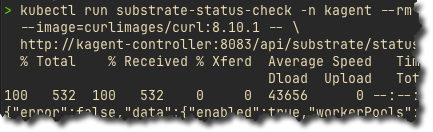
The last check is to confirm that the AgentHarness CRD supports Substrate.
kubectl get crd agentharnesses.kagent.dev \ -o jsonpath='{.spec.versions[?(@.name=="v1alpha2")].schema.openAPIV3Schema.properties.spec.properties.runtime.enum}'Expected output:
["openshell","substrate"]%With these checks in place, it’s time to dive into the creation of Substrate resources in k8s.
Creating A Substrate Harness
With the installation, configuration, and checks in place to ensure that kagent and Agent substrate is connected, let’s dive into the hands-on portion to see kagent and Substrate working together within your environment.
- First, create a secret. For the secret below, it can be any non-empty string. That token becomes the Bearer token kagent/OpenClaw uses for the harness gateway.
kubectl apply -f - <<EOF
apiVersion: v1
kind: Secret
metadata:
  name: my-substrate-gateway-token
  namespace: kagent
type: Opaque
stringData:
token: "strong-token-string"- Using the
AgentHarnessobject, deploy a Harness using the `substrate` runtime.
kubectl apply -f - <<EOF
apiVersion: kagent.dev/v1alpha2
kind: AgentHarness
metadata:
  name: openclaw-substrate-demo
  namespace: kagent
spec:
  backend: openclaw
  runtime: substrate
  description: OpenClaw harness running on Agent Substrate
  modelConfigRef: default-model-config
  substrate:
    workerPoolRef:
      name: kagent-default
    gatewayTokenSecretRef:
      name: my-substrate-gateway-token
    snapshotsConfig:
location: gs://ate-snapshots-field-engineering-us-kagent-oss-felevan/kagent/openclaw-substrate-demo/- Ensure that the Substrate Harness was deployed and running as expected.
kubectl get agentharness openclaw-substrate-demo -n kagentYou can also open up the Substrate pane within your kagent environment to get a visual of your Substrate workloads running. The way to do that is to put the `/substrate` endpoint on at the end of the URL.
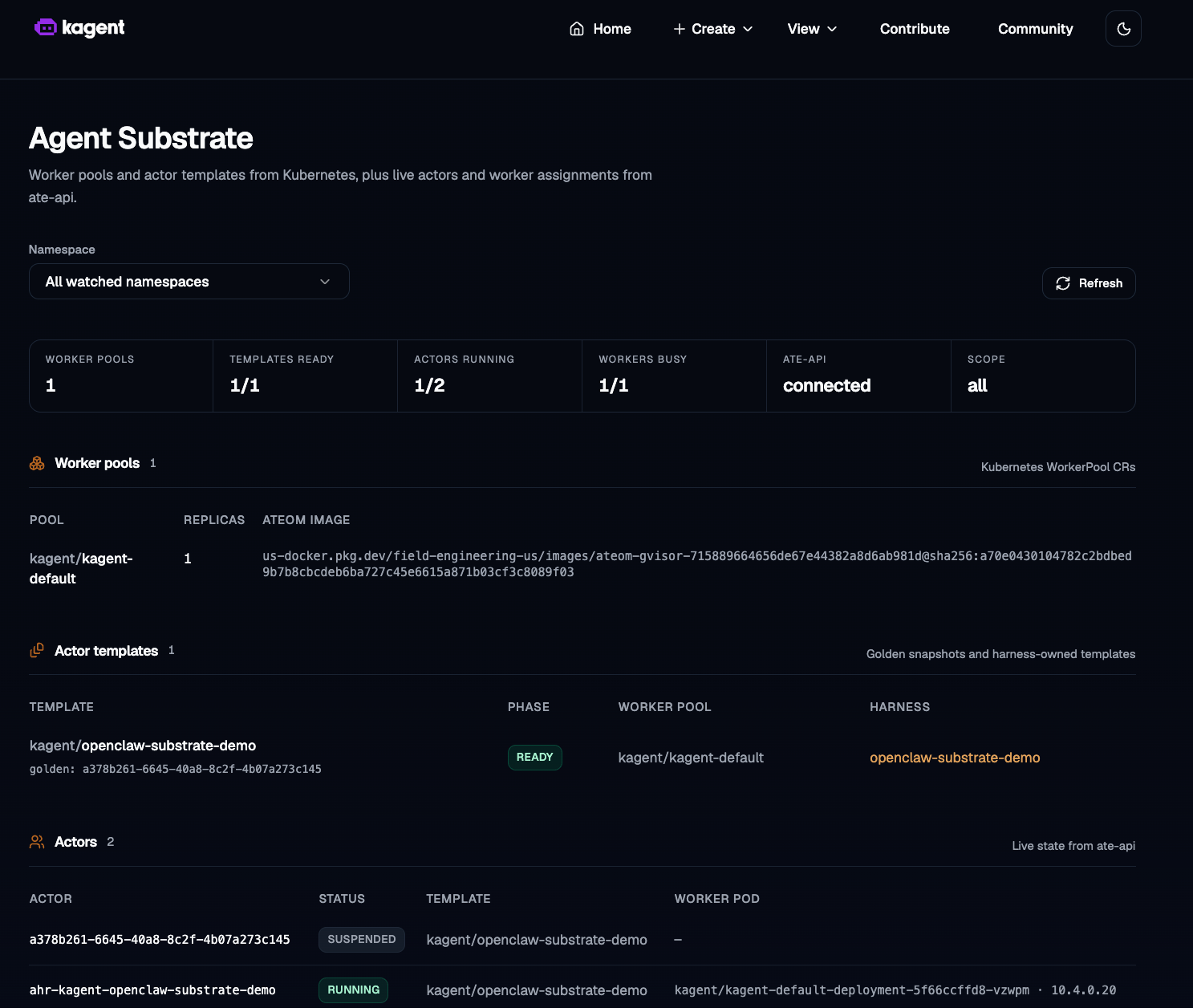
The “½ Actors Running” is normal for this setup. Substrate is showing two actors because it tracks:
- The golden snapshot actor for the ActorTemplate
- The real kagent AgentHarness actor
The current state should should the Golden Actor suspended and the Harness Actor running.
Congrats! You’ve officially set up Substrate as a runtime within your kagent environment.
Wrapping Up
Combining an efficiency system with a tried-and-true orchestration and clustering platform gives teams the resources (GPU, CPU, memory) they need along with the ability to scale and treat Agents in a way that makes them ready and prepared for production without having to worry about performance degradation or wasting resources, which saves on both cost, time to implement, and provisioning hardware. With kagent as the agentic runtime and Agent Substrate as the provisioning layer, agents can now run safely and efficiently in Kubernetes.
Learn more about kagent and Agent Substrate:


%20(1).png)




%20a%20Bad%20Idea.png)