An AI gateway sits between your apps and the LLM providers they call. Most AI gateway guides assume you already run Kubernetes. agentgateway also runs as a standalone process: one binary, configured by one config.yaml, with a web UI built in. You can run it on a laptop, a VM, under systemd, or as a container, and the same file works in all four places.
Below, you start a standalone agentgateway, put OpenAI behind it from the UI, and see the YAML each change writes.
Why run an AI gateway standalone?
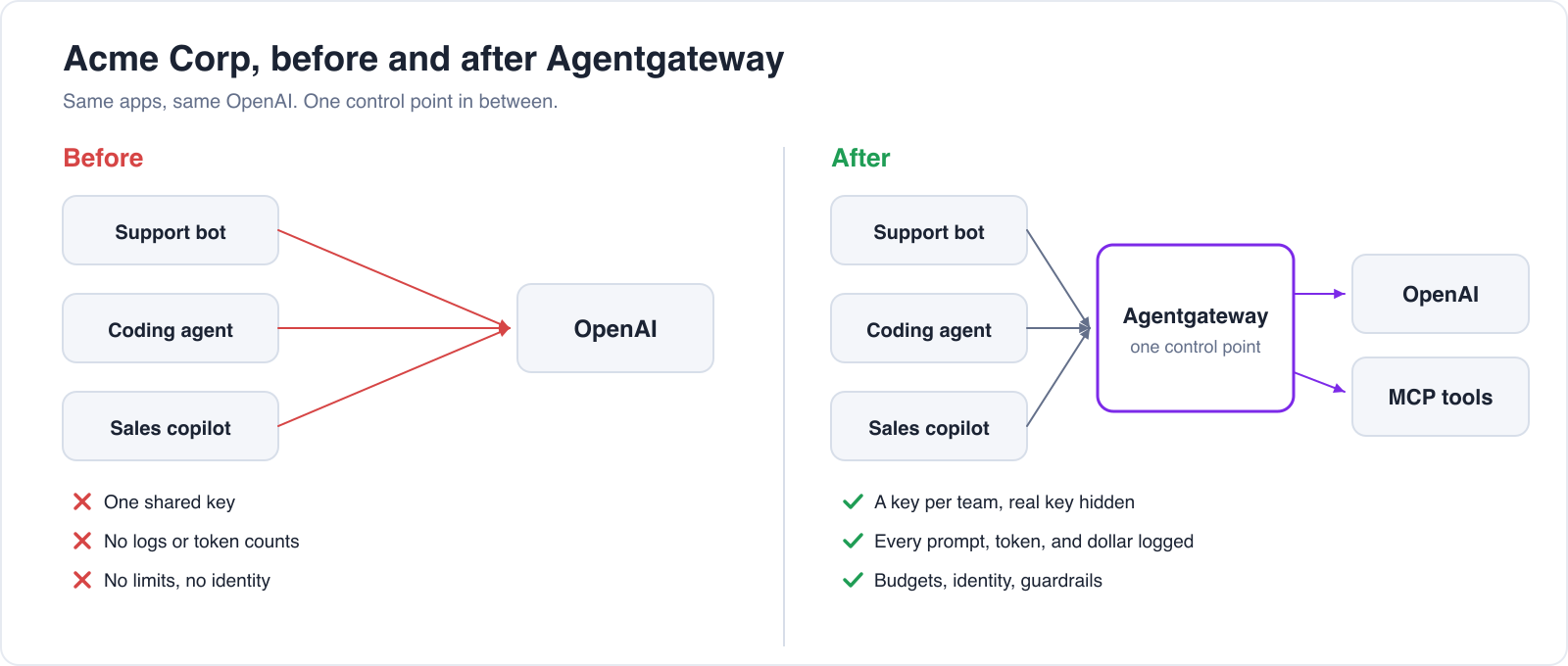
When apps call an LLM provider directly, each app stores a copy of the provider API key. Your platform team can't tell which app sent a request, how many tokens it used, or what it cost, and rotating the key means redeploying each app that uses it.
With a gateway, the key is stored in one place. Apps keep their OpenAI SDK and change one URL. Run the gateway standalone when:
- Your AI apps run on VMs, in serverless containers, or on developer laptops, outside a Kubernetes cluster
- You want to try the gateway in minutes before deciding how to deploy it
- A small team wants governance for LLM and MCP traffic without running a control plane
agentgateway is open source and hosted by the Agentic AI Foundation (AAIF) at the Linux Foundation. Solo.io created the project and offers Solo Enterprise for agentgateway, which adds support, CVE fixes, and Enterprise-only features.
Start the gateway
A single agentgateway process serves LLM traffic, MCP traffic, the UI, metrics, and an admin API. Which ports it opens depends on your config. A typical setup:
A starting config.yaml stores request logs in SQLite, serves the UI on port 4001, and opens an LLM listener on port 4000 with no models yet:
config:
  database:
    url: sqlite:///var/lib/agentgateway/data.db?mode=rwc

gateways:
  ui:
    port: 4001
    protocol: HTTP
ui:
  gateways: [ui]

llm:
  port: 4000
Start the gateway with the file:
agentgateway -f config.yaml
Or run the container image, mounting the directory that contains config.yaml:
docker run --rm -p 4000:4000 -p 4001:4001 \
  -e OPENAI_API_KEY \
  -v "$PWD:/config" \
  cr.agentgateway.dev/agentgateway -f /config/config.yaml
Open http://localhost:4001/ui/ in a browser.
Two ways to make a change: the UI or the config file
Each task in these articles shows two ways to do it. Pick one:
- Option A: In the UI. Fill in a form and save. The UI writes the change to
config.yamlfor you. Most dialogs have a View diff button that shows the YAML before you save. - Option B: Edit
config.yamldirectly. Add the YAML yourself, in Git or any editor. The UI shows the result.
Either way, the gateway reloads config.yaml in about a second, with no restart.
The UI writes the shortest equivalent YAML. For example, it leaves out params.model when the provider model has the same name as the incoming one. The Option B YAML in these articles sometimes spells those fields out, and both forms mean the same thing.
A few settings have no UI form yet, such as Prometheus metric labels. Those you set in config.yaml.
Put OpenAI behind the gateway
Option A: In the UI
- Open LLM → Models and click Add model.
- Fill in the form with the values in the table below.
- Click Save model.
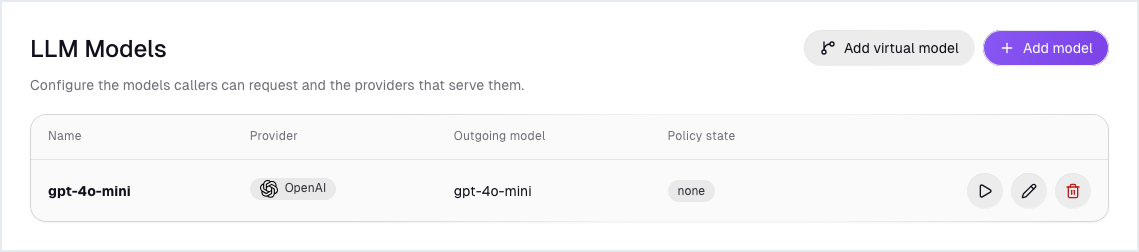
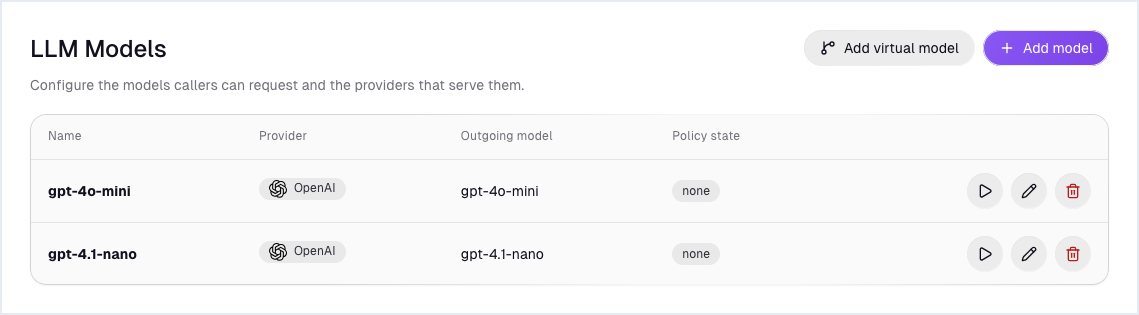
Click Add model again for gpt-4.1-mini, with the same provider and key. Both models are listed:
Option B: Edit config.yaml directly
llm:
  port: 4000
  models:
  - name: gpt-4o-mini
    provider: openai
    params:
      model: gpt-4o-mini
      apiKey: "$OPENAI_API_KEY"
  - name: gpt-4.1-mini
    provider: openai
    params:
      model: gpt-4.1-mini
      apiKey: "$OPENAI_API_KEY"
$OPENAI_API_KEY refers to an environment variable of the gateway process. The key stays in the gateway's memory. It appears nowhere in the file, the UI, or any app.
The same models list takes other providers. agentgateway has built-in support for OpenAI, Anthropic, Amazon Bedrock, Google Gemini and Vertex AI, Azure OpenAI, GitHub Copilot, and OpenAI-compatible endpoints such as Ollama.
Send a request
Apps send a standard OpenAI Chat Completions call to the gateway instead of api.openai.com, and leave out the provider key:
curl -s localhost:4000/v1/chat/completions \
  -H 'content-type: application/json' \
  -d '{"model":"gpt-4o-mini","max_tokens":30,"messages":[{"role":"user","content":"Say hello"}]}' \
| jq '{model, reply: .choices[0].message.content, usage}'The response is OpenAI's, with the dated model version OpenAI served (gpt-4o-mini-2024-07-18) and token counts in usage. The gateway also serves the OpenAI Responses API at /v1/responses.
Connect an app or a coding agent
In the UI
Open LLM → Client Setup, pick a Model and an Integration, and the UI generates the code or settings to paste. Integrations include the OpenAI Python SDK and coding agents such as Claude Code, Codex CLI, Cursor, GitHub Copilot, and Goose.
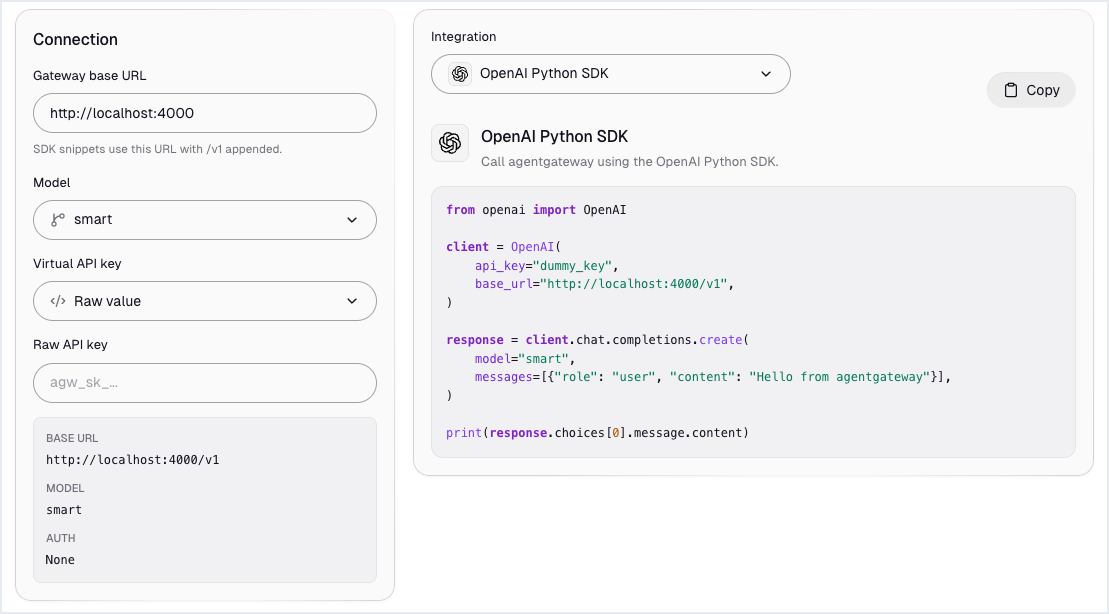
What changes in the app
Only the base URL:
from openai import OpenAI

client = OpenAI(base_url="http://localhost:4000/v1", api_key="unused")
reply = client.chat.completions.create(
    model="gpt-4o-mini",
    messages=[{"role": "user", "content": "Say hello"}],
)Client Setup changes nothing in config.yaml.
Sharing config in production
One file suits a single gateway. To run several gateway instances from one shared config, set config.storage.mode: hybrid and point config.database at Postgres. Changes from the UI or the admin API go to the database, layered over a read-only base file that you keep in Git. Hybrid storage is part of open source agentgateway. See Configuration storage.
For provider credentials, prefer workload identity where your platform offers it, such as an IAM role for Bedrock. Static keys referenced from environment variables work everywhere.
What you can add next
Each of these builds on the same config.yaml:
Frequently asked questions
Do I need Kubernetes to run agentgateway?
No. agentgateway runs as a standalone binary or container configured by a YAML file. On Kubernetes, you can install it with Helm and configure it through the Gateway API and agentgateway's custom resources instead.
Does the standalone gateway have a UI?
Yes. Add a ui block bound to a listener and the gateway serves a web UI for models, keys, budgets, guardrails, MCP servers, logs, and analytics. The UI writes each change to config.yaml.
Do I have to restart the gateway after a config change?
Usually not. agentgateway watches config.yaml and reloads on save. Settings under the top-level config: block, such as the database URL and metric labels, are read at startup and need a restart.
Can I run more than one standalone gateway with the same config?
Yes. With config.storage.mode: hybrid and a Postgres database, several gateway instances share one configuration.
Is standalone agentgateway open source?
Yes. Everything in this article is part of open source agentgateway. Solo Enterprise for agentgateway adds support and Enterprise-only features. See open source vs. Enterprise.