Agents in the enterprise require efficiency (think resources/cost), security (governance and policies), and isolation (think sandboxes). By default, agentic workloads come with none of this, and to implement those three successfully, you need a runtime that supports and implements the key configurations for ensuring a proper production-grade agentic implementation.
Without these three, security breaches, over-spend/zero cost optimization, and seclusion standards will never be met.
In this blog post, you will learn how it all comes together when incorporating kagent with Agent Substrate as your runtime and sandbox of choice for all things agentic.
Prerequisites
To follow along with this blog post from a hands-on perspective, you will need the following:
- A Kubernetes cluster
If you don’t have a Kubernetes cluster, that’s totally fine! You can still follow along from a theoretical standpoint as there will be architecture discussions around how and why it’s implemented.
Where Does Substrate Fit With Kagent?
Substrate was born out of the idea of how Agents realistically work in an environment. You spin them up, ask a few questions, and then stop using them until you have another question. That means that by definition, Agents don’t run all of the time (think about the percentage of which you’re interacting with Agents throughout the day). This means Agents need a way to spin up and spin down efficiently from a performance standpoint, and when they spin down, they release the hardware resources (CPU/memory) they’re using, but don’t go into a cold state so it doesn’t take seconds for them to start back up and instead of into a warm state.
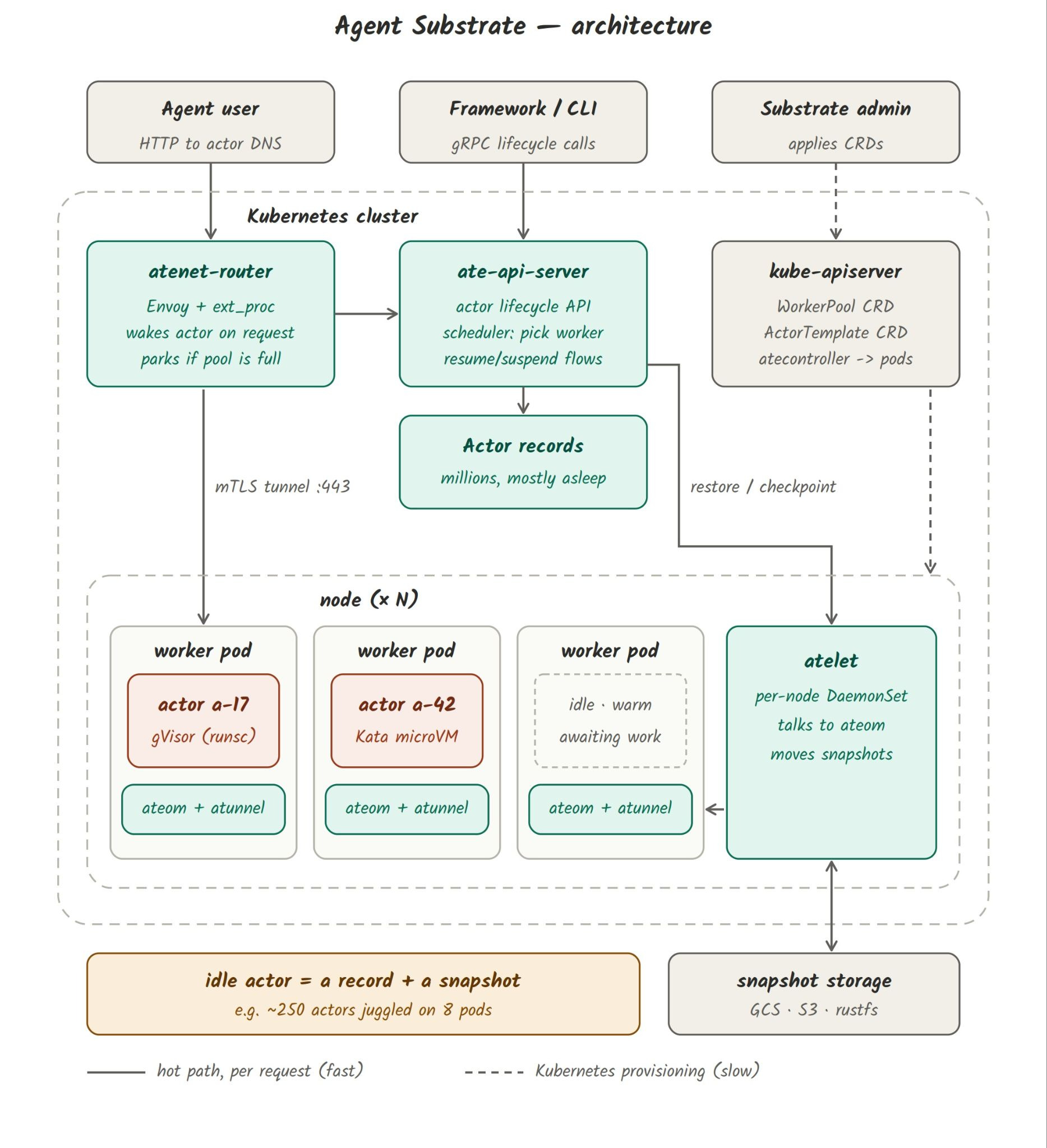
Two other important factors are scale and isolation. Today, in a typical environment, Agents are 1:1. One person in a terminal, one Agent. One Agent, one Pod. This causes an inefficient way to not only use Agents, but inefficiencies of scheduling Agents as when idle, they eat up hardware resources for virtually no reason (with scale ultimately comes where you can run Agents). With scale also comes isolation. Scale is great, but if Agents aren’t running in a secure way, scaling up means a larger attack surface. As the industry has been, sandboxing comes in a few shapes and sizes, including software-level isolation and hardware-level isolation (both of which exist, and are good, for particular purposes depending on whether you want isolation at the userspace level or the chip level).
To have the ability to accomplish all of this, you need proper routing to and from Actors (think ingress/egress), networking primitives (think agentgateway for the AI gateway), and an API that's built with performance in mind (spinning up and down Agents in an effective manner), and all of this is within the architecture of Agent Substrate. However, these are lower-level primitives of which you should be conscious and understanding of, but there needs to be a runtime layer on top to ensure anyone can interact with Agents, LLMs, and MCP Servers without needing to live in the lower-level at all times.
This is where kagent comes into play.
Underneath the hood, Agent Substrate manages and handles all of the sandboxing. Kagent sits on top of Agent Substrate and facilitates all of the needs for agentic workloads as a proper agent runtime should. You still have the ability to do things like click on a button that says “Agents” and chat with in an Agent like you can in any other harness. The key difference is the connective tissue underneath.
What’s The Architecture?
Because there’s the Agent Substrate lower-level engineering and kagent as the agentic harness runtime, how does it all fit together? The thing to keep in mind is what happens underneath the hood vs what you’re interacting with. A great example of this is how Kubernetes works in a declarative fashion. When you create a k8s Pod, the underlying Scheduler figures out the best placement for the Pod in terms of which Worker Node it should reside on based on current resources available. When you create more replicas of a Pod or need self-healing due to a deleted Pod, the ReplicaSet Controller handles it. You aren’t manually going into the ReplicaSet Controller or Scheduler and telling it what to do as you would with an imperative task.
This is an important reason as to why/how Agent Substrate and Kubernetes is the perfect combination. It implements what Kubernetes is best at (scheduling workloads and orchestrating them) with what Substrate is best at (a performant API for deploying Agents and where they run).
Kagent + Agent Substrate + Kubernetes enhances all of this in production.
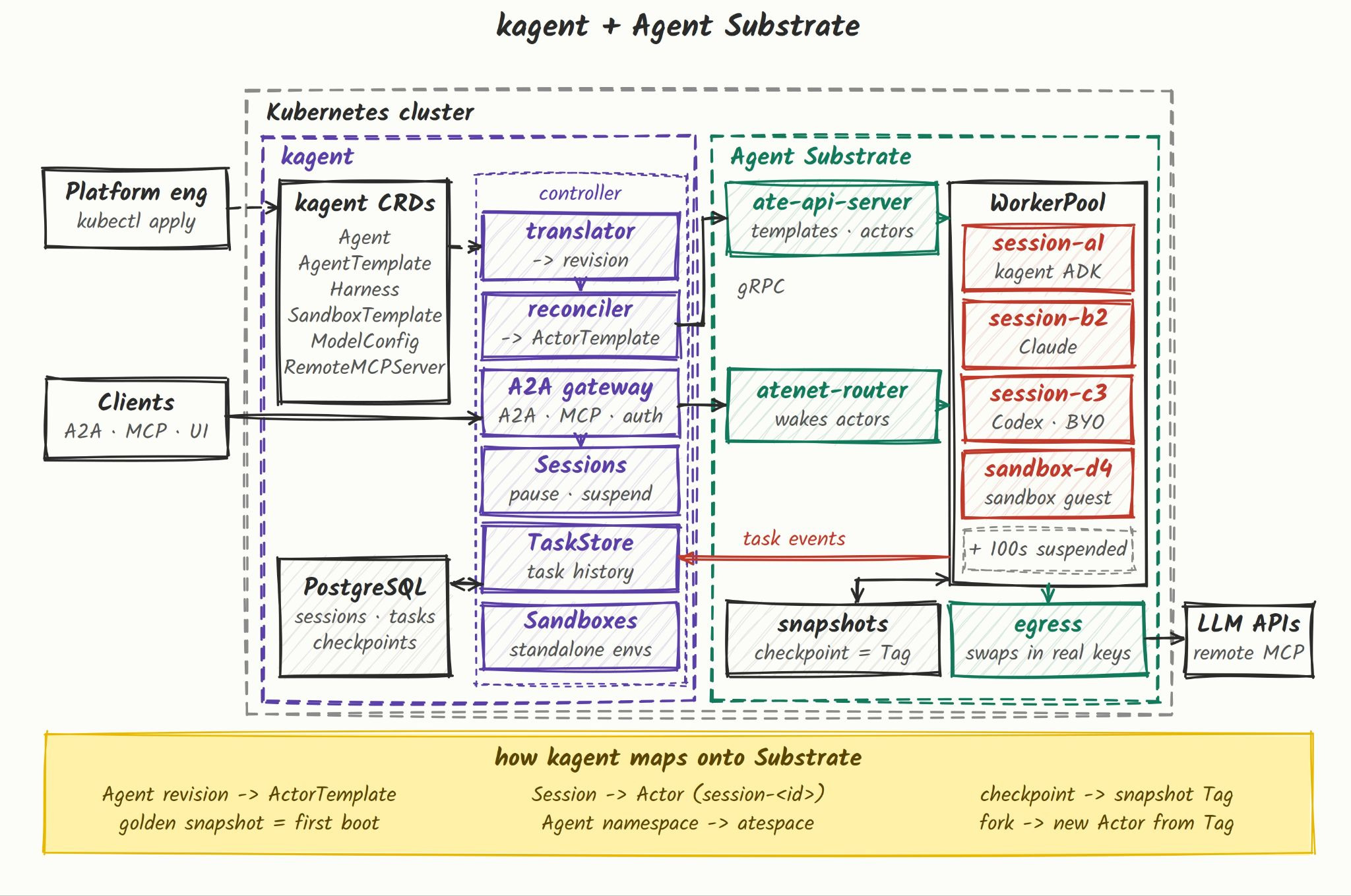
With kagent and Agent Substrate working together, you create a Harness (an Agent) and chat with the Agent. Underneath the hood, kagent is working with the Agent Substrate primitives/API to ensure the Actor that gets deployed/is running goes onto a proper Worker (Pod - where the Actor is running) via its WorkerPool and spins up/spins down when its in use/not in use. When deploying kagent, you have the ability to create the WorkerPool during the installation so you aren’t manually creating the location where Actors run (although, you can of course create your own WorkerPools outside of the installation).
Within kagent, you also get analytics, the ability to have context/checkpoint snapshots, scheduling (think an autonomous Agent), evaluations, and the ability to connect to/add MCP Servers to your Actors (Agents). Kagent is the method of interacting with Agent Substrate without constantly hitting the underlying primitives. It’s the friendly user interface to manage, create, observe, and cater to your agentic workloads in the enterprise.
Installation & Configuration
With the architecture, design, “what”, and “why” broken down in the previous sections, let's dive into the hands-on implementation. The first section will be all about installation and configuration. When installing kagent enterprise, there will be two main components:
- Kagent + CRDs
- Substrate + CRDs
- Install the kagent CRDs
helm install kagent-crds \
  oci://us-docker.pkg.dev/solo-public/kagent-enterprise-helm/charts/kagent-enterprise-crds \
  --version 1.0.0-alpha5 --namespace kagent --create-namespace \
--set substrate.enabled=true- Install Agent Substrate. You’ll see that the installation comes with a view values around namespaces and exposing observability data.
cat > substrate-values.yaml <<'EOF'
credentialProvider:
  namespacePolicies:
    - atespace: kagent
      allowedNamespaces: [kagent]

otel:
  endpoint: http://solo-enterprise-telemetry-collector.kagent.svc.cluster.local:4317
  traces:
    enabled: false
atelet:
  extraEnv:
    - name: OTEL_EXPORTER_OTLP_METRICS_TEMPORALITY_PREFERENCE
      value: delta
EOF

helm install substrate oci://ghcr.io/kagent-dev/substrate/helm/substrate \
  --version 0.2.0-beta5 --namespace ate-system --create-namespace \
--wait=false -f substrate-values.yaml- Download
kubectl-ate, which is the command-line tool to manage Actors and Workers.
OS=$(uname -s | tr '[:upper:]' '[:lower:]')
ARCH=$(uname -m | sed 's/x86_64/amd64/;s/aarch64/arm64/')
curl -fsSL -o kubectl-ate \
  "https://github.com/kagent-dev/substrate/releases/download/v0.2.0-beta5/kubectl-ate-OS-{ARCH}" &&
chmod +x kubectl-ate- Configure the Actor identity certificates.
kubectl get secret actor-id-ca-pool -n ate-system -o jsonpath='{.data.pool}' \
  | base64 --decode \
  | jq -r '.CAs[0].RootCertificateDER' \
  | base64 --decode \
  | openssl x509 -inform der -outform pem > actor-id-ca.crt

kubectl create secret generic actor-id-ca-certs -n ate-system --from-file=ca.crt=actor-id-ca.crt- Create the authentic ConfigMap that tells the
ate-api-serverwhich JWTs to trust.
kubectl create configmap ate-api-authentication -n ate-system --from-literal=authentication.yaml='actorIdentityJWTProvider: kubernetes
jwtProviders:
- name: kubernetes
  issuer: https://kubernetes.default.svc
  audiences: [api.ate-system.svc]
  certificateAuthorityFile: /var/run/secrets/kubernetes.io/serviceaccount/ca.crt
  discoveryTokenFile: /var/run/secrets/kubernetes.io/serviceaccount/token
'- Install kagent. This config uses OpenAI for the default Model Config, but you can also use Anthropic.
export ENTERPRISE_LICENSE_KEY=
export OPENAI_API_KEY=

helm install kagent \
  oci://us-docker.pkg.dev/solo-public/kagent-enterprise-helm/charts/kagent-enterprise \
  --version 1.0.0-alpha3 --namespace kagent --wait --timeout 15m -f - <<EOF
global:
  cluster: kagent-demo
  licensing:
    createSecret: true
    licenseKey: "${ENTERPRISE_LICENSE_KEY:?Set ENTERPRISE_LICENSE_KEY}"

telemetry:
  enabled: true
  traces:
    enabled: true

otel:
  captureSensitiveContent: true
  tracing:
    enabled: true
    exporter:
      otlp:
        endpoint: http://solo-enterprise-telemetry-collector.kagent.svc.cluster.local:4317
        insecure: true

controller:
  substrate:
    enabled: true
    ateApiEndpoint: "dns:///api.ate-system.svc:443"
    atenetRouterURL: "http://atenet-router.ate-system.svc:80"
    defaultWorkerPool:
      name: kagent-default

substrate:
  enabled: false

substrateWorkerPool:
  create: true
  name: kagent-default
  workerImage: ghcr.io/kagent-dev/substrate/ateom-gvisor:v0.2.0-beta5
  sandboxClass: gvisor

providers:
  openAI:
apiKey: "${OPENAI_API_KEY:?Set OPENAI_API_KEY}"- Confirm that everything is up and operational.
kubectl get pods -n kagent
kubectl get pods -n ate-system- You can now opus the UI and see kagent up and running.
kubectl port-forward -n kagent svc/kagent-ui 8080:8080
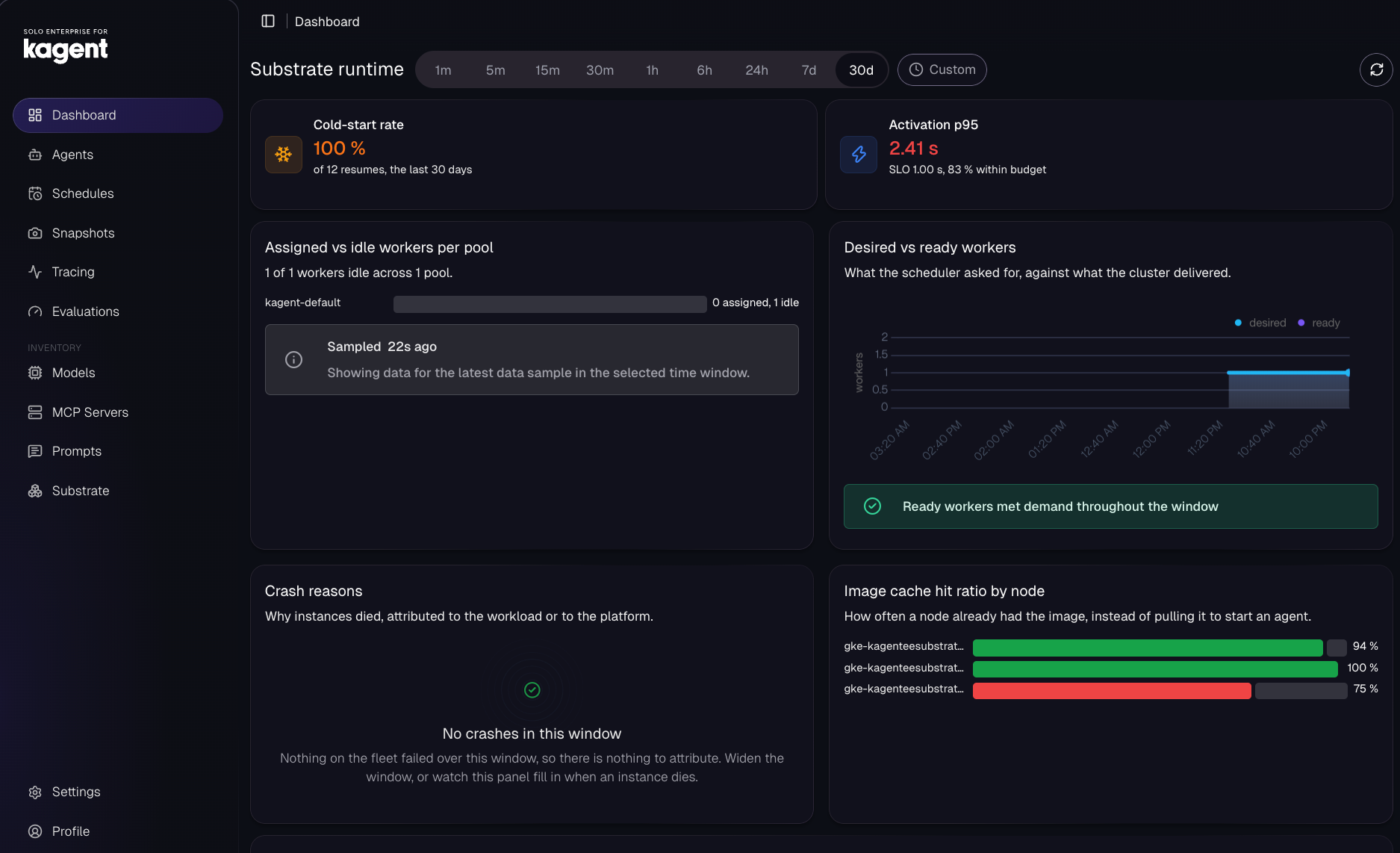
(Please note your environment will look different than the screenshots below due to what’s deployed within said environment).
Deploying An Agent
With kagent up and running, you can now deploy your first Agent. The Agent will consist of two primary objects:
- Harness
- AgentTemplate
The Harness is the Agent itself. The AgentTemplate is the spec of your Actors/Agents that you’re deploying (think of it like a golden image, but “image” is a bit too heavy of a word). For the purposes of the Agent below, you can use the Go ADK image if don’t want to build your own (you’ll see it in the image: parameter).
- Run the following to deploy the Agent and create the template.
kubectl apply -f - <<EOF
apiVersion: kagent.dev/v1alpha3
kind: Harness
metadata:
  name: kagent
  namespace: kagent
spec:
  kagent: {}
  workload:
    image: http://ghcr.io/kagent-dev/kagent/golang-adk@sha256:699c7a36daa0050d5954f42ad3b614690d825664cf64ffe8871dbe20dc68464e
  substrate:
    workerPoolRef:
      name: kagent-default
    snapshotPolicy:
      location: gs://ate-snapshots/kagent/
  allowedAgentTemplates:
    selector:
      matchLabels:
        kagent.dev/harness: kagent
---
apiVersion: kagent.dev/v1alpha3
kind: AgentTemplate
metadata:
  name: assistant
  namespace: kagent
  labels:
    kagent.dev/harness: kagent
spec:
  modelConfig:
    name: default-model-config
  description: A substrate-backed assistant used to verify this main build.
  systemPrompt: You are a helpful assistant running on kagent.
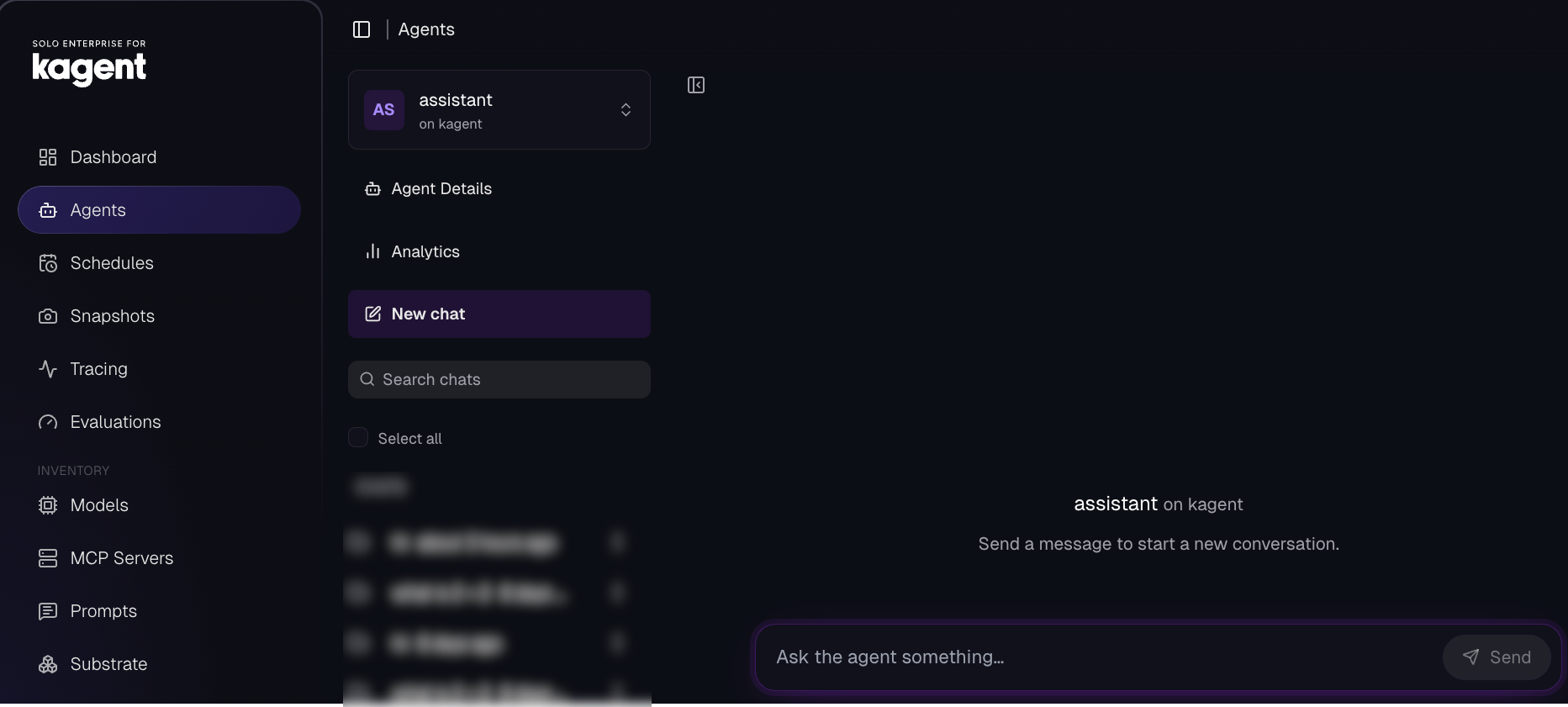
You should now be able to see your Agent running in the Agents tab.
Running & Snapshotting
With the Agent deployed, you can now interact with it like you would any other Agent.
- In the Agents tab, click on your assistant Agent and type something to it like what is 2 + 2.
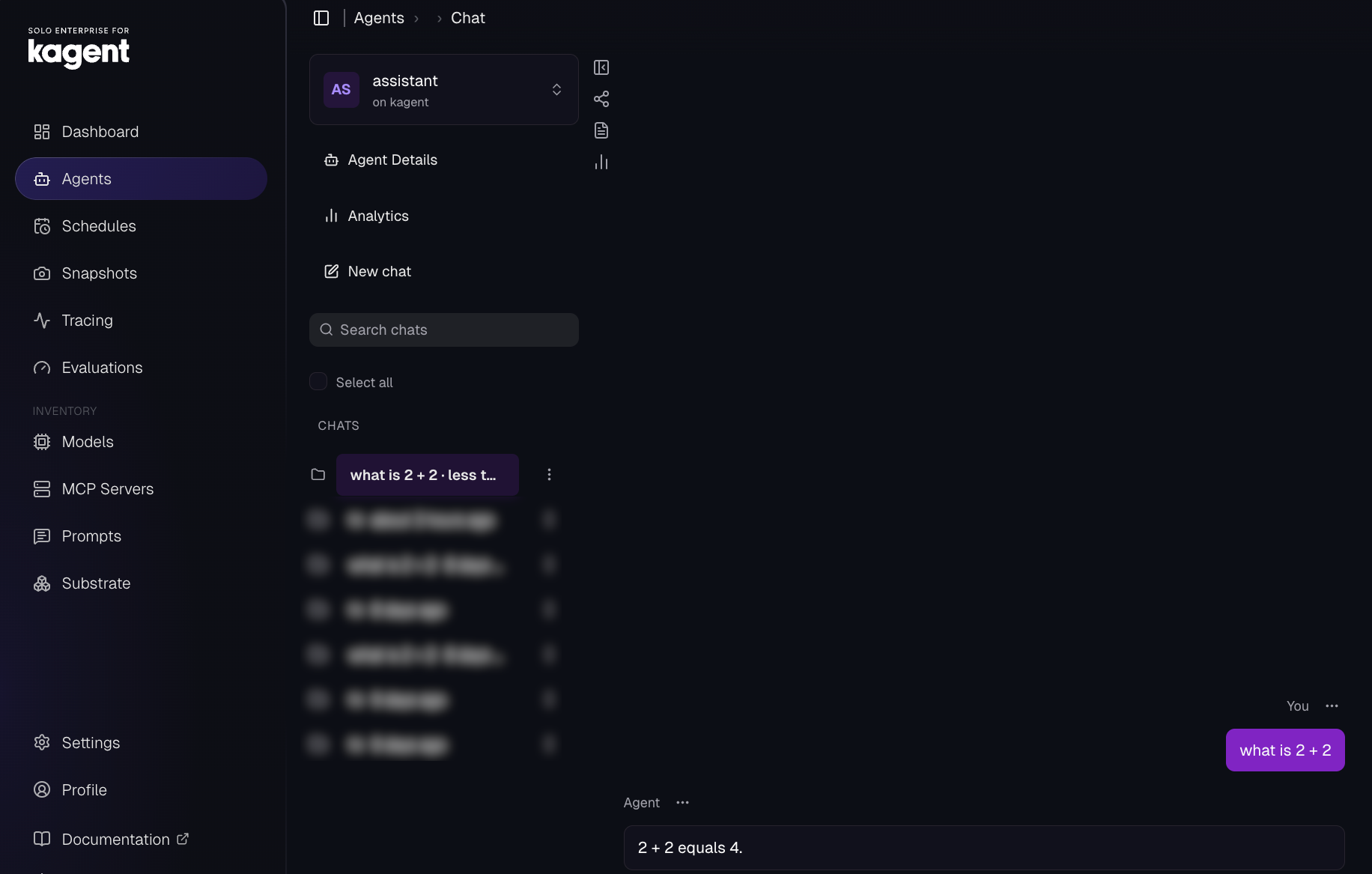
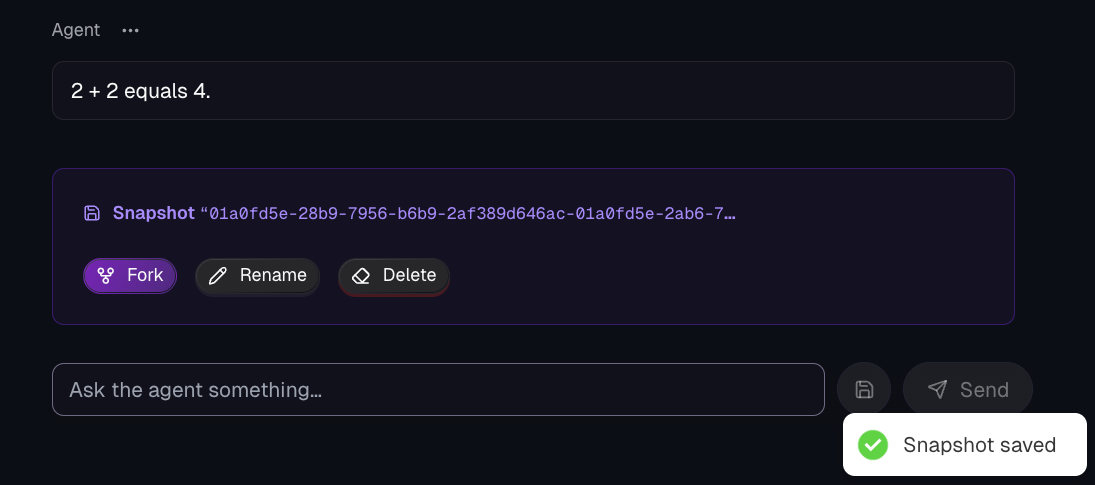
- Within the Agents session, you’ll see a save icon. This is the context/checkpoint snapshot.
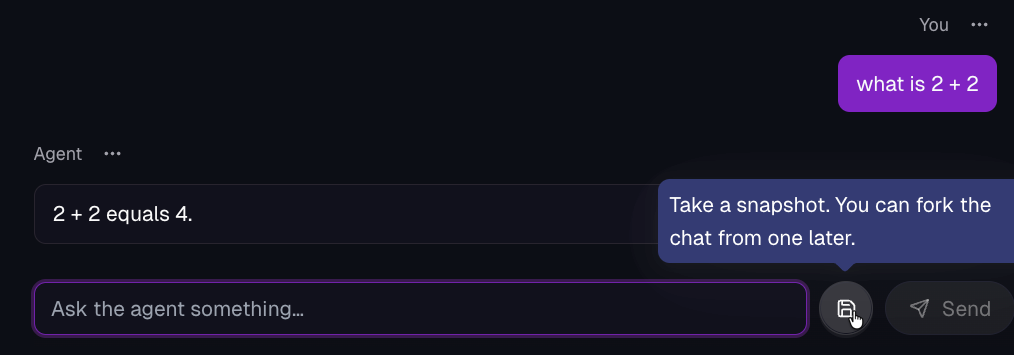
Once you click the save button, you’ll see that the snapshot is saved and you can fork it, rename it, or delete it.
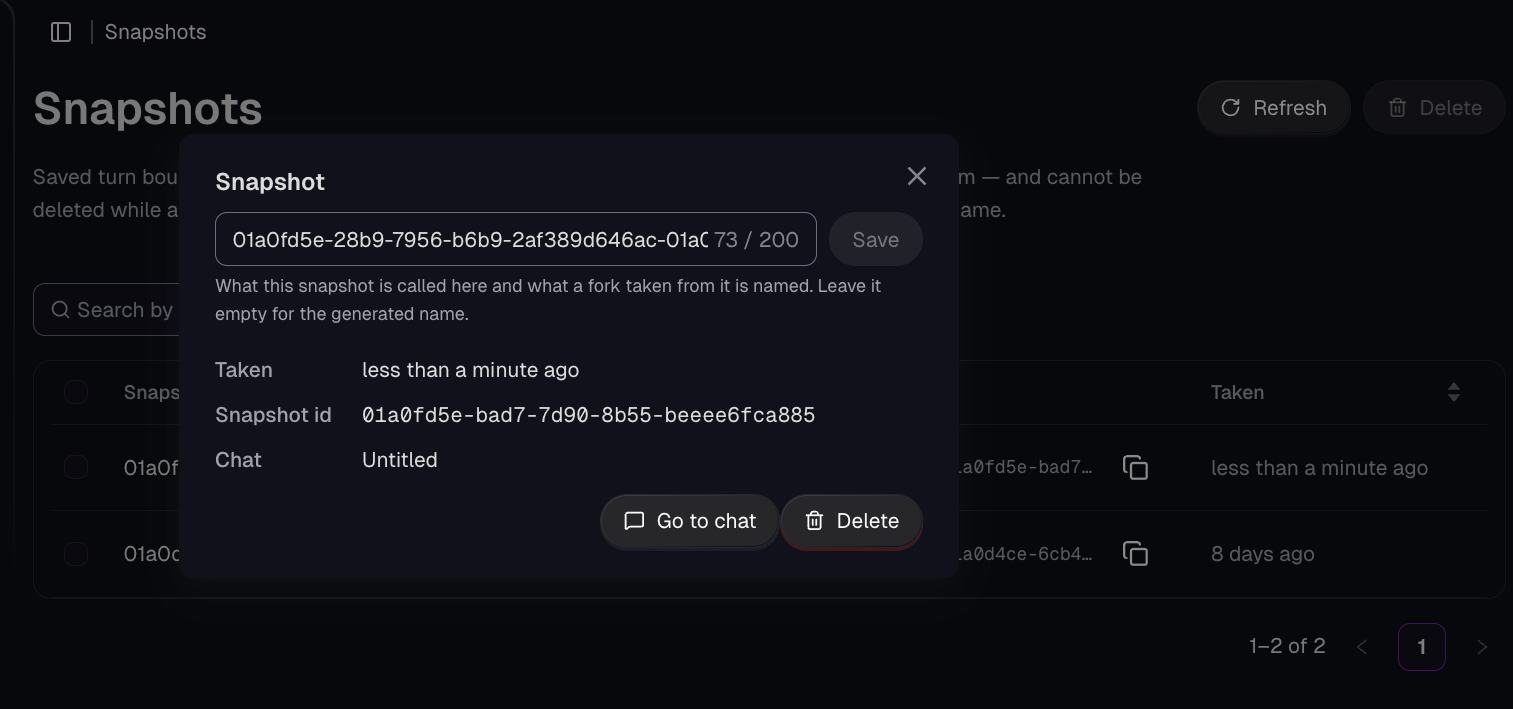
- Within kagent, click on the Snapshots tab and you’ll see your latest snapshot, along with the ability to delete it or go to the chat so you can be within the exact session at the time that it was snapshotted.
Navigating The Substrate Dashboard
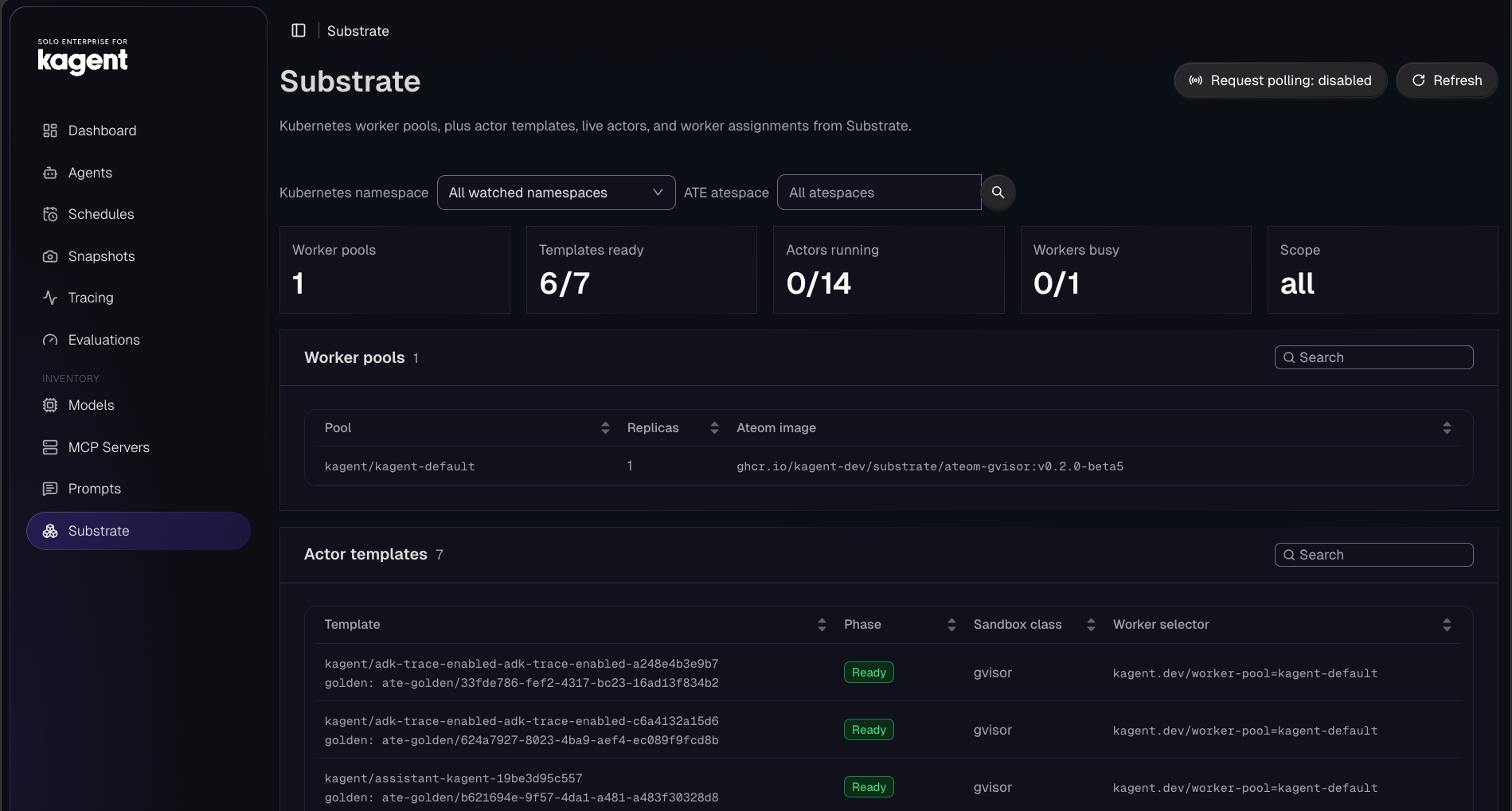
Up until this point, you’ve deployed several objects including a Worker, WorkerPool, Template, and Actor. With all of this deployed, you can see the resources deployed within the Substrate dashboard.
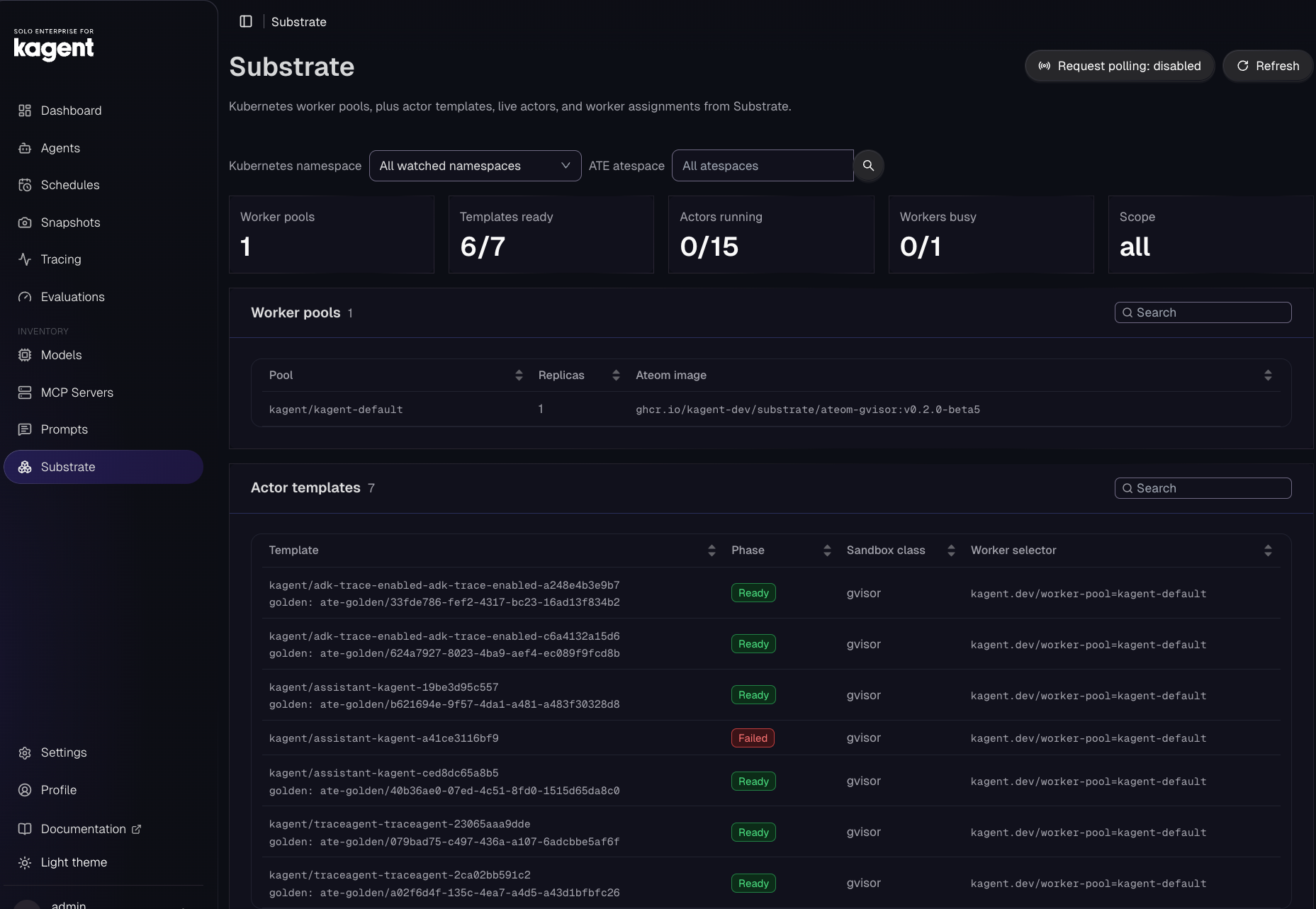
Within the Substrate dashboard, you can see all resources/objects that are running and not running. You’ll notice that although you interact with an Agent (Actor), it's off (for example 0/15 in the screenshot above). That’s because Actors only run when they’re being used (that’s the “warm state” that was mentioned for hardware efficiency).
Wrapping Up
Organizations of all shapes and sizes need an effective, performant, and secure method of running Agents along with a way to interact with Agents and MCP Servers in a way that everyone from engineers to various departments like marketing, HR, finance, etc. are comfortable with. That’s what you get when implementing kagent as the harness runtime and Substrate as the underlying infrastructure.
If you’d like to learn more about kagent + Agent Substrate, there’s a plethora of resources including the Agent Substrate 101 series that just wrapped up on YouTube along with the All Things AI weekly stream and Agent Substrate workshop.


%20(1).png)




%20a%20Bad%20Idea.png)