In every production-grade agentic implementation, there are two fundamentals to keep in mind - ingress and egress. Traffic going TO the Agent and traffic coming FROM the Agent.
For an Agent to appropriately receive requests and send requests, it needs to be sandboxed and isolated to ensure that it can only send/receive what you specify and where/how you specify. It also needs a dedicated AI Gateway to ensure the traffic can be observed and have proper policy enforcement.
In this blog post, you’ll learn how to combine sandboxing/isolation with a managed AI Gateway using kagent v1 and agentgateway.
Prerequisites
To follow along in a hands-on fashion, you will need:
- A Kubernetes cluster (v1.34 or above) in any managed (AKS, EKS, GKE) or on-prem (microk8s, kubeadm, Kind, Minikube, etc.) environment.
- Kagent v1 installed, and you can learn how to do that here.
- Agentgateway installed, which can be installed from the docs here.
If you don’t have an environment up and running yet, that’s totally fine. It’s still good to read through, understand, and digest this blog so you know the path forward once you have an environment ready to use.
Why Use A Dedicated Gateway?
Within Agent Substrate, there is a component called atenet-egress where you can do things like set policy enforcement. However, what if you want a more manageable, dedicated Gateway for things like:
- Model routing
- Semantic routing
- Cost optimization (budgets for users/teams, limits on tokens used, limits on dollars spent for LLM calls, a dashboard to see token/dollar usage, virtual keys)
- Prompt guarding
- The ability to capture, collect, and view observability data (logs, traces, metrics)
That’s when you begin to think to yourself “I need a dedicated Gateway that I control, manage, and can pull data points from”.
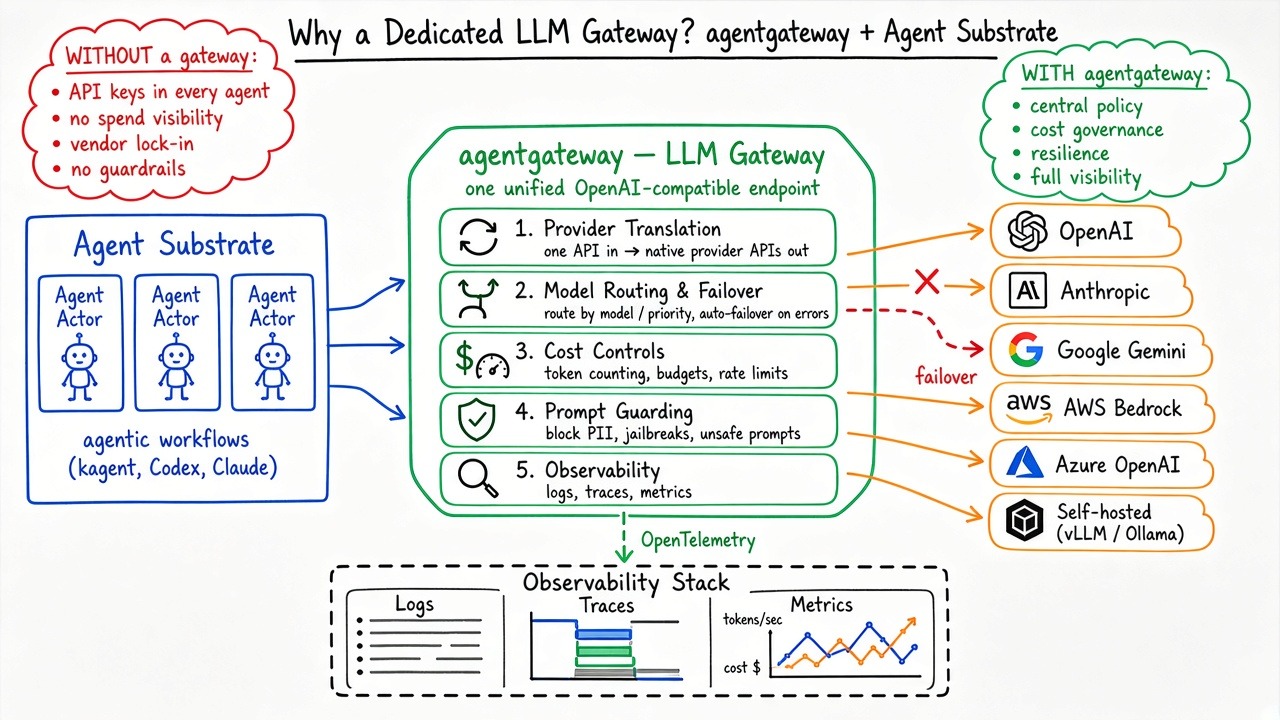
To ensure that you can implement and use everything in the bullet points above, the workflow goal for your Agents (Actors) is:
actor → atunnel → atenet-egress (policy, injects actor JWT) → agentgateway LLM gateway → OpenAI/Anthropic/…That way, you can still get the best of both worlds. You can use both atenet-egress and agentgateway for your dedicated LLM Gateway so you can cover all of the bases for all traffic that needs to leave the Agent (Actor).
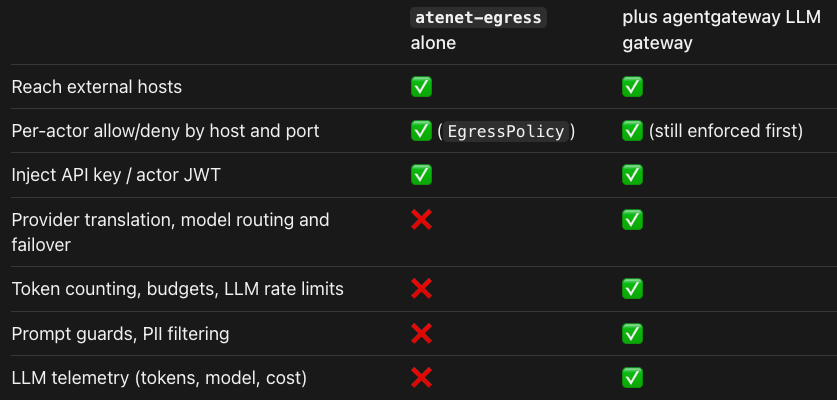
Now that you know the “why” in terms of why you’d want to use a dedicated LLM Gateway, let’s dive into the hands-on portion of configuring your workflow.
Gateway, Backend, and Route
The first step is to create your LLM Gateway using agentgateway. This will make use of a few objects to ensure you have a proxy/data plane, a backend with your preferred LLM, and routing.
💡 openai is used for the LLM provider. However, if you’d like to use Anthropic, Gemini, or an open-weight model/provider, you absolutely can.
- On your terminal, create an env variable with your LLM key (in this case, OpenAI).
export OPENAI_API_KEY="<your-openai-api-key>"- Create a Secret with the key from step 1.
kubectl apply -f - <<EOF
apiVersion: v1
kind: Secret
metadata:
  name: policy-demo-openai
  namespace: agentgateway-system
  labels:
    demo: kagent-policy-enforcement
type: Opaque
stringData:
  Authorization: "$OPENAI_API_KEY"
EOF- The objects below that you create do the following:
- Makes the Gateway objects Kubernetes Service a
ClusterIP, reachable inside the cluster. - Provisions the Gateway proxy and configures an HTTP listener on port 8080.
- Defines OpenAI as the upstream provider.
- Sends requests matching exactly
/v1/chat/completionson that listener to the OpenAI backend.
kubectl apply -f - <<EOF
apiVersion: enterpriseagentgateway.solo.io/v1alpha1
kind: EnterpriseAgentgatewayParameters
metadata:
  name: policy-demo-llm
  namespace: agentgateway-system
  labels:
    demo: kagent-policy-enforcement
spec:
  service:
    spec:
      type: ClusterIP
---
apiVersion: gateway.networking.k8s.io/v1
kind: Gateway
metadata:
  name: policy-demo-llm
  namespace: agentgateway-system
  labels:
    demo: kagent-policy-enforcement
spec:
  gatewayClassName: enterprise-agentgateway
  infrastructure:
    parametersRef:
      group: enterpriseagentgateway.solo.io
      kind: EnterpriseAgentgatewayParameters
      name: policy-demo-llm
  listeners:
  - name: http
    port: 8080
    protocol: HTTP
    allowedRoutes:
      namespaces:
        from: Same
---
apiVersion: enterpriseagentgateway.solo.io/v1alpha1
kind: EnterpriseAgentgatewayBackend
metadata:
  name: policy-demo-openai
  namespace: agentgateway-system
  labels:
    demo: kagent-policy-enforcement
spec:
  ai:
    provider:
      openai: {}
  policies:
    auth:
      secretRef:
        name: policy-demo-openai
    ai:
      routes:
        /v1/chat/completions: Completions
---
apiVersion: gateway.networking.k8s.io/v1
kind: HTTPRoute
metadata:
  name: policy-demo-openai
  namespace: agentgateway-system
  labels:
    demo: kagent-policy-enforcement
spec:
  parentRefs:
  - name: policy-demo-llm
    sectionName: http
  rules:
  - matches:
    - path:
        type: Exact
        value: /v1/chat/completions
    backendRefs:
    - group: enterpriseagentgateway.solo.io
      kind: EnterpriseAgentgatewayBackend
      name: policy-demo-openai
EOF
With the objects above created, you now have a dedicated proxy/Gateway for your Agent (Actor) to route traffic through and reach its destination (OpenAI) in a secure and observable way
Routing Your Agent Through Agentgateway
With the Gateway, backend, and routes configured, the next step is to ensure that the Agent you’re using automatically, and by default, routes its egress traffic (e.g. - the request it makes to an LLM) through the Gateway. This is done in kagent via the ModelConfig object. To ensure that this works as expected, you’ll create a few other objects as well including the Harness and the Agent itself.
- Create a kagent Harness.
kubectl apply -f - <<EOF
apiVersion: api.kagent.dev/v1alpha3
kind: Harness
metadata:
  name: assistant
  namespace: kagent
spec:
  kagent: {}
  workload:
    image: us-docker.pkg.dev/solo-public/kagent-enterprise/golang-adk@sha256:d8259251d31a6686e0d093863e06b973bad6f704b9314360388484efcba9a5ad
  env:
    - name: OTEL_BSP_SCHEDULE_DELAY
      value: "2000"
  substrate:
    workerPoolRef:
      name: kagent-default
    snapshotPolicy:
      location: s3://ate-snapshots/kagent/
EOF
💡 For the Harness, you can use the kagent harness, the BYO harness, and agentic harnesses like Claude and Codex.
- Create the ModelConfig that has your Gateway configuration to route through via the base URL. It also contains what LLM you want to use.
kubectl apply -f - <<EOF
apiVersion: api.kagent.dev/v1alpha3
kind: ModelConfig
metadata:
  name: openai
  namespace: kagent
  labels:
    demo: kagent-policy-enforcement
spec:
  provider: OpenAI
  model: gpt-4.1-mini
  stream: true
  apiKeySecret: kagent-openai
  apiKeySecretKey: OPENAI_API_KEY
  openAI:
    baseUrl: http://policy-demo-llm.agentgateway-system.svc.cluster.local:8080/v1
    apiFormat: chatCompletions
EOF
- Create the AgentTemplate and the Agent
kubectl apply -f - <<EOF
apiVersion: api.kagent.dev/v1alpha3
kind: AgentTemplate
metadata:
  name: assistant
  namespace: kagent
spec:
  description: Programmatic Go ADK agent with a traced model and addition tool.
  modelConfig:
    name: openai
  systemPrompt: |
    You are a concise Kubernetes assistant. Use k8s_get_resources for live
    cluster facts. Report what the tool returns and do not modify resources.
  tools:
    - mcp:
        server:
          kind: RemoteMCPServer
          name: kagent-tool-server
        tools:
          - k8s_get_resources
---
apiVersion: api.kagent.dev/v1alpha3
kind: Agent
metadata:
  name: assistant
  namespace: kagent
spec:
  template:
    ref:
      name: assistant
  harnessRef:
    name: assistant
EOF
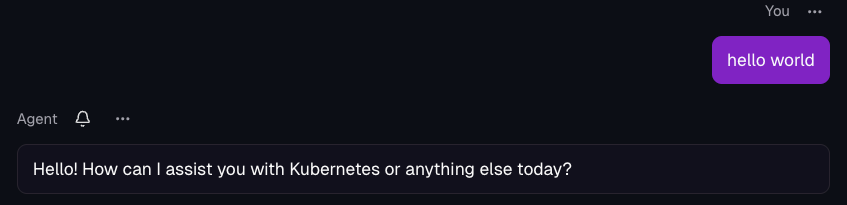
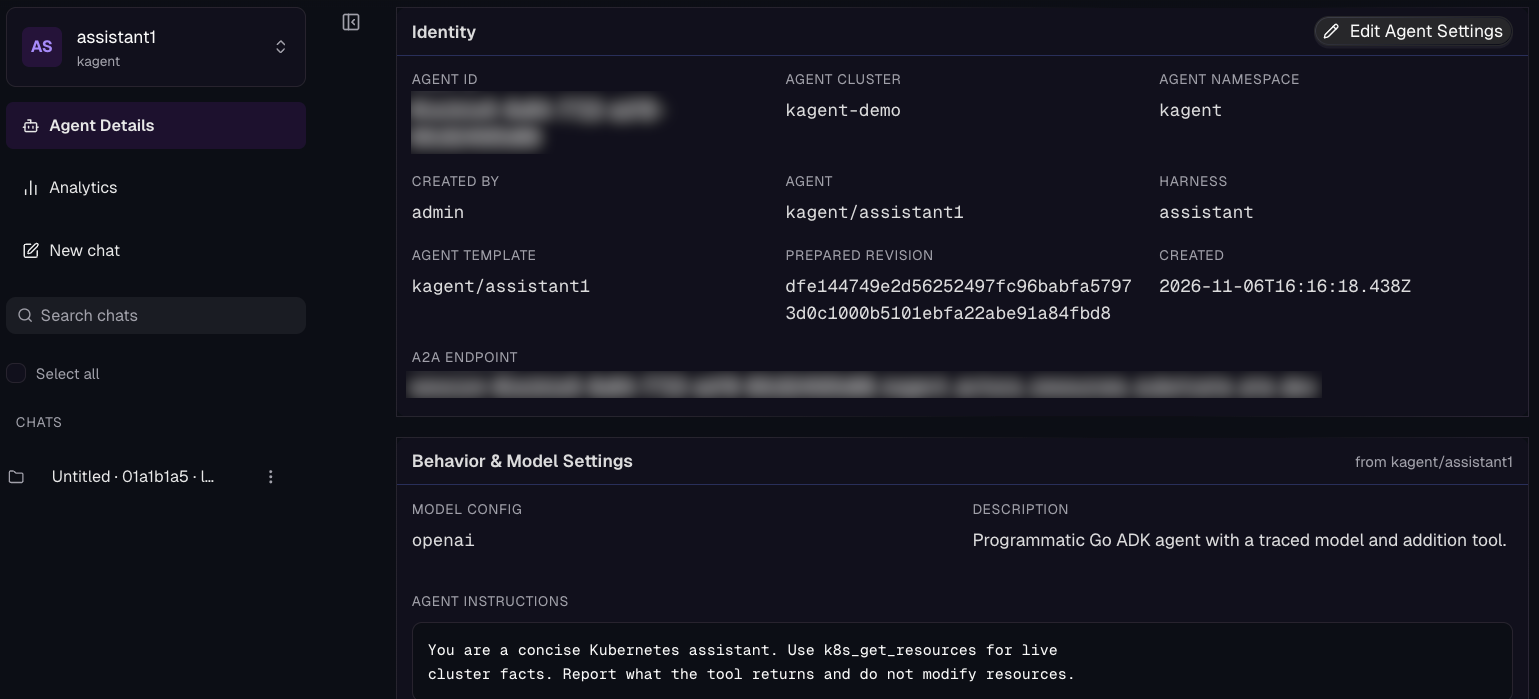
- Open your Agent and prompt it with whatever you’d like. Something like:
Hello WorldYou’ll see that your Agent is up and operational along with specific details about your Agent.
- Look at the logs for your Gateway and you’ll see that the traffic flowed through your dedicated LLM Gateway.
kubectl logs -n agentgateway-system \
  -l gateway.networking.k8s.io/gateway-name=policy-demo-llm \
  --all-containers=true --tail=100
You should see an output similar to the below:
2026-11-06T16:14:41.913756Z     info    proxy::gateway  started bind    bind="8080/agentgateway-system/policy-demo-llm"
2026-11-06T16:16:23.576994Z     info    request gateway=agentgateway-system/policy-demo-llm listener=http route=agentgateway-system/policy-demo-openai endpoint=api.openai.com:443 src.addr=10.115.131.83:45256 http.method=POST http.host=policy-demo-llm.agentgateway-system.svc.cluster.local http.path=/v1/chat/completions http.version=HTTP/1.1 http.status=200 trace.id=51b004d2788e4e685ca100600657c9c3 span.id=febda231da44d920 protocol=llm gen_ai.operation.name=chat gen_ai.provider.name=openai gen_ai.request.model=gpt-4.1-mini gen_ai.response.model=gpt-4.1-mini-2025-04-14 gen_ai.usage.input_tokens=1111 gen_ai.usage.cache_read.input_tokens=0 gen_ai.usage.output_tokens=15 gen_ai.usage.reasoning_tokens=0 agw.ai.time_to_first_token=1.961152153 agw.ai.time_per_output_token=0.013681321 agw.ai.usage.cost.total=0.0004684 gen_ai.usage.input_audio_tokens=0 gen_ai.usage.output_audio_tokens=0 duration=2166m
Guardrails: Rejecting Prompts
In the previous two sections, you implemented the ability to route your Agent through a dedicated LLM Gateway that you created for your agentic workflow to be observable and securable.
Since it’s now enabled to have the ability to be secured, let’s implement a policy to showcase what policy enforcement can look like for your Agent.
- Create a policy targeting the HTTPRoute with a deterministic request guard.
kubectl apply -f - <<EOF
apiVersion: enterpriseagentgateway.solo.io/v1alpha1
kind: EnterpriseAgentgatewayPolicy
metadata:
  name: policy-demo-llm-controls
  namespace: agentgateway-system
  labels:
    demo: kagent-policy-enforcement
spec:
  targetRefs:
  - group: gateway.networking.k8s.io
    kind: HTTPRoute
    name: policy-demo-openai
  backend:
    ai:
      promptGuard:
        request:
        - scope: [SystemPrompt, Messages, ToolOutput, ToolInput]
          regex:
            action: Reject
            matches:
            - DEMO_BLOCK_ME
          response:
            statusCode: 403
            message: "POLICY_DEMO_GUARDRAIL: request rejected"
EOF- Prompt your Agent with:
Reply with DEMO_BLOCK_MEYou’ll see within your Agent output that the request gets denied.
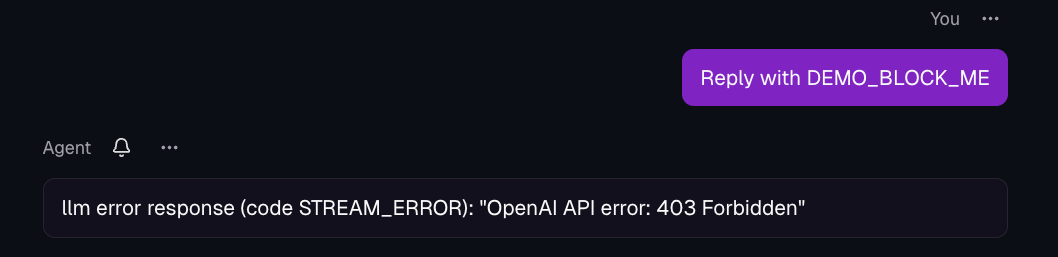
The request that it got denied is because the message to your Agent has DEMO_BLOCK_ME in it, which matches the regex for what should be blocked with the policy implemented in step number 1.
This, of course, is just a small example of implementing prompt guarding, but you could implement prompt guards for any type of response, message, and request.
Wrapping Up
Every request (ingress) coming into your cluster and your Agent along with every request leaving the cluster via a request from your Agent (egress) can, and should be, secure, governed, and observable. Without it, you have zero knowledge of who (or what) is using your Agents (no data to see logs/traces/metrics), what your Agents are connecting to (an LLM, MCP Server, another Agent), how much it’s costing you/your team/your organization, and how you can implement policy enforcement.
Aside from this blog post and several others, there are a great deal of free resources that you can use to learn how isolation, sandboxing, and governance works for your agentic workloads.
Level 100 for learning Agent Substrate playlist
Lab on running isolated sandboxes for your Agents
Agent Substrate 201 series: dive into the architecture of Substrate