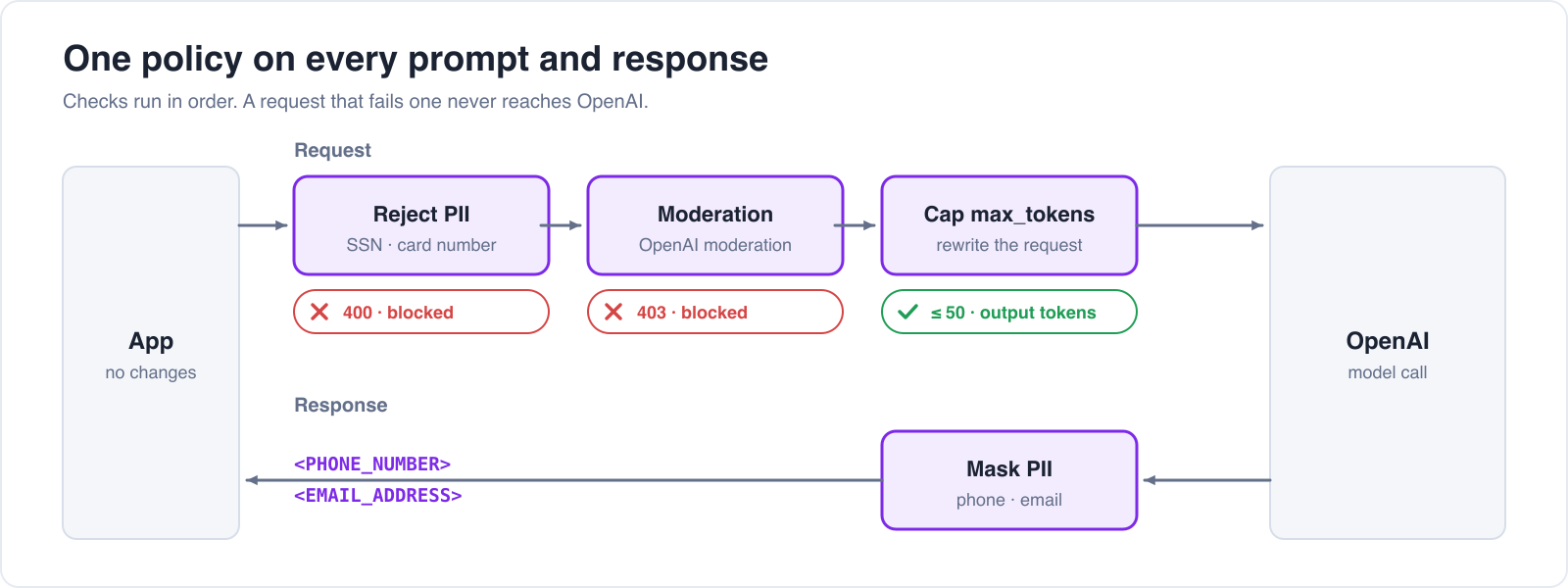
Users paste customer records into chat assistants, and models repeat contact details they find in retrieved documents. If each team writes its own PII filter, you end up with as many filters as teams, each with different rules and gaps. An AI gateway applies one guardrail policy to the prompts and responses of all your apps and models, with no app changes. With agentgateway, you:
- Reject prompts that contain a Social Security number or credit card number
- Mask email addresses and phone numbers in model responses
- Send prompts to a cloud moderation service and block harmful content
- Cap output tokens with a request transformation
- Control whether blocked prompts are stored in the gateway's logs
Guard types
Open LLM → Guardrails in the UI and click Add guard under Request guards or Response guards. The Guard type list offers:
Solo Enterprise for agentgateway adds a Microsoft Purview DLP guard that applies your existing Purview policies.
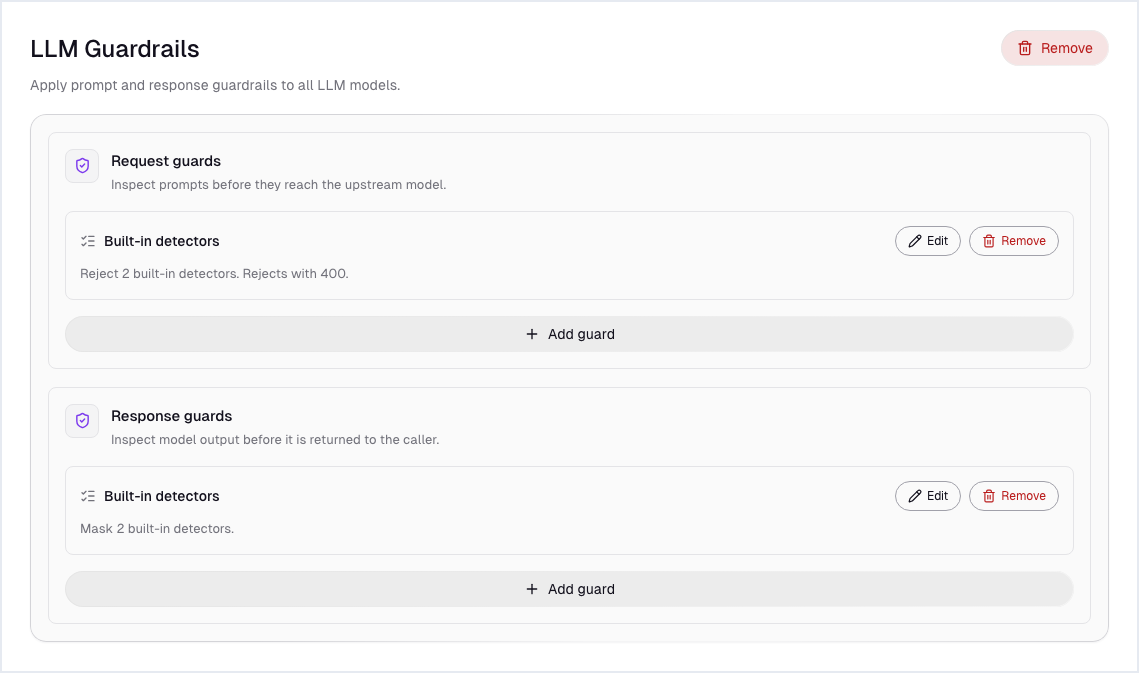
Guards are saved under llm.policies.guardrails, with separate lists for requests and responses, and agentgateway runs each list in order. They apply to every model.
Each task below shows two ways to make the change: Option A in the agentgateway UI, or Option B by editing config.yaml directly. Both produce the same config, so use whichever you prefer.
Reject PII in prompts, mask it in responses
Option A: In the UI
- Open LLM → Guardrails. Under Request guards, click Add guard and fill in the step 1 values below. Click Add guard.
- Under Response guards, click Add guard and fill in the step 2 values below. Click Add guard.
- The guards stay pending until you save them. Click View diff to see the YAML, then Save guardrails.
Step 1
Step 2
Option B: Edit config.yaml directly
llm:
  policies:
    guardrails:
      request:
      - regex:
          action: reject
          rules:
          - builtin: ssn
          - builtin: creditCard
        rejection:
          status: 400
          body: "Request blocked: remove sensitive data (SSN or card number) and try again."
      response:
      - regex:
          action: mask
          rules:
          - builtin: phoneNumber
          - builtin: email
A prompt with an SSN gets the 400 and the custom message, and the gateway never sends it to the provider. In a response, the gateway replaces matches with placeholders such as <PHONE_NUMBER> and <EMAIL_ADDRESS> before the app receives it.
Block harmful content with a moderation service
A moderation guard sends each prompt to a classification service. This one uses OpenAI's moderation model, so it needs the same key reference as the models.
Option A: In the UI
- On LLM → Guardrails, under Request guards, click Add guard and choose OpenAI Moderation.
- Fill in the form with the values in the table below.
- Click Add guard, then Save guardrails.
backendAuth:
  key: "$OPENAI_API_KEY"
Paste the Backend policies lines rather than typing them; the editor's autocomplete drops the : when you press Enter.
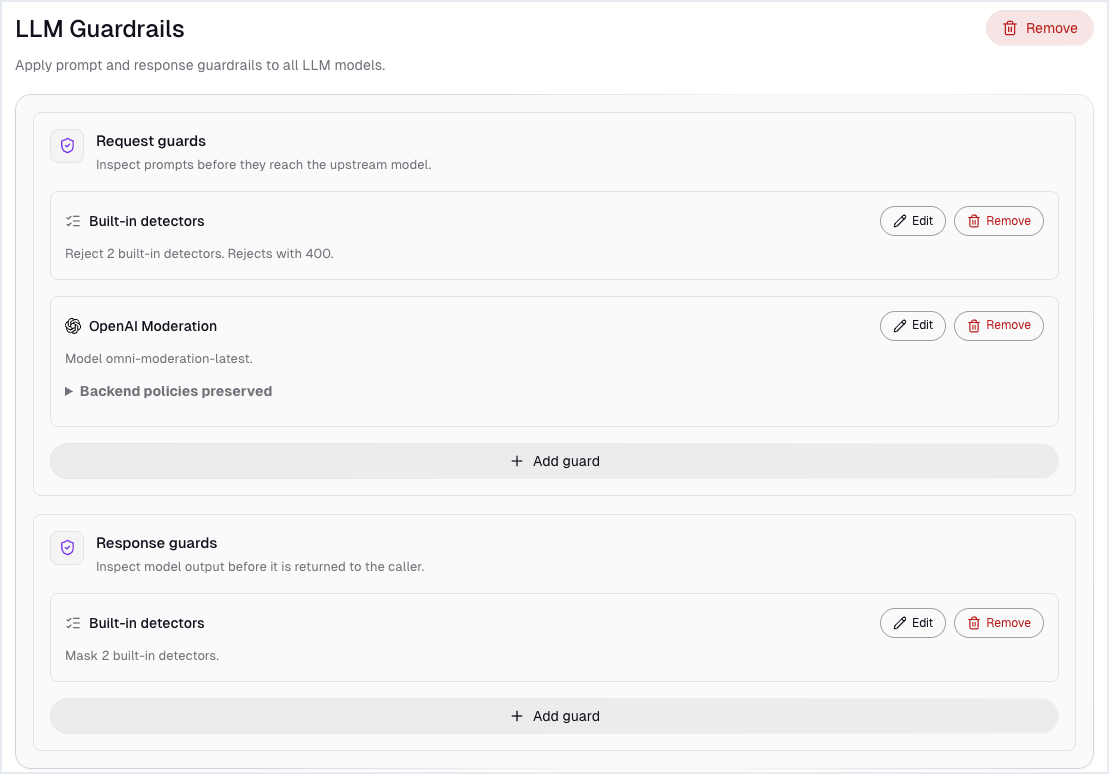
The page now lists both request guards and the response guard:
Option B: Edit config.yaml directly
Add a second entry to the request list:
llm:
  policies:
    guardrails:
      request:
      - openAIModeration:
          model: omni-moderation-latest
          policies:
            backendAuth:
              key: "$OPENAI_API_KEY"
        rejection:
          body: "Content blocked by moderation policy"
A prompt the moderation model flags gets 403 by default. Choose Bedrock Guardrails, Google Model Armor, or Azure Content Safety instead to use the safety service your cloud already provides.
Cap output tokens
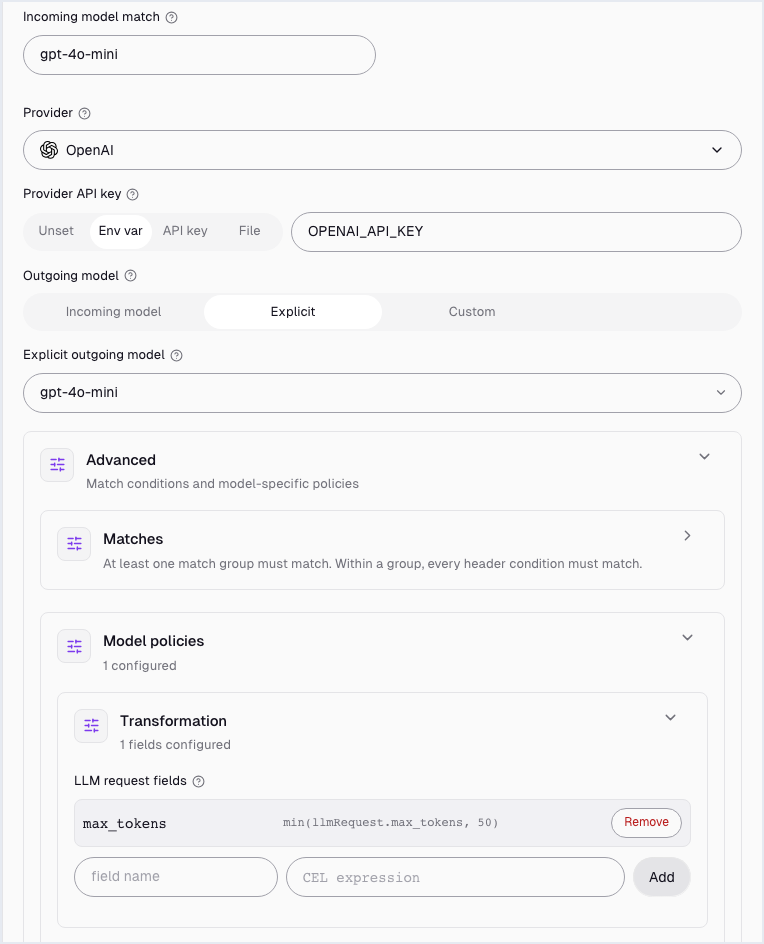
A transformation rewrites fields of the request before the gateway sends it. This one, on a single model, limits max_tokens to 50 whatever the app asks for.
Option A: In the UI
- Open LLM → Models and click Edit on the
gpt-4o-minirow. - Open Advanced, then Model policies, then Transformation.
- Under LLM request fields, set the field name to
max_tokensand the CEL expression tomin(llmRequest.max_tokens, 50). Click Add, then Save model.
Option B: Edit config.yaml directly
Add a transformation block to the model:
llm:
  models:
  - name: gpt-4o-mini
    provider: openai
    params:
      model: gpt-4o-mini
      apiKey: "$OPENAI_API_KEY"
    transformation:
      max_tokens: "min(llmRequest.max_tokens, 50)"
Results
Decide what your logs keep
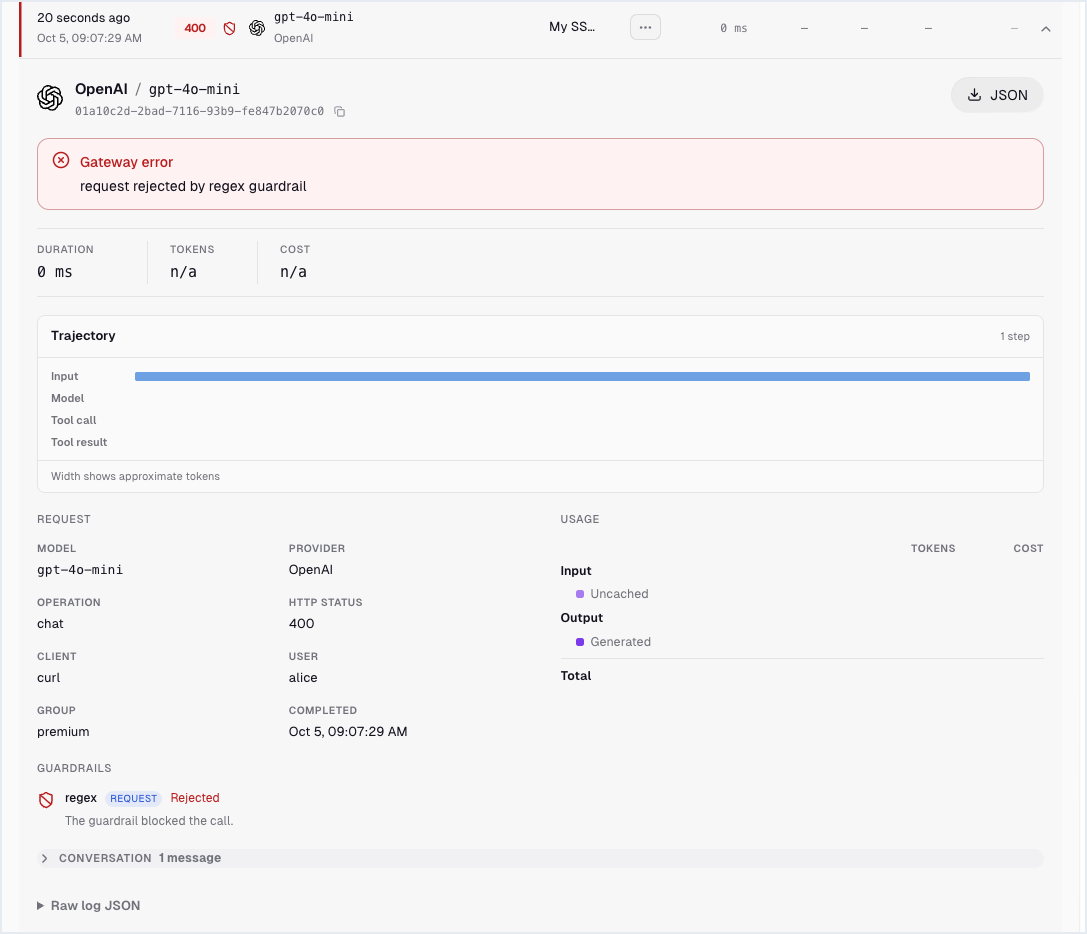
Guardrails protect what reaches the model. The gateway's own logging decides what your systems store. By default, agentgateway logs metadata for each request: status, model, tokens, cost, user, and which guardrail fired.
Option A: In the UI
Open LLM → Logs and click a blocked request. The entry shows the 400, the user, and the guardrail that rejected it:
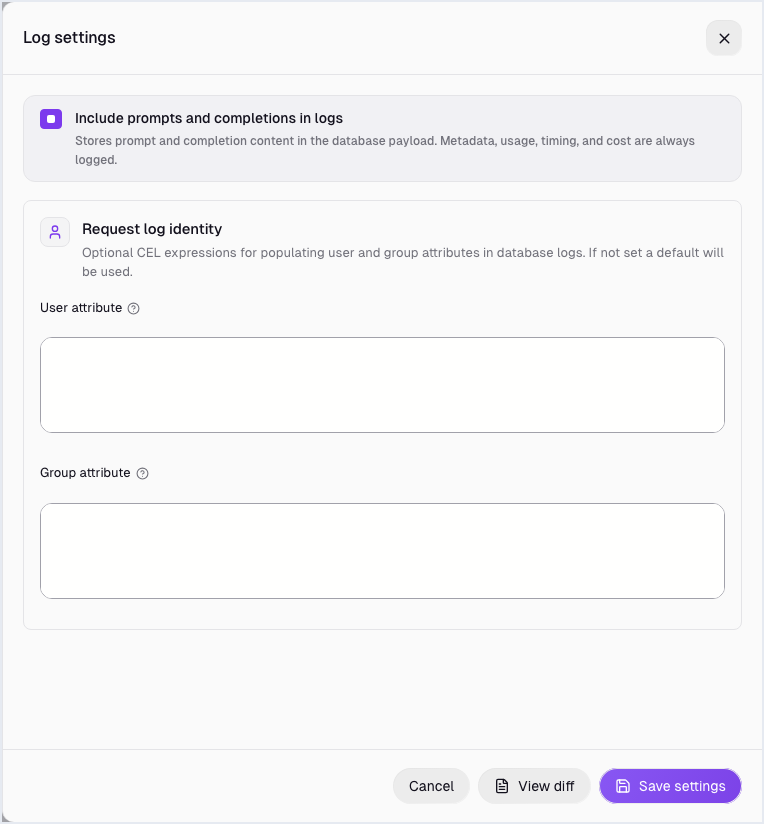
To store prompt and completion text too, click Settings on the same page, select Include prompts and completions in logs, and click Save settings:
Option B: Edit config.yaml directly
Add a top-level frontendPolicies block:
frontendPolicies:
  accessLog:
    database:
      llm: full
With llm: full, the log database also stores the text of rejected prompts, including the PII the guard blocked. Decide where prompt text may be stored before you select that box.
Frequently asked questions
What are LLM guardrails?
LLM guardrails are checks on prompts and responses that block, mask, or flag content such as PII, secrets, jailbreak attempts, or harmful requests. Running them in an AI gateway applies one policy to all apps and models.
Can an AI gateway redact PII from LLM responses?
Yes. agentgateway's response guards mask matches from built-in detectors (email, phone number, credit card, SSN, Canadian SIN) or your own regular expressions before the response reaches the app.
Can I use Amazon Bedrock Guardrails or Google Model Armor with agentgateway?
Yes. agentgateway has built-in guard types for Amazon Bedrock Guardrails, Google Cloud Model Armor, Azure AI Content Safety, and OpenAI moderation, and a webhook type for your own service.
Do guardrails add latency?
Regex guards run inside the gateway and add little latency. Moderation services add a network call per request, so measure them against your latency budget.
Do guardrails also apply to MCP tool calls?
agentgateway has separate MCP guardrails for tool calls and results. See What is an MCP gateway?.