NGINX vs. Other Web Servers: How Does It Compare?
When evaluating web server solutions, NGINX is often compared to other popular servers like Apache HTTP Server, Microsoft IIS, and Caddy. Unlike Apache’s process-based architecture, which creates a new process or thread for each connection, NGINX uses an event-driven, asynchronous approach. This allows it to handle thousands of simultaneous connections using a small, predictable number of worker processes, resulting in lower memory consumption and greater scalability, especially for sites experiencing high traffic.
Key reasons users choose NGINX include:
- High performance for static and dynamic content
- Efficient use of system resources with low memory footprint
- Powerful built-in features for reverse proxying, load balancing, and caching
- Flexible configuration suitable for a variety of application architectures
To explore more about how NGINX compares to other solutions, visit Solo.io’s guide on NGINX vs. Apache.
Frequently Asked Questions about NGINX
What makes NGINX different from Apache?
While Apache serves each incoming connection with a separate process or thread, NGINX’s event-driven model allows it to serve multiple connections with fewer resources, which results in higher efficiency and predictable performance, especially under heavy load.
Is NGINX suitable for cloud-native environments?
Yes. NGINX’s lightweight architecture and support for containerization make it an excellent fit for microservices and Kubernetes-based deployments. Its ability to serve as an API gateway, load balancer, or ingress controller adds further value in cloud-native scenarios.
Are there alternatives to NGINX worth considering?
Yes, depending on your requirements, alternatives may include Apache HTTP Server, HAProxy for load balancing, Caddy for automatic HTTPS, or cloud provider-specific solutions like AWS Application Load Balancer. Learn more at solo.io/topics/nginx/nginx-alternatives.
What is NGINX?
NGINX is open source software that powers web servers and enables reverse proxying, caching, load balancing, and media streaming. It was originally designed as a web server with high performance and reliability. Besides functioning as an HTTP server, NGINX acts as a proxy server for email (IMAP, POP3, and SMTP) and a reverse proxy and load balancer for HTTP, TCP, and UDP servers.
The NGINX architecture is built around efficient resource utilization and can handle thousands of concurrent connections with minimal memory footprint, making it a popular choice for modern web applications and microservices deployments.
NGINX server architecture: How does NGINX work?
NGINX uses a predictable process model that is sensitive to available hardware resources:
- The master process performs privileged operations including reading configuration files, binding to network ports, and spawning a controlled number of child processes. This design ensures system stability and controlled resource allocation.
- The cache loader process executes during startup to populate the disk-based cache into memory, then terminates. Because this process runs infrequently, it maintains low resource requirements and doesn't impact ongoing server performance.
- The cache manager process operates periodically to prune expired entries from the disk cache, ensuring it stays within configured size limits. This automated cache management prevents storage bloat while maintaining optimal cache performance.
- Worker processes handle the core NGINX operations including processing network connections, reading and writing content to disk, and communicating with upstream backend servers. These processes are responsible for the day-to-day request handling that powers your applications.
In most cases, the recommended NGINX configuration of one worker process per CPU core makes the most efficient use of hardware resources. It can be customized by setting the worker_processes directive in NGINX configuration.
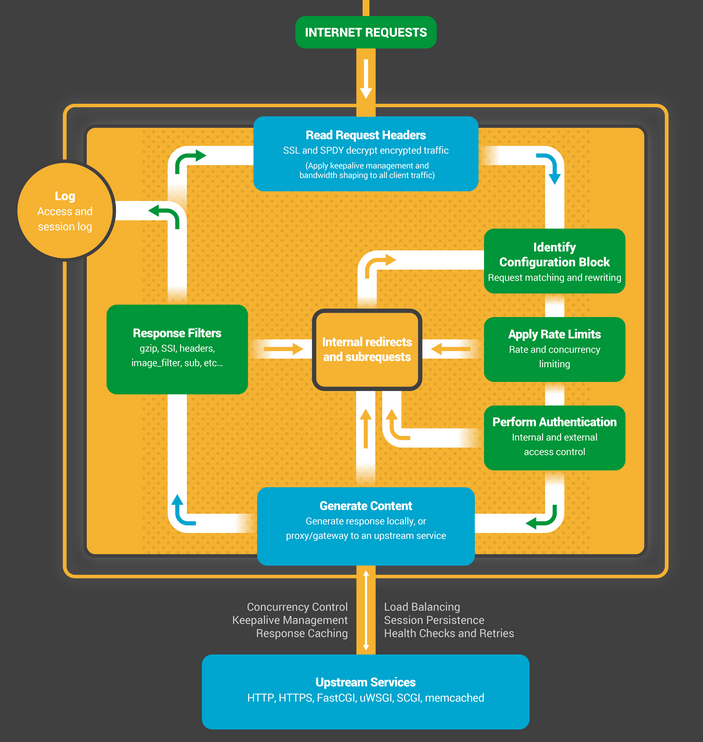
When the NGINX server is active, worker processes handle all incoming traffic. Each worker process manages multiple connections simultaneously using a non-blocking, event-driven architecture, which dramatically reduces context switching overhead compared to traditional thread-per-connection models.
Each worker process is single-threaded and runs independently to acquire and process new connections. Processes can communicate using shared memory to obtain shared cache data, session persistent data, and other shared resources.
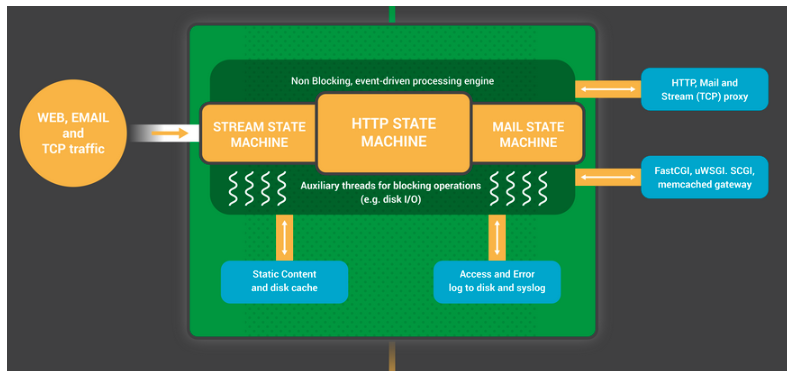
Each NGINX worker process is initialized with an NGINX configuration and comes with a set of listening sockets, provided by the master process.
The NGINX worker process first waits for events on the listen socket. These events are created by new incoming connections. These connections are assigned to state machines – HTTP state machines are most commonly used, but NGINX also provides state machines for streaming (raw TCP) traffic and email protocols (SMTP, IMAP, and POP3).
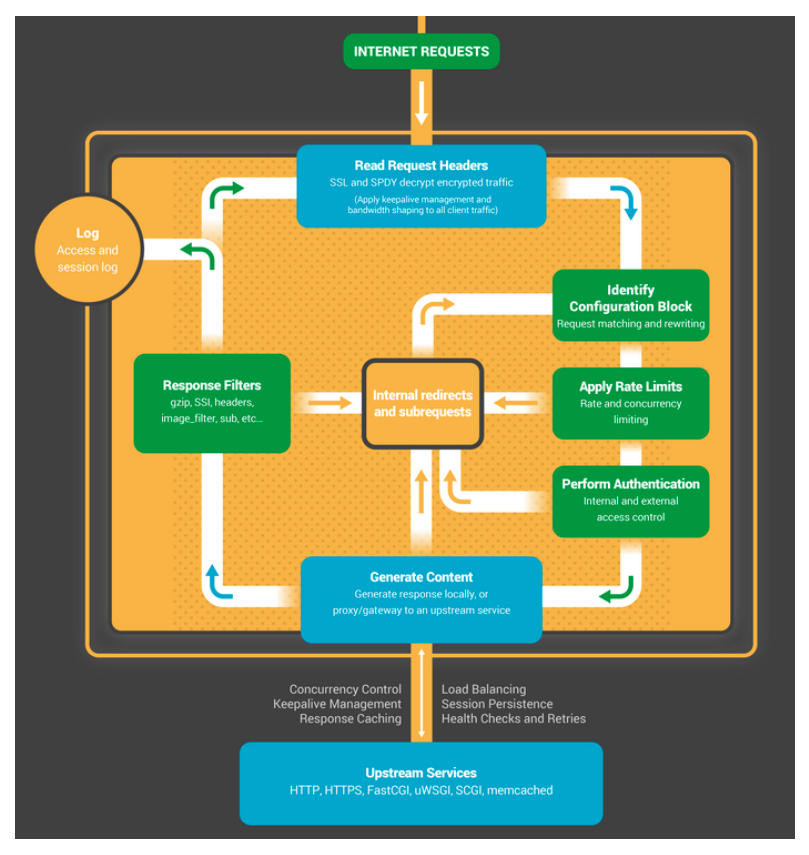
A state machine is a set of instructions that tells NGINX how to handle requests. Most web servers that do the same thing as NGINX use a similar state machine.
NGINX products and solutions
NGINX Plus
NGINX Plus is a cloud native API gateway that also includes a content delivery network, load balancer, reverse proxy, and web server. It provides features like proactive health checks, high availability, domain name server (DNS) discovery, RESTful API management, and session persistence.
The NGINX load balancing capabilities built into NGINX Plus enable integration with advanced monitoring tools, Kubernetes container optimization, enhanced security controls, and comprehensive debugging and diagnostics for complex application architectures. For organizations requiring enterprise-grade API management and traffic control, NGINX Plus provides production-ready features beyond the open-source version.
NGINX Unit
NGINX Unit is a general-purpose web application server. It is designed to be a building block of web architectures, and can be used at any scale or in any type of organization. It is suitable for both modern microservice environments and modern legacy and monolithic applications.
NGINX Unit simplifies the application stack for web applications and APIs by combining multiple layers into a single component. With Unit, NGINX devices can:
- Serve static media assets directly to clients
- Execute application code natively in multiple programming languages
- Reverse proxy requests to backend servers
- Dynamically reconfigure applications without service interruption
NGINX Ingress Controller
The NGINX Ingress Controller is a traffic management solution optimized for cloud-native applications running in containerized Kubernetes environments. This enterprise-grade tool delivers high performance, security, and reliability for Kubernetes workloads.
NGINX Ingress Controller provides comprehensive performance monitoring and visibility features that help teams quickly identify and resolve performance bottlenecks, detect anomalous behavior, and maintain service level objectives in production environments. The controller integrates seamlessly with Kubernetes-native resource definitions and supports advanced routing, SSL/TLS termination, and traffic policies.
NGINX Service Mesh
The NGINX Service Mesh lets you control Kubernetes deployments through a unified data plane. It is designed for high performance and scalability. NGINX Service Mesh provides traffic management, load balancing, encryption, and identity management.
NGINX Service Mesh provides traffic management, load balancing, encryption, and identity management capabilities. However, it's worth noting that NGINX Service Mesh is not widely adopted by enterprises for production applications compared to other service mesh solutions in the market.
NGINX Management Suite
Management Suite provides visibility and control over NGINX instances, application-delivered services, API management workflows, and security solutions.
The core functionality of Management Suite is implemented within the NGINX Instance Manager, which is part of the control plane. Its key features include:
- Discovering configuration issues and suggesting fixes.
- Finding and renewing expired certificates and detecting NGINX instances exposed to CVEs and other security issues.
- Controlling access to NGINX configurations using role-based access control (RBAC).
- Detecting if NGINX App Protect WAF is installed and checking applied version and signature packages.
NGINX App Protect
NGINX App Protect is a modern application security solution that protects against advanced threats and subtle attacks. It provides a web application firewall (WAF) and application-level denial-of-service (DoS) security defenses, providing built-in protection for web servers.
NGINX Amplify
NGINX Amplify is a free SaaS-based monitoring tool for NGINX open source and NGINX Plus. It is easy to set up and lets you monitor performance, track infrastructure assets, and improve configurations through static analysis. NGINX Amplify also monitors the underlying operating system, application server, database, and other components.
NGINX Amplify extends monitoring beyond NGINX itself to track the underlying operating system, application servers, databases, and other infrastructure components, providing a holistic view of your application stack performance.
NGINX and Kubernetes
Kubernetes is an open-source container orchestration platform that provides a complete environment for deploying, scaling, and managing containerized applications. The integration between NGINX and Kubernetes enables powerful traffic management and security capabilities.
Several NGINX products can run in a Kubernetes environment:
- NGINX Plus – a reverse proxy and load balancer that can take on multiple roles:
- Sidecar for NGINX service mesh
- Ingress controller in Kubernetes cluster to manage ingress and egress traffic
- Per-service and per-pod application firewall proxies when deployed with NGINX App Protect
- A service-to-service API gateway between containers and pods
- NGINX Service Mesh – a lightweight, full-featured service mesh based on NGINX Plus, which provides data plane security, scalability, and cluster traffic management.
- NGINX Ingress Controller – an enterprise ingress and egress controller for Kubernetes cluster traffic management and API gateway use cases.
These Kubernetes integrations enable organizations to leverage NGINX's performance and features within cloud-native architectures.
The basics of NGINX configuration
NGINX configuration is typically done using a configuration file, which is usually named nginx.conf and is located in the NGINX installation directory. The configuration file is written in a specific format, with a set of directives that control how NGINX behaves and what it does when it receives requests.
Configuration concepts
Here are some basic concepts to understand when working with NGINX configuration:
- Directives: Instructions that tell NGINX what to do. They consist of a name and one or more parameters. Directives can be placed at different levels in the configuration file, and the level at which a directive is placed determines its scope and how it is interpreted.
- Blocks: Collections of directives that are grouped together. They are surrounded by curly braces { and } and can contain other blocks. Blocks can be nested to create a hierarchy of configuration settings.
- Context: The context in which a directive is placed determines its meaning and how it is applied. NGINX has several different contexts, including the main context, which applies to the entire NGINX server, and the server context, which applies to a specific server block.
- Server blocks: A server block is a block of directives that define the configuration for a specific virtual server. Virtual servers allow you to host multiple websites on a single NGINX instance by specifying different configurations for each server block.
Here is an example of a simple NGINX configuration file:
worker_connections 2048; ## Default: 1024
}
http {
server {
listen 80;
server_name example.com;
root /var/www/html;
location / {
try_files $uri $uri/ =404;
}
}
}
This configuration file contains a single server block that listens on port 80 and serves content from the /var/www/html directory. It also has a location block that specifies how to handle requests for different URLs.
Rate limiting with NGINX
Rate limiting is a technique that is used to control the rate at which requests are processed by a server. It can be used to protect a server from being overwhelmed by excessive traffic, or to prevent malicious actors from launching denial of service (DoS) attacks or other types of abuse.
NGINX provides several directives that can be used to implement rate limiting. The most commonly used directive for this purpose is limit_req, which allows you to specify a maximum rate at which requests will be accepted from a particular client or group of clients.
For example:
limit_req_zone $binary_remote_addr zone=one:10m rate=10r/s;
server {
listen 80;
server_name example.com;
root /var/www/html;
location / {
limit_req zone=one burst=5;
try_files $uri $uri/ =404;
}
}
}
In this example, we have defined a limit request zone called one that is based on the client’s IP address ($binary_remote_addr). The zone allows a maximum of 10 requests per second (rate=10r/s), with a burst of up to 5 requests (burst=5). This means that clients can make up to 5 requests above the specified rate, but any additional requests will be delayed or rejected. The rejected requests will have HTTP 503 status.
NGINX alternatives
Apache HTTP Server
Apache HTTP Server is open-source software developed and maintained by the Apache Software Foundation through an active open developer community. It runs on numerous operating systems and has been a cornerstone of web infrastructure for decades.
- Core components provide basic server-like functionality that accepts connections and manages concurrency.
- Modules correspond to different functions performed by each request. A given Apache distribution can be configured to include modules with security features, dynamic content management, and basic HTTP request handling.
Apache web server features include:
- Handling static files
- Automatic indexing
- .htaccess and URL rewrite
- Compatibility with IPv6 addresses
- Bandwidth limiting
- HTTP/2 support
- FTP connections
- Gzip compression and decompression
- Perl, PHP, and Lua scripts
- Load balancing
- Session tracking
- Geolocation based on IP address
HAProxy
HAProxy is a fast, reliable load balancer solution. It is an open source product with an active community. It supports modern architectures, including microservices, cloud native, and virtualized environments.
HAProxy leverages cloud native protocols to be a complete solution for environments such as Red Hat OpenShift, OVH, Rackspace, Digital Ocean, and Amazon Web Services (AWS). It is also supported by OpenStack as its reference load balancer.
HAProxy products include:
- HAProxy One – a next-generation, end-to-end application delivery platform designed to secure and simplify modern application architectures; offers a complete suite of solutions including application delivery software and turnkey and appliance services monitored and managed by a central control plane.
- HAProxy Fusion Control Plane – enables organizations to streamline workflows, orchestrate traffic routing and security protocols, increase transfer rates, and scale applications.
- HAProxy Edge – an application delivery network (ADN) that provides a wide range of turnkey application services with incredible scale and complete visibility.
- HAProxy ALOHA Hardware or Virtual Load Balancer – a virtual load balancer or plug-and-play hardware built on HAProxy Enterprise, designed to support layer 4 and layer 7 proxies.
- HAProxy Enterprise Kubernetes Ingress Controller – designed to manage traffic flow into Kubernetes clusters. Can automatically detect anomalies and changes in Kubernetes infrastructure and distribute traffic to healthy pods, while avoiding downtime due to pod health degradation or scaling changes.
LiteSpeed Web Server
LiteSpeed Web Server (LSWS) is a proprietary, lightweight web server that provides high performance and resource savings without compromising security. It also provides built-in DDoS protection and allows per-IP connection and bandwidth throttling.
LSWS features include:
- Apache drop-in replacement – follows a configuration format similar to that of the Apache web server and provides compatibility with the Apache web server. It can be a drop-in replacement and requires no changes to the operating system or Apache configuration.
- Server management with zero downtime – prevents server stability issues. While other web servers block connections during software updates, LSWS enables graceful restart during updates, with minimal downtime that does not block connections.
- Handle concurrent connections – handles concurrent connections faster than Apache, because it relies on an event-based architecture. Spawns a new process for each connection, so it can handle more connections faster and consume fewer resources.
- Edge Side Includes (ESI) – a markup language that lets users split pages into smaller pieces and process them separately from the rest of the page.
- LightSpeed Cache (LSCache) – high-performance acceleration of dynamic content. It can purge specific URLs with automatic page caching and reservations. LSCache also provides separate caches for desktop and mobile views. Plugins are available for popular CMS platforms.
Using kgateway to Replace NGINX
For AI and agent traffic, agentgateway leads: an open source, Rust-based Linux Foundation gateway built for LLM, MCP, and agent-to-agent (A2A) protocols, with token-based rate limiting and inline guardrails that NGINX does not provide natively. Solo Enterprise for agentgateway adds enterprise features and support.
Organizations frequently choose kgateway and Istio as NGINX replacements for API gateway or service mesh functionality. This preference stems from the use of widely-adopted open-source projects including Envoy Proxy and Istio Service Mesh as foundational technologies.
Additionally, Solo Enterprise for kgateway and Solo Enterprise for Istio both build on Envoy Proxy, so teams can apply a consistent Envoy-based approach to API gateway and service mesh traffic. This architectural consistency simplifies overall operations, enhances security posture, and provides unified observability across your infrastructure.
For modern cloud-native environments requiring advanced traffic management, security, and observability, kgateway offers powerful API gateway capabilities built on proven open-source technologies.
Frequently Asked Questions
How do I migrate from NGINX to a Kubernetes-native solution?
Start by running the new solution in parallel with your existing NGINX deployment, then gradually shift traffic while monitoring for issues. Modern alternatives like kgateway built on Envoy Proxy offer native Kubernetes integration with the Gateway API standard. Recreate your NGINX rate limiting policies, authentication rules, and routing configurations in the new platform. Kubernetes-native solutions typically provide superior auto-scaling, better observability integration, and simpler operations compared to managing traditional NGINX instances.
What are the performance trade-offs between NGINX and Envoy-based gateways?
NGINX excels at serving static content with extremely low latency, while Envoy-based API gateways like kgateway shine in dynamic, microservices environments. Envoy's hot-reload allows configuration updates without dropping connections, whereas NGINX typically requires brief reloads. For complex routing, protocol transformation, and service mesh integration, Envoy's extensible filter architecture proves more flexible. Both handle tens of thousands of requests per second efficiently, so the choice depends on your operational requirements and need for deep Kubernetes integration.
How should I implement rate limiting for API protection in production?
Implement a multi-layered approach: define rate limit zones based on client IP, API key, or session tokens using NGINX's limit_req_zone with appropriate burst values. Use tiered limits, which are stricter for unauthenticated endpoints, moderate for standard API calls, higher for premium users. Deploy rate limiting at multiple levels: edge (NGINX or cloud WAF) and application layer. Monitor metrics closely; sudden increases in rejected requests may indicate legitimate traffic spikes or DDoS attacks. Modern API gateways like kgateway provide advanced quota management with per-user limits and dynamic policy integration.
What's the difference between NGINX Ingress Controller and newer Gateway API implementations?
The NGINX Ingress Controller uses traditional Kubernetes Ingress resources, which have limitations for complex routing, traffic splitting, and header-based routing. The newer Kubernetes Gateway API offers a more expressive model with role separation, supporting weighted traffic splitting, canary deployments, cross-namespace routing, and protocol-specific routing (gRPC, websockets). Gateway API implementations like kgateway provide better long-term flexibility, vendor neutrality, and granular RBAC controls. Migration is straightforward and many implementations include compatibility layers to translate existing Ingress resources.
When should I choose NGINX Plus over open-source NGINX or alternatives?
Choose NGINX Plus when you need enterprise support, active health checks, dynamic reconfiguration via API, advanced load balancing algorithms, and session persistence. However, for Kubernetes environments, alternatives built on Envoy often provide similar capabilities with better cloud-native integration. Consider NGINX Plus for traditional VM-based infrastructure or high-traffic web serving requiring proven stability. For new cloud-native deployments, evaluate whether alternatives offer better value through automatic service discovery, integrated WAF, and multi-cluster capabilities.



%20(1).png)




















%20a%20Bad%20Idea.png)