Openshift Service Mesh offers a robust microservices management solution designed specifically for Red Hat OpenShift environments. As organizations modernize their infrastructure, understanding the details of OpenShift Service Mesh and how it builds on Istio is essential for anyone looking to improve traffic control, security, and observability in Kubernetes clusters.
What is OpenShift Service Mesh?
OpenShift Service Mesh is an Istio-based implementation tailored to streamline microservices deployment and management in OpenShift. It helps users coordinate service-to-service communications, apply security policies, and monitor application health transparently, all within the familiar OpenShift ecosystem. This solution leverages Envoy proxies and integrates with Red Hat tools for seamless updates, observability (via Kiali and Jaeger), and policy enforcement. If you want a deeper dive, consult Solo.io's OpenShift Service Mesh resource.
OpenShift Service Mesh vs Other Solutions
When evaluating service mesh options, the primary alternatives include standalone Istio and other open source meshes like Linkerd. OpenShift Service Mesh stands out for:
- Full certification and operational support within Red Hat OpenShift.
- Pre-integrated tools (Kiali, Jaeger, Grafana) for observability and tracing.
- Simplified upgrades, deployment, and security, using native OpenShift Operators and Operator Lifecycle Manager (OLM).
- End-to-end support from Red Hat for troubleshooting and enterprise needs.
This means OpenShift users benefit from both Istio innovation and a production-ready platform with streamlined Day-2 operations, making it an optimal choice for regulated or large-scale environments.
Frequently Asked Questions (FAQ): OpenShift Service Mesh
Who should use OpenShift Service Mesh?
Teams deploying microservices or distributed applications on Red Hat OpenShift who require advanced traffic management, security, and observability should consider OpenShift Service Mesh. It's especially beneficial for regulated industries or enterprises needing certified support.
How does OpenShift Service Mesh compare to managing Istio manually?
OpenShift Service Mesh makes setup, upgrades, and troubleshooting far easier by handling lifecycle tasks through the Operator pattern. This reduces complexity and resources required to maintain a production mesh.
Where can I get started with OpenShift Service Mesh?
To get started, visit Solo.io's OpenShift Service Mesh overview page for in-depth architecture guides, deployment steps, and best practices.
OpenShift Service Mesh is a comprehensive, Istio-based solution for managing microservices on OpenShift platforms. By leveraging OpenShift Service Mesh, teams gain capabilities for granular traffic control, robust security, and efficient observability—all tailored for Red Hat OpenShift environments. In this guide, we explore what makes OpenShift Service Mesh unique and why it's a critical tool for modern cloud-native application development.
Comparing OpenShift Service Mesh and Istio
Although OpenShift Service Mesh is built on top of Istio, there are notable differences that set it apart for enterprise OpenShift deployments. OpenShift Service Mesh delivers seamless integration with the wider Red Hat ecosystem and streamlines Day-2 operations, providing built-in support for OpenShift security, integrated monitoring tools like Kiali and Jaeger, and certified operator support for installation and upgrades. While Istio is flexible and widely adopted in the Kubernetes community, OpenShift Service Mesh offers a curated experience specifically optimized for OpenShift clusters.
Frequently Asked Questions About OpenShift Service Mesh
Is OpenShift Service Mesh the same as Istio?
While OpenShift Service Mesh is based on Istio, it includes additional integrations, Red Hat support, and components such as Kiali, Jaeger, and Grafana, making it uniquely suited for OpenShift users.
What are the advantages of OpenShift Service Mesh over managing Istio manually?
OpenShift Service Mesh simplifies lifecycle management with Operator Lifecycle Manager (OLM), offers out-of-the-box observability, and provides official support for production workloads, reducing operational burdens.
Where can I find more information?
For further resources and detailed guides, visit the official Solo.io OpenShift Service Mesh page and Solo.io’s OpenShift topics overview.
OpenShift Service Mesh is a key component for modern application architecture, providing advanced traffic management, security, and observability for microservices running on OpenShift. Organizations leveraging OpenShift Service Mesh can simplify the process of deploying, securing, and monitoring their distributed applications at scale.
OpenShift Service Mesh vs. Standalone Istio: Key Differences
While OpenShift Service Mesh is built on top of Istio, there are several important distinctions between the two. OpenShift Service Mesh adds enterprise-level features, streamlined integration with Kubernetes and Red Hat tools, and an easier installation process tailored specifically for OpenShift clusters. Some advantages of using OpenShift Service Mesh over standalone Istio include:
- Certified Operator: Official Red Hat Operator streamlines deployment and upgrades.
- Out-of-the-Box Integrations: Advanced monitoring (Kiali, Jaeger, Grafana) and security features are included.
- Lifecycle Management: Integration with OpenShift’s Operator Lifecycle Manager (OLM) automates mesh management tasks.
Frequently Asked Questions about OpenShift Service Mesh
What is the main purpose of OpenShift Service Mesh?
OpenShift Service Mesh is designed to manage microservices communication, providing discovery, authentication, traffic control, observability, and security for services running on OpenShift clusters.
How does OpenShift Service Mesh enhance security?
It implements service-to-service encryption, fine-grained access controls, and robust authentication mechanisms, helping protect sensitive data as it moves between services.
Where can I learn more?
For deeper insights, explore more on the official OpenShift topics page or review Solo.io’s additional resources related to Istio and OpenShift integrations.
What is OpenShift Service Mesh?
A microservices architecture splits enterprise applications into modular services to simplify maintenance and scaling. However, as these applications grow in complexity and size, it becomes increasingly difficult to observe and manage them. Service mesh helps address these architectural problems in several ways.
Red Hat OpenShift Service Mesh is based on Istio, an open source service mesh. It enables you to easily create a network of deployed services for discovery, service-to-service authentication, load balancing, failure recovery, monitoring, and metrics. A service mesh can provide operational functions such as A/B testing, access control, end-to-end authentication, and canary releases.
OpenShift Service Mesh creates a centralized point of control within an application to address various problems in a microservices-based architecture. It introduces a transparent layer on an existing distributed application without modifying its code. It captures or intercepts traffic between services and can redirect, modify, or create new requests to services.
OpenShift Service Mesh architecture
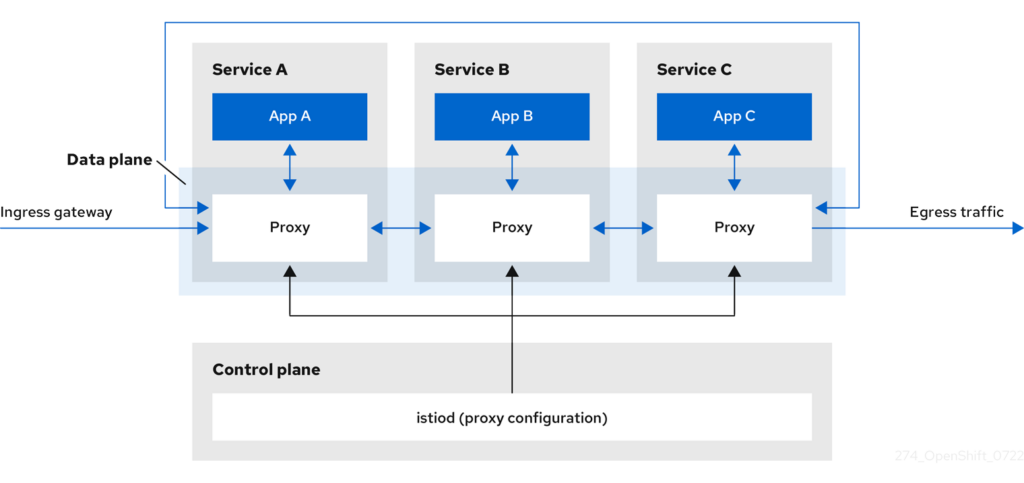
A service mesh typically consists of the following components:
- Istio control plane: This is the central component of the service mesh, responsible for managing and configuring the service mesh. It consists of a number of components, including the Mixer, Pilot, and Citadel, which work together to manage the service mesh.
- Sidecar proxies: A sidecar proxy is a lightweight, dedicated process that runs alongside each service in the mesh. It intercepts all inbound and outbound traffic to and from the service, and is responsible for routing traffic, enforcing policies, and collecting telemetry data.
- Gateways: A gateway is a component that sits at the edge of the service mesh and acts as an entry point for incoming and outgoing traffic. It is typically used to enable communication between the service mesh and external services or clients.
Here’s a high-level overview of how these components work together in a service mesh:
- A client sends a request to a service in the mesh.
- The request is intercepted by the sidecar proxy associated with the service.
- The sidecar proxy routes the request to the appropriate service, based on routing rules and policies configured in the Istio control plane.
- The service processes the request and sends a response back to the client via the sidecar proxy.
- The sidecar proxy sends the response back to the client.
Throughout this process, the Istio control plane is responsible for managing and configuring the service mesh, including routing traffic, enforcing policies, and collecting telemetry data. The gateways are responsible for enabling communication between the service mesh and external services or clients.
Red Hat OpenShift also provides a number of Istio add-ons to enhance the functionality of the service mesh. These include:
- Kiali: A visualization and management tool for Istio, providing a web-based user interface for viewing and managing the service mesh. It allows users to view traffic flow between services, view service metrics, and apply traffic policies.
- Grafana: An open source visualization and monitoring tool that can be used with Istio to visualize and monitor service mesh metrics.
- Jaeger: An open source distributed tracing tool that can be used with Istio to trace requests as they flow through the service mesh.
- Prometheus: An open source monitoring and alerting tool that can be used with Istio to monitor service mesh metrics and trigger alerts based on predefined thresholds.
Service mesh deployment models in OpenShift
Red Hat OpenShift supports the following service mesh deployment models.
Single-mesh deployment
In a single-mesh deployment, there is only one service mesh in the system, which is used to manage service-to-service communication for all applications in the system. This model is suitable for small or medium-sized systems where there is a single team responsible for managing the service mesh.
Single-tenant deployment
In a single-tenant deployment, there is only one tenant (i.e., a group of users or applications with a shared set of resources) in the system, and all applications in the tenant share a single service mesh. This model is suitable for environments where all applications are owned by a single team and there is a need for shared resources and shared policies.
Multi-tenant deployment
In a multi-tenant deployment, there are multiple tenants in the system, each with their own service mesh. This model is suitable for environments where different teams or organizations are responsible for different applications and need their own dedicated resources and policies.
Multi-mesh (federated) deployment
In a multi-mesh (federated) deployment, there are multiple service meshes in the system, which are connected and managed as a single entity. This model is suitable for large-scale systems where different teams or organizations are responsible for different parts of the system and need their own dedicated service meshes.
OpenShift Service Mesh use cases
Here are some use cases of OpenShift Service Mesh.
A/B testing
A/B testing is a technique for comparing two or more versions of a product or service to determine which performs better. With OpenShift Service Mesh, it is possible to perform A/B testing by routing a portion of traffic to a new version of a service and comparing its performance to the existing version.
Here’s an example of how A/B testing might be performed with OpenShift Service Mesh:
- Deploy the new version of the service to OpenShift, along with a sidecar proxy for each instance of the service.
- Use the Istio control plane to create a routing rule that directs a portion of traffic to the new version of the service. For example, you might route 50% of traffic to the new version and 50% to the existing version.
- Monitor the performance of the new version of the service using tools such as Kiali and Grafana.
- Compare the performance of the new version to the existing version to determine which performs better.
Canary deployment
Canary deployment is a technique for rolling out a new version of a service to a small percentage of users in order to test its stability and performance before rolling it out to the entire user base. With OpenShift Service Mesh, it is possible to perform canary deployments by routing a portion of traffic to a new version of a service and gradually increasing the percentage of traffic over time.
Rate limiting
Rate limiting is a technique for controlling the rate at which a service processes requests, in order to protect against resource exhaustion or malicious attacks. With OpenShift Service Mesh, it is possible to implement rate limiting by using the Istio control plane to apply rate limiting policies to incoming requests. For example:
kind: handler
metadata:
name: handler1
spec:
compiledAdapter: memquota
compiledTemplate: checknothing
---
apiVersion: config.istio.io/v1alpha2
kind: instance
metadata:
name: requestcountinstance
spec:
compiledTemplate: requestcount
dimensions:
source: source.name | "unknown"
target: target.name | "unknown"
---
apiVersion: config.istio.io/v1alpha2
kind: rule
metadata:
name: rule1
spec:
actions:
- handler: handler1.instance
instances:
- requestcountinstance
rate_limit:
unit: minute
requests_per_unit: 1000
match: source.name == "my-service"
In this example, the policy applies a rate limit of 1000 requests per minute to a service with the name “my-service”. It uses the memquota adapter and the requestcount template to implement the rate limit.
Access control
With OpenShift Service Mesh and Kubernetes, you can use NetworkPolicies and AuthorizationPolicies to control which pods are allowed to communicate with each other within the service mesh.
Here’s an example of a NetworkPolicy that allows pods with the label “app=frontend” to communicate with pods with the label “app=backend”:
kind: NetworkPolicy
metadata:
name: allow-frontend-to-backend
spec:
podSelector:
matchLabels:
app: frontend
ingress:
- from:
- podSelector:
matchLabels:
app: backend
Enabling Gloo Mesh with Red Hat OpenShift
Solo.io Gloo Mesh is the leading Istio Service Mesh for Enterprise deployments. Gloo Mesh can run on on-premises (private cloud) Red Hat OpenShift, or on public cloud Red Hat OpenShift (software or any of the managed cloud services such as Red Hat OpenShift on AWS, Azure Red Hat OpenShift).
Learn more about how Gloo Mesh can enable Istio Service Mesh on OpenShift.



%20(1).png)





















%20a%20Bad%20Idea.png)