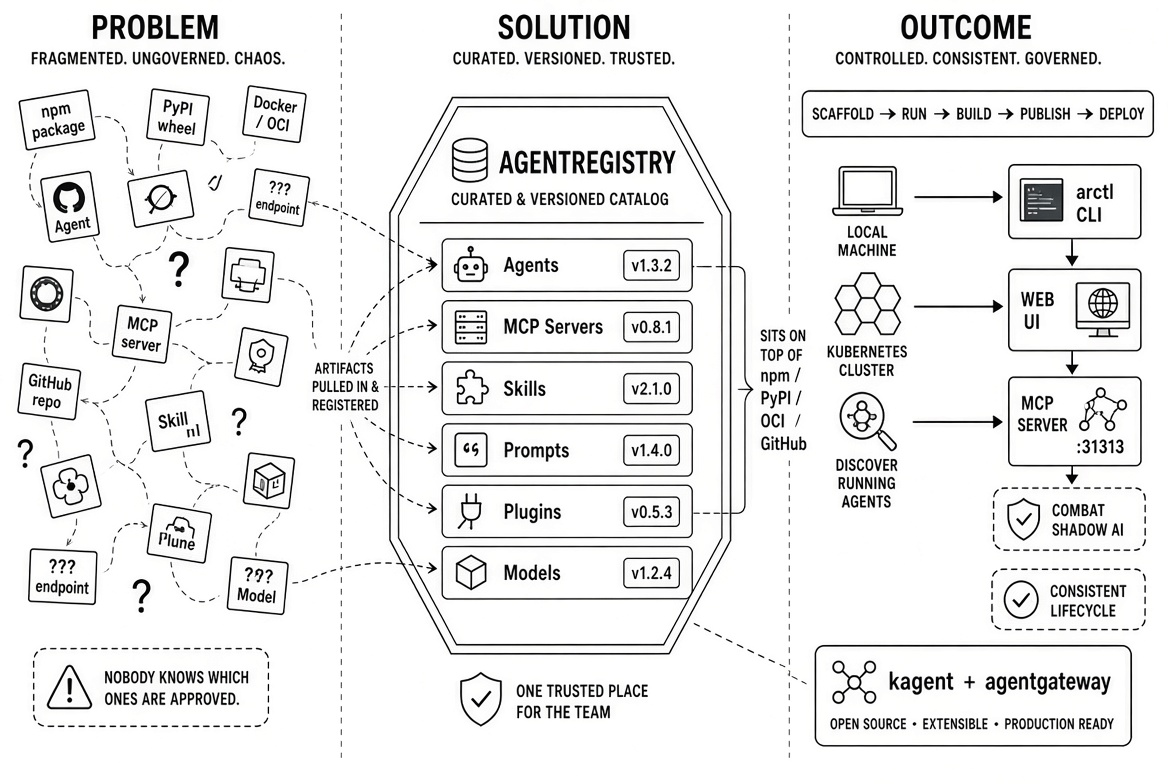
Agentregistry is an open source catalog and lifecycle tool focused on the higher-level building blocks of agentic systems: Agents, MCP servers, Skills, Prompts, Plugins, and Models.
A major issue today is that these building blocks live scattered across npm, PyPI, Docker/OCI registries, GitHub repositories, and random endpoints. Agentregistry gives you one curated, versioned, searchable place for the ones your team actually trusts and wants to use.
A higher-level kind of registry
Importantly, agentregistry does not try to replace the underlying binary artifact registries: it sits on top of them. You can pull MCP servers from npm (npx), PyPI (uvx), OCI images, or remote endpoints and register them into your own catalog. Then people on the team discover, version, and deploy from that catalog instead of hunting around and doing one-off setups.
Agentregistry is more like a specialized catalog plus a packaging and deployment layer for the AI agent ecosystem. It solves the "we have a bunch of MCP servers and agent definitions floating around and nobody knows which ones are approved or how to run them consistently" problem, rather than the "we need a place to put and serve our JARs and container images" problem.
Deploying and discovering artifacts
Agentregistry is opinionated, and its scope goes beyond just being a catalog. It can help teams deploy the artifacts to local machines or Kubernetes with little friction. The enterprise product extends these deployment capabilities by supporting additional target runtimes such as AWS Bedrock AgentCore. There is, in addition, the ability to discover agents that may be already running in various environments such as Azure AI Foundry, or Microsoft Copilot Studio.
Taken together, these capabilities provide a way for enterprises to combat shadow AI: find and catalog all agentic artifacts, then provide a way to deploy them in a coherent and controlled manner to a target platform.
Interfaces
Agentregistry comes with a CLI named arctl and a web UI to expose its operations. Interestingly, it also exposes its own operations as an MCP server (on port 31313 by default). So in addition to the CLI (arctl) and the web UI, you can talk to the registry itself through the Model Context Protocol. That means an agent (or Claude Code, Cursor, etc.) can call tools against the registry to, for example, search the catalog.
Lifecycle management
As an opinionated project, agentregistry also helps with the broader lifecycle of agentic artifacts. With the arctl CLI, we can scaffold a project for an agent, an MCP server, or a skill. We can then proceed to develop the artifact and run it locally on the developer's machine with the arctl run command, which leverages Docker Compose.
A single project can be composed of multiple artifacts, such as an agent using an MCP server and a particular skill.
arctl build will then assist with packaging and storing the artifacts to, say, a container registry.
The artifacts can then be published to the registry with the arctl apply command. Agentregistry borrows the Kubernetes concept of resource specifications, which it uses to describe agents, MCP servers, and other agentic artifact kinds.
A worked example: build, publish, and deploy an MCP server
This example utilizes version 0.4.0 of the agentregistry open source project.
Setup
Start with a Kubernetes cluster, then install agentregistry on Kubernetes:
helm upgrade --install agentregistry \
  oci://ghcr.io/agentregistry-dev/agentregistry/charts/agentregistry \
  --namespace agentregistry --create-namespace \
  --set config.jwtPrivateKey=$(openssl rand -hex 32) \
  --set image.tag=v0.4.0 \
  --set database.host=postgres-pgvector.agentregistry.svc.cluster.local \
  --set database.password=agentregistry \
  --set database.sslMode=disable
Verify that agentregistry is running:
kubectl get pods -n agentregistryWait for the deployment to finish rolling out:
kubectl rollout status -n agentregistry deploy/agentregistryExpose the agentregistry UI to a local port on the host
kubectl port-forward -n agentregistry svc/agentregistry 12121:12121Visit the UI in a browser. Nothing is yet published to the registry.
Most of the following steps involve the use of the arctl CLI. Install the agentregistry CLI by following these instructions.
The arctl CLI is configured by default to locate the server at its default address, localhost:12121. Should you need to configure a different endpoint, here is the command:
arctl configure --url http://localhost:12121Scaffold the project
Create and scaffold a project for an MCP server in Python:
arctl init mcp my-mcp --language python --framework fastmcpNavigate to the project directory:
cd my-mcpThe initial project scaffolds two simple tools: "echo" and "sum", similar to the example "server-everything" MCP server, which you can find under src/tools:
ls src/toolsFeel free to inspect and review the code.
Test it locally
The MCP server is configured for HTTP transport. Run it locally:
arctl run .In a separate terminal use an MCP client to communicate with it.
List tools:
mcp-inspector --cli http://localhost:3000/mcp \
  --transport http --method tools/list | jq .tools[].name
A tool call:
mcp-inspector --cli http://localhost:3000/mcp \
  --transport http --method tools/call \
  --tool-name example_sum \
  --tool-arg a=3 --tool-arg b=4
After asserting that the MCP server works, press Ctrl+C to terminate the server.
Build it
The build step packages the MCP server into an OCI container.
Normally we use the arctl build command, but this method does not support building multi-arch images.
Here I want a multi-arch image, so I step down to using the docker CLI directly:
docker buildx build --platform linux/amd64,linux/arm64 \
  --label io.modelcontextprotocol.server.name="my-mcp" \
  --tag localhost:5001/my-mcp:latest \
  --push .
The built image is pushed to a local docker registry listening on port 5001.
Publish it
The project scaffold provided a manifest file for the MCP server: mcp.yaml.
Edit mcp.yaml and set the identifier to match the image tag used above to build the image:
      origin:
        identifier: localhost:5001/my-mcp:latest
Push the artifact to the registry with the apply command:
arctl apply -f mcp.yamlVisit the registry UI and confirm that the artifact has been published (is listed).
We can do the same from the command line, with:
arctl get mcpsDeploy it
List the runtimes that agentregistry supports:
arctl get runtimesThe output:
NAME                 TYPE
kubernetes-default   Kubernetes
local                Local
Our target platform will be Kubernetes, which employs kagent and kmcp to reconcile Agent and MCPServer (and other) artifacts to running instances. In the case of an MCP server, agentregistry will apply a kmcp MCPServer resource to the cluster which will be reconciled into a Kubernetes deployment.
Deployment is driven by an agentregistry-specific "Deployment" type resource.
We can do this either from the UI or from the shell.
Start by installing kagent:
kagent install --profile minimalNext, create the deployment resource and apply it with arctl:
cat << EOF | arctl apply -f -
apiVersion: ar.dev/v1alpha1
kind: Deployment
metadata:
  name: my-mcp-server
spec:
  env:
    KAGENT_NAMESPACE: default
  runtimeRef:
    kind: Runtime
    name: kubernetes-default
  targetRef:
    kind: MCPServer
    name: my-mcp
    tag: latest
EOF
Inspect the "deployment":
arctl get deploymentsAnd:
arctl get deployments default/my-mcp-server -o yamlVerify that the server is running
On the cluster, we should have an MCPServer resource:
kubectl get mcpserversVerify that the kmcp MCPServer was reconciled to a Kubernetes deployment:
kubectl get deployCheck that the pod is running:
kubectl get podTest the deployed server
Port-forward the service:
kubectl port-forward service/my-mcp-my-mcp-server 3000Call it using an MCP client:
Call tools/list:
mcp-inspector --cli http://localhost:3000/mcp \
  --transport http --method tools/list | jq .tools[].name
Call the echo tool:
mcp-inspector --cli http://localhost:3000/mcp \
  --transport http --method tools/call \
  --tool-name example_echo --tool-arg message="hello world"
Verify that the MCPServer is listed in the kagent dashboard:
kagent dashboardNavigate to the View menu and select "MCP & Tools".
You should see the my-mcp MCP server listed, sporting the two tools example_echo and example_sum.
Summary
Agentregistry is an open source project with strong focus on MCP, agents, skills (and prompts, models, and plugins) as first-class artifacts. It sits on top of, and does not replace the various package registries where the binary artifacts reside. Beyond being a registry, it assists with discovering agentic artifacts in runtime environments and supports deploying published artifacts to target runtimes. Through the arctl CLI, the project also supports the end-to-end development, packaging, publication, and deployment of agentic artifacts.
Agentregistry fits naturally next to the open source projects kagent and agentgateway. Kagent serves as a target deployment platform for artifacts drawn from the registry. Agentgateway is used to federate deployed MCP servers behind a single endpoint, which clients such as Claude or VS Code can integrate with. The gateway can then be further configured with policies for access control, rate limiting, and so on.



%20(1).png)









%20a%20Bad%20Idea.png)