Every organization is struggling with AI agent and tooling sprawl. We at Solo.io are no different. Claude? Codex? Every week some new tool is being released. Grok Bot? OpenClaw 2.0 connected to Fireworks.ai? Tools, API keys, hundreds of providers and zero visibility. We built and are open-sourcing something we think can help.
Agentdesktop is an open-source, AI tool visibility and management layer. It complements MDM solutions with AI-specific discovery, tool configuration, and device/user identity for rich policy enforcement across a desktop fleet. Laptops and desktops are the first real production environment for AI agents and organizations need visibility and control designed for those tools, not just the underlying devices themselves. Before we see how it works, let’s look at what it can do:
Features of agentdesktop:
- AI tool/harness discovery and inventory: detect AI tools, MCP servers, skills and models
- Tool-native config management: centrally manage, version, and reconcile native settings for tools such as Claude Code, Codex, VS Code, and others
- Harness-native sandbox policy: define filesystem and network restrictions once, then translate them into each supported harness’s native sandbox configuration
- User and device identity: Device key/certs, bound to user identity/SSO, bound to AI agents
- Runtime credentials: short lived, tool-specific credentials; provider API keys/sensitive credentials can be injected transparently at the gateway instead of being distributed to workstations
- Identity-aware gateway integration: Configure AI tools to route through organizational LLM gateway with credentials containing the enrolled user, device, and an allowed client label giving the gateway identity context for routing, policy, and logging.
- Observability: collect session and tool-use activity and attach user, device, and client identity to gateway telemetry for model and token-usage attribution
- Incremental adoption: start with a standalone version, upgrade to controller-managed mode
How is this different from MDM?
MDM remains the right layer for enrolling devices, deploying software, and enforcing OS-level posture. It can deploy scripts and configuration profiles for individual tools, but supporting AI-native tools requires harness-aware logic: locating each tool across multiple operating systems, finding and parsing its specific configuration format (JSON, JSONC, or TOML), inventorying MCP servers and skills without collecting secrets, safely merging managed settings, installing credential helpers, and reporting whether everything was applied successfully. Sandboxing is one example: an intent such as “allow agent-executed commands to write to these directories, deny access to ~/.ssh, and allow network access only to these domains” must be translated into each harness’s native settings. The team must maintain and update these bespoke scripts whenever an AI tool changes its paths, schemas, or behavior. What begins as a “simple, quick script” quickly becomes a bespoke integration product with a substantial maintenance burden. Agentdesktop packages that translation and reconciliation while MDM continues to enforce the controls beneath it.
And none of the previous MDM configuration really touches the runtime credential sprawl problem. Each tool and provider tends to bring its own credential model, leaving long-lived API keys and OAuth tokens scattered across environment variables, configuration files, and operating-systems. Those bearer credentials are difficult to inventory, attribute, rotate, and revoke, and a leaked credential can remain useful independently of the user or device to which it was originally issued. Agentdesktop instead gives tools short-lived credentials carrying the enrolled user, device, and an allowed client label, while provider API keys remain at the gateway and transparently injecrted rather than being distributed to workstations.
How agentdesktop works
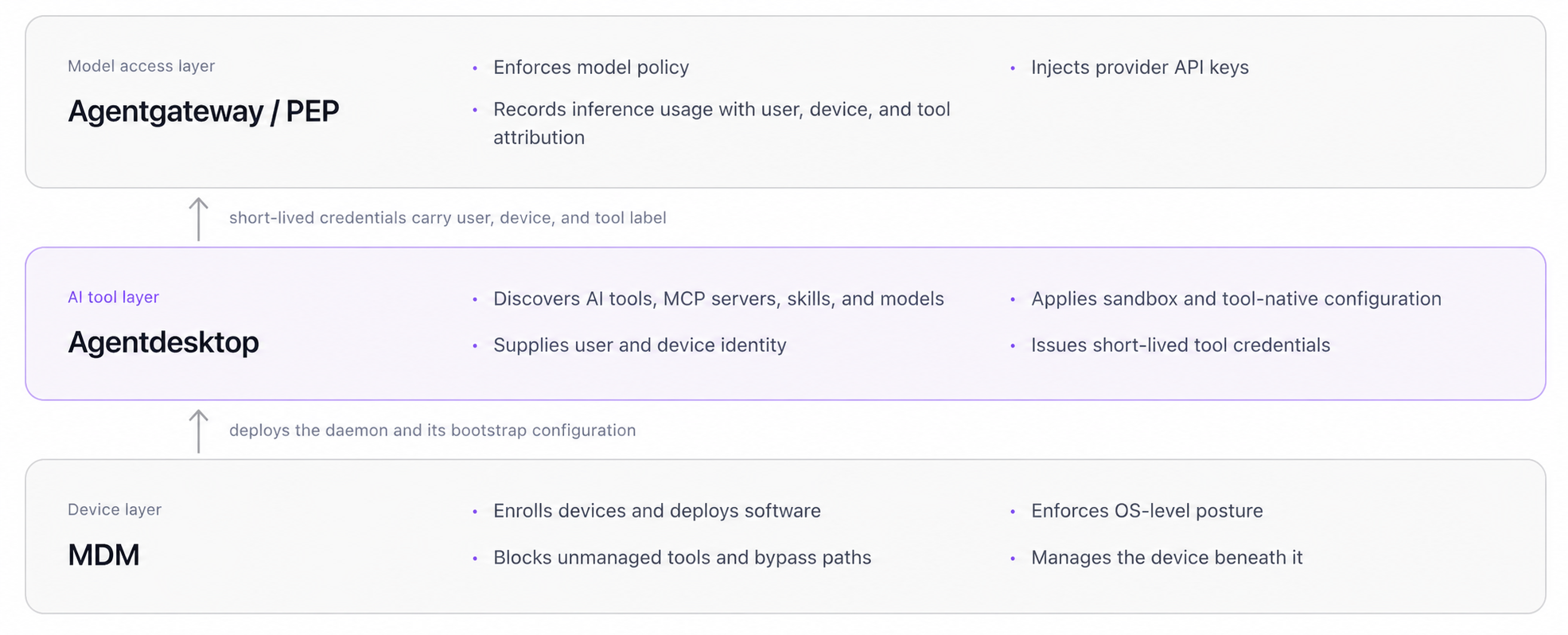
MDM remains the device layer described above. Agentdesktop builds on that foundation and the layers work together: MDM deploys the local agentdesktop daemon and its bootstrap configuration. Agentdesktop discovers and configures AI tools, MCP servers, skills, and models, applies sandbox policy through their native configuration, then supplies short-lived credentials carrying user, device, and tool context to agentgateway.
Teams do not need to adopt the entire architecture at once. Agentdesktop supports an incremental path: begin on a single workstation in standalone mode, then introduce the controller when centralized inventory, configuration, identity, and reporting are needed across a fleet. The same endpoint daemon and tool-native configuration model are used in both modes.
Standalone mode
In standalone mode, agentdesktop reads configuration from a local YAML file, discovers supported AI tools, and previews or reconciles their native configuration. That local configuration can express sandbox policy and connectivity to a compatible LLM gateway as well as any tool-specific configuration. The daemon orchestrates an SSO login to the enterprise identity provider allowing future calls from the AI harness to carry the user’s enterprise identity.
Standalone mode provides a low-friction way to evaluate agentdesktop while applying local execution boundaries and user-aware gateway policy.
sandbox:
  network:
    allowedDomains:
    - github.com
  filesystem:
    writable:
    - /var/cache/company
    denied:
    - ~/.ssh

llmGateway:
  url: https://llm-gateway.example.com
  authentication:
    type: SSO
    issuer: https://login.example.com
    clientId: agentdesktop
    redirectUri: http://127.0.0.1:51327/callback
    scopes: [openid, offline_access]

programs:
  claudeCode:
    permissions:
      defaultMode: plan
    companyAnnouncements:
    - Managed by Agentdesktop

  codex: {}
The sandbox and llmGateway blocks express two complementary policies. The sandbox controls what agent-executed commands can access locally; the gateway controls which remote services the harness can reach and under what identity. Agentdesktop translates that common intent into the native configuration expected by each supported harness.
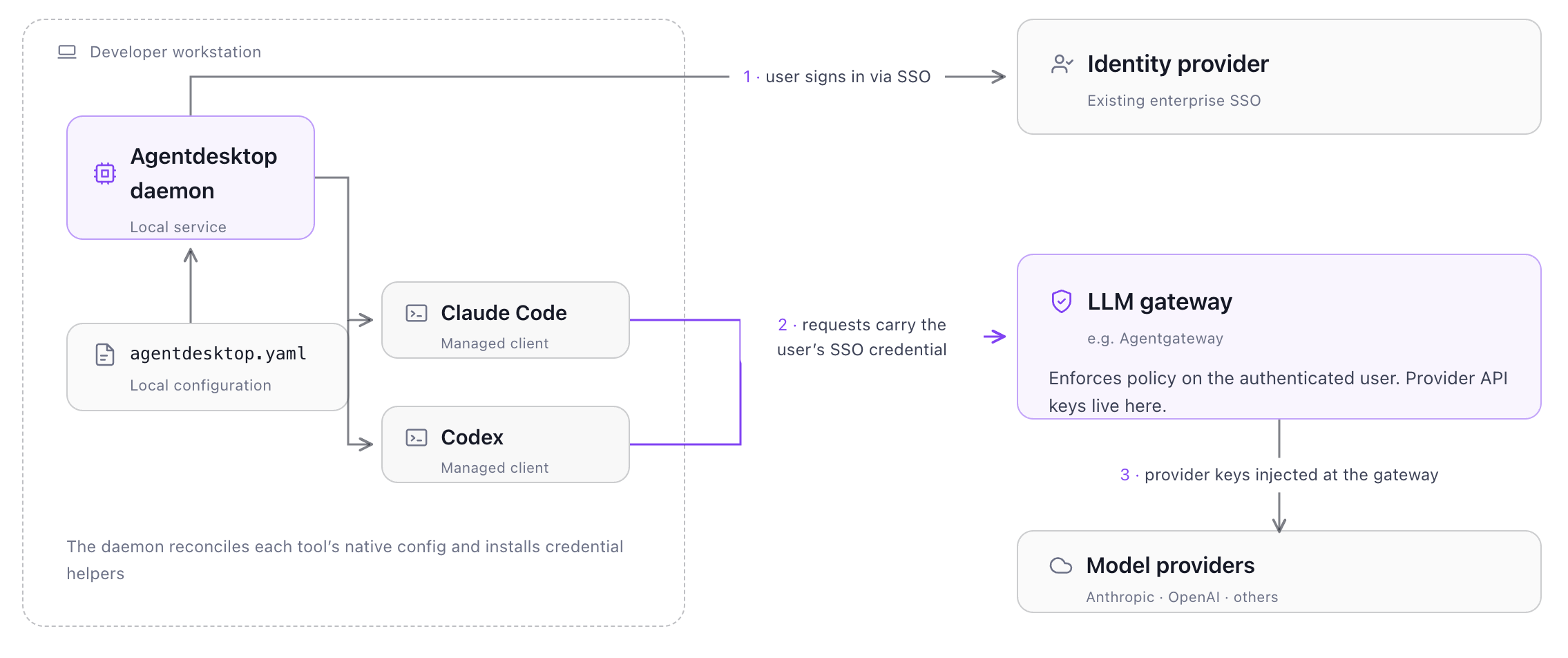
When agentdesktop starts, it opens the browser for user SSO authentication, reconciles the tools’ native configuration, and installs credential-helpers. When a tool needs gateway access, the daemon supplies the user’s current SSO credential. With this configuration, LLM requests from the managed Claude Code and Codex (and other) clients are sent through agentgateway and authenticated using the user’s identity. The actual provider tokens/keys are injected by the gateway. Clients don’t see them directly. For more detailed identity (ie, user+device+agent), see the next section.
Controller-managed mode
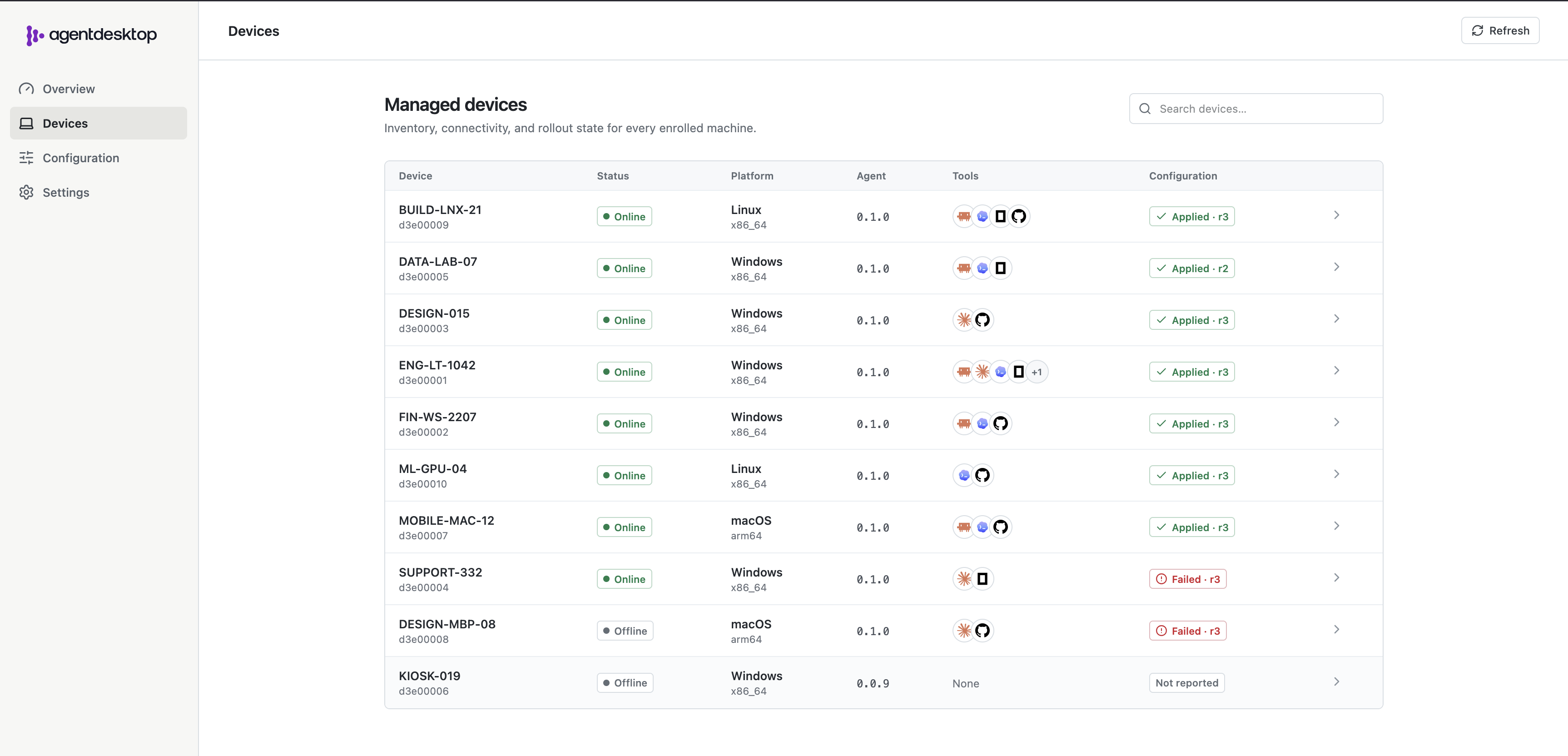
Controller-managed mode introduces a central agentdesktop controller for fleet inventory, versioned configuration, user and device enrollment, and gateway credential issuance. It gives platform teams a fleet-wide view of enrolled devices, authenticated users, applied configuration revisions, installed AI tools, MCP servers, skills, and models.
MDM can deploy the same endpoint daemon used in standalone mode, along with a small bootstrap configuration that tells it where to find and how to trust the controller:
controller:
  address: https://agentdesktop.example.com
  caCertificatePath: /etc/agentdesktop/controller-ca.pem
When the daemon first connects, it generates a private device key and certificate signing request (CSR) locally. The private key never leaves the workstation (and is stored in the OS native credential manager). Agentdesktop then opens the organization’s SSO login flow so the user can authenticate through the existing enterrise identity provider.
The controller validates the user’s SSO identity and the device’s signed certificate request, assigns the device a unique ID, and returns a client certificate containing that identity. From then on, protected controller operations require both:
- The device certificate and locally held private key for mutual TLS.
- A valid access token for the same user who enrolled the device.
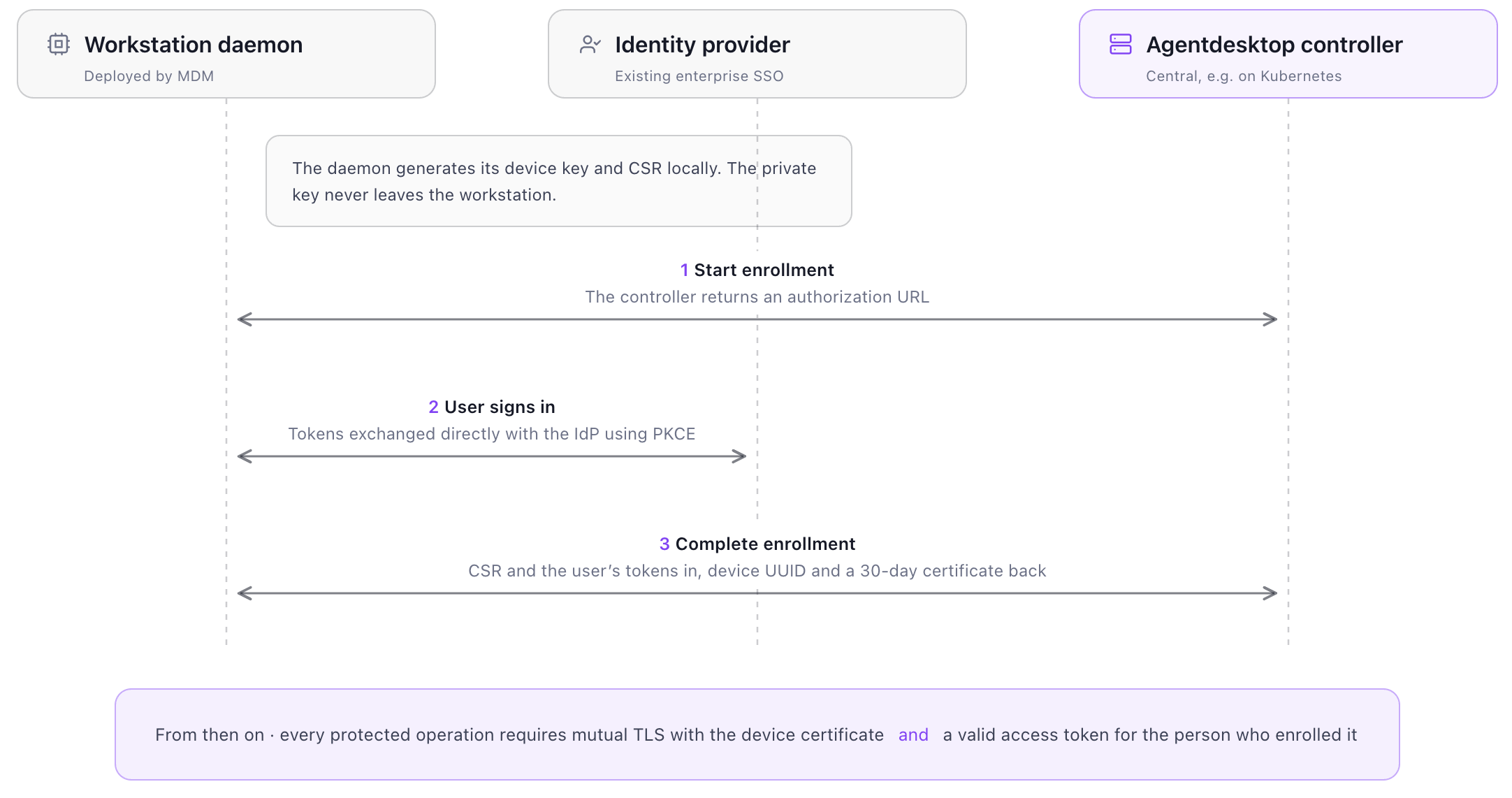
This binds the controller session to an enrolled device and an authenticated user. The daemon can then report its AI-tool inventory; receive versioned sandbox, gateway, and tool-specific policy; reconcile that configuration into tool-native files; and report whether the revision was successfully applied.
Short-lived AI tool credentials
The controller-delivered configuration can connect supported tools to the organization’s LLM gateway:
llmGateway:
  url: https://llm-gateway.example.com
  authentication:
    type: controllerJwt
    audience: agentgateway
    allowedClientIds:
    - claude-code
    - codex
    - opencode

programs:
  claudeCode: {}
  codex: {}
  openCode:
    model: company-model
    models:
      company-model:
        name: Company model
Agentdesktop writes each tool’s native gateway and credential-helper configuration. When Claude Code, Codex, or OpenCode needs to call the gateway, its helper asks the local agentdesktop daemon for a credential using an allowed client label such as claude-code or codex.
The daemon authenticates to the controller with the device certificate and the user’s SSO credential. After verifying both identities and checking the requested label against the allowlist, the controller issues a short-lived JWT containing:
sub: the enrolled user’s SSO subject.act.sub: the controller-assigned device ID.client_id: the allowed client label requested through the local helper.aud,iss,iat, andexp: the intended gateway, issuer, and validity window.- Selected identity-provider claims, such as email, when available.
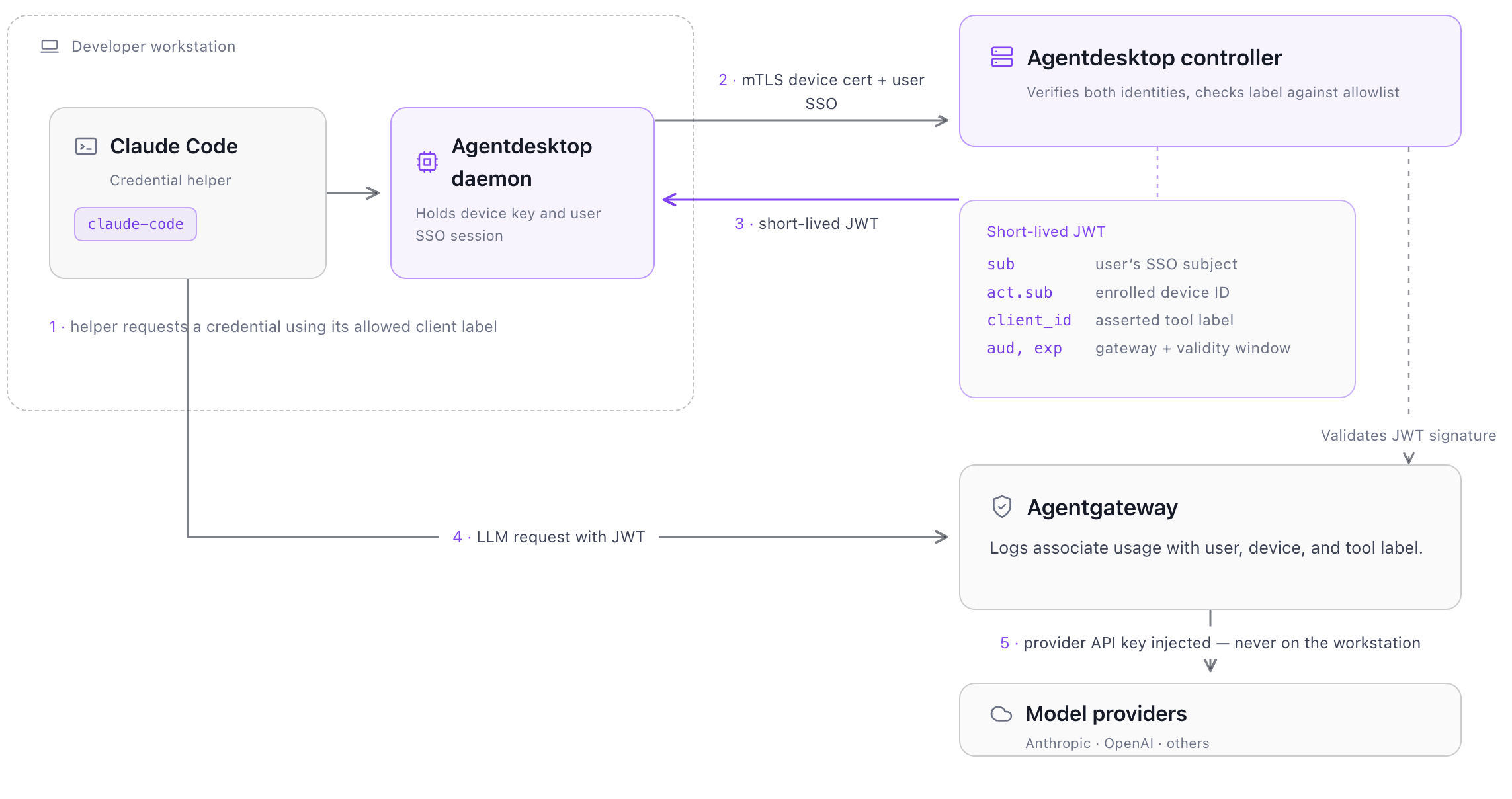
At the moment (to be improved in future), the client_id is an asserted client label, not an attested process identity. Agentdesktop’s generated helper associates the expected label with each managed tool, but another process with access to the same local user boundary could request a different allowed label. It is therefore useful for routing, policy, logging, and attribution, not as cryptographic proof of the executable. Future versions will introduce SPIFFE SVIDs for identity.
Agentgateway validates the JWT using the controller’s public signing keys before accepting the request. The resulting gateway logs can associate inference activity with the authenticated user, enrolled device, and asserted tool label, while the model-provider API key remains at the gateway.
Agentdesktop establishes this managed path, but each layer retains a distinct responsibility. MDM manages the underlying device and can prevent alternate access paths; agentdesktop discovers and configures supported AI tools and supplies user-and-device identity; agentgateway enforces model policy, injects provider credentials, and records inference usage. MCP connections are inventoried but are not automatically proxied through agentgateway.
See agentdesktop in action
The fastest way to understand agentdesktop is to watch it work:
From evaluation to production
Standalone mode provides a low-friction way to evaluate agentdesktop on one workstation. In a production deployment, MDM can install and configure the endpoint daemon, while the controller runs centrally, such as on Kubernetes, and integrates with the organization’s existing identity provider, PKI, database, and LLM gateway.
Agentdesktop is open source under the Apache 2.0 license. Organizations can inspect what the endpoint daemon collects, audit its identity and credential boundaries, extend integrations as AI tools evolve, and use their existing infrastructure rather than adopting a vertically bundled platform.
To get started, install agentdesktop and run standalone mode with --dry-run to preview the sandbox, gateway, and tool-native configuration it would apply. Add the controller when centralized inventory, identity, configuration, and reporting are needed across the fleet.
Get involved
- Join the community on discord
- Learn more on GitHub
- Visit the agentdesktop site


%20(1).png)







%20a%20Bad%20Idea.png)