As new technology grows, progresses, and gets adopted, the primary goal within the industry as a whole is to get it working. That way, engineers and leadership teams alike can begin testing the solution, vetting it, and ensuring that it work as expected.
The problem is that typically, security takes a back seat. In a world where a countless amount of data and credentials are being fed to a platform (your LLM provider) and traffic is traversing from one location to another (Agent to MCP/LLM/Agent), the industry as a whole cannot afford to put security on the back burner.
In this blog post, you’ll learn from a theoretical and hands-on perspective how to implement an end-to-end security posture with kagent and agentgateway.
Why Agentic Security
There’s a good chance that just about every conversation engineering teams are currently in about Agentic AI have something to do with security. Even if it’s the DevOps, Platform, or MLOps teams, someone, somewhere, brings up what security will look like. Within various blogs, videos, forum posts, and anything else that falls into the “content” category, security is always talked about within AI conversations as well.
AI contains perhaps the biggest security risks in technology right now. The reason why is because everyone, without maybe even thinking about it, is feeding information into LLM providers. Those LLMs are then being trained on that data. A great example of this is a code base. If you’re working on a private repo for your organization, do you have an Agent open helping you write and modify code? Do you have a values.env file with environment variables that the Agent can read? Taking it a step further, who’s authenticating to these LLM providers via Agents and do you have any visibility into how the Agent is traversing through the network to reach another Agent, LLM, or MCP Server?
Everything, without exception, around AI in today’s world is about 1). Data 2) Packets flowing through a network, and those two things need to be secured.
OIDC Provider AuthN/Z
The lowest barrier to entry from a security perspective is typically going to be utilizing an OIDC provider to configure who can access an Agent or an MCP Server (authenticate) and what they can do once they have access (authorization/RBAC/permissions) because organizations usually already have an OIDC provider in place.
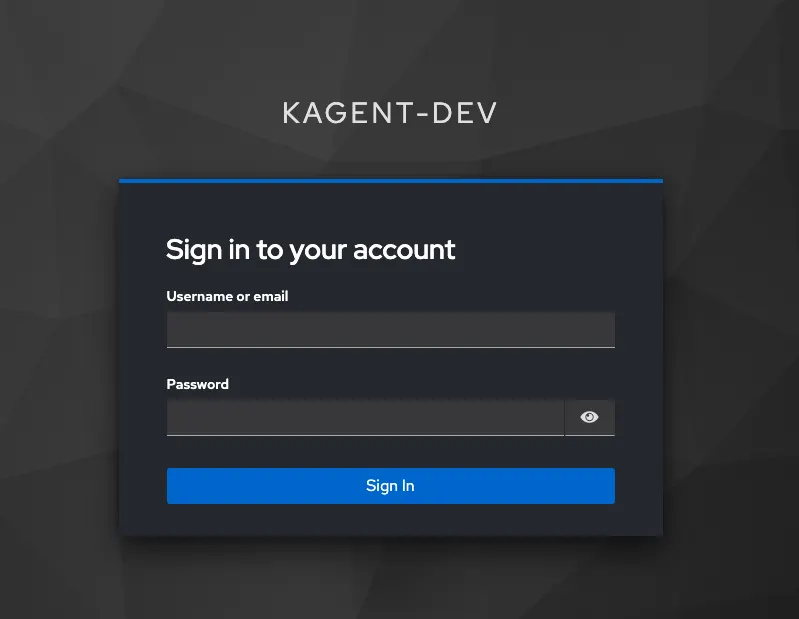
With kagent, you can use any OIDC provider from keycloak to Entra to Okta because kagent follows the OpenID Connect (OIDC) protocol. This allows you to use your current OIDC provider to set up authentication and authorization for all users, groups, and service accounts.
💡oAuth is also supported. You will see that in the upcoming section on MCP security.
As an example, let’s say you set up groups within your OIDC provider that specify admins, readers, and writers. This means that there is one group that can has “full blown sudo access”, one that can create resources, and another that can only read (get/list/watch/etc.).
    {
      "roleMapper": "has(claims.Groups) ? claims.Groups.transformList(i, v, v in rolesMap, rolesMap[v]) : (has(claims.groups) ? claims.groups.transformList(i, v, v in rolesMap, rolesMap[v]) : [])",
      "roleMappings": {
        "admins": "global.Admin",
        "readers": "global.Reader",
        "writers": "global.Writer"
      }
    }
The permissions are attached to users/groups/service accounts logging into kagent and then can traverse from your OIDC provider to kagent. This means that if a user that is in the reader group logs into kagent, they won’t have the permissions to delete or create any resources as you can see in the screenshot below.
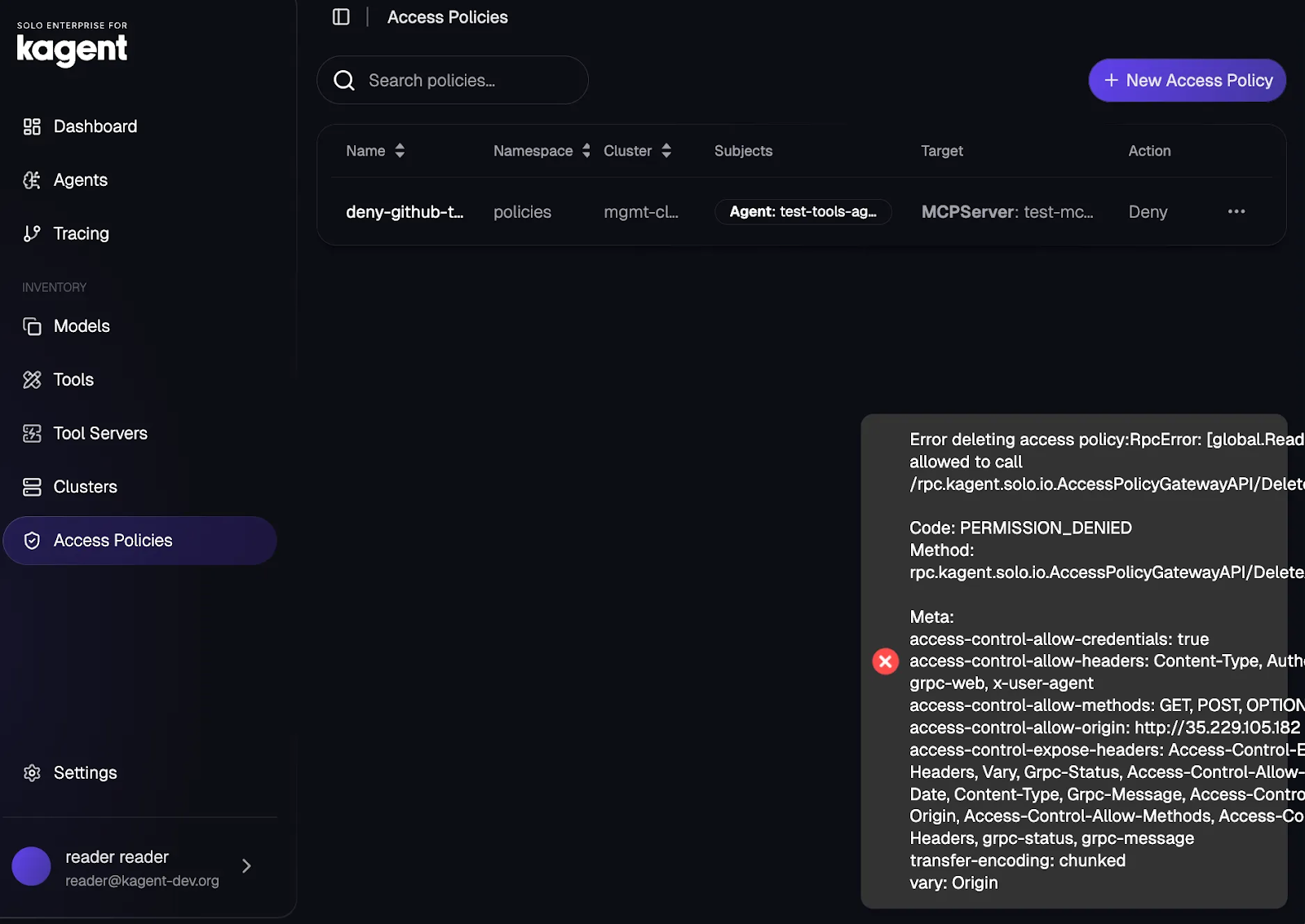
Using an OIDC provider to ensure proper access and permissions is key to the start of a successful security posture within an Agentic environment.
Next, let’s take a look at how to secure access to resources like Agents and MCP Servers.
Access Policies
As mentioned in the opening of this blog post, the majority of organizations are thinking about how to get Agents, LLMs and MCP Servers to work for what they want to do for a particular task that needs to be solved. That “task” can potentially utilize multiple Agents, MCP Server tools, MCP Servers, and LLM providers. That means there are countless attack surfaces, and even performance constraints (e.g - no Agent should have more than 18 tools attached to it. If there are more than 18, there’s a great chance for hallucinations). Because MCP Server security is top of mind for everyone, let’s use MCP as the example for Access Policies in this section.
The first step is to ensure that the Namespace used to deploy the MCP Server is labeled with Ambient.
kubectl label namespaces policies istio.io/dataplane-mode=ambient💡Access Policies work at L7 of the OSI Model, which means a Waypoint is needed to ensure that traffic can properly flow at the Application layer (l7). This is why Ambient is so important within any Agentic environment and where Agent Mesh ultimately comes into play.
Next, you can create an MCP Server to test Access Policies against. In this case, the GitHub MCP Server is used.
kubectl apply -f - <<EOF
apiVersion: kagent.dev/v1alpha1
kind: MCPServer
metadata:
  name: test-mcp-server
  namespace: policies
  labels:
    kagent.solo.io/waypoint: "true"
spec:
  deployment:
    image: mcp/everything
    port: 3000
    cmd: npx
    args:
      - "-y"
      - "@modelcontextprotocol/server-github"
  transportType: stdio
EOF
Create a secret for your LLM provider (in this case, Anthropic is used as an example) and a Model Config so the Agent has an LLM on the backend to use.
export ANTHROPIC_API_KEY=

kubectl create secret generic kagent-anthropic --from-literal=ANTHROPIC_API_KEY=$ANTHROPIC_API_KEY -n policies

kubectl apply -f - <<EOF
apiVersion: kagent.dev/v1alpha2
kind: ModelConfig
metadata:
  name: anthropic-model-config
  namespace: policies
spec:
  apiKeySecret: kagent-anthropic
  apiKeySecretKey: ANTHROPIC_API_KEY
  model: claude-sonnet-4-20250514
  provider: Anthropic
  anthropic: {}
EOF
Within the Agent configuration itself, you can specify the Model Config and the MCP Server. Notice how within the mcpServer section, four tools are specified to be used by this Agent.
kubectl apply -f - <<EOF
apiVersion: kagent.dev/v1alpha2
kind: Agent
metadata:
  name: test-tools-agent
  namespace: policies
spec:
  description: This agent can use a single tool to expand it's Kubernetes knowledge for troubleshooting and deployment
  type: Declarative
  declarative:
    modelConfig: anthropic-model-config
    systemMessage: |-
      You're a friendly and helpful agent that uses the Kubernetes tool to help troubleshooting and deploy environments

      # Instructions

      - If user question is unclear, ask for clarification before running any tools
      - Always be helpful and friendly
      - If you don't know how to answer the question DO NOT make things up
        respond with "Sorry, I don't know how to answer that" and ask the user to further clarify the question

      # Response format
      - ALWAYS format your response as Markdown
      - Your response will include a summary of actions you took and an explanation of the result
    tools:
    - type: McpServer
      mcpServer:
        name: test-mcp-server
        kind: MCPServer
        toolNames:
        - search_repositories
        - search_issues
        - search_code
        - search_users
EOF
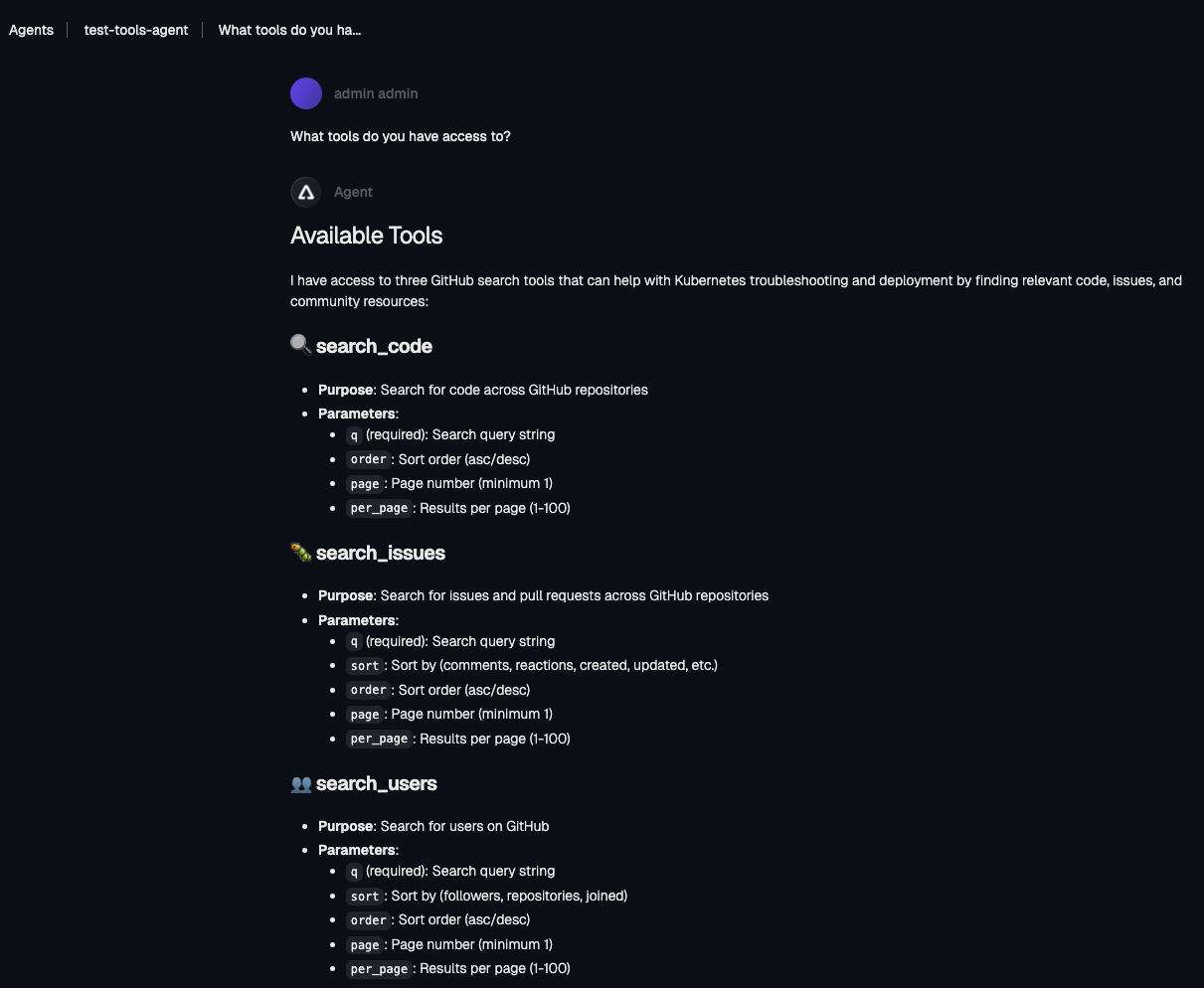
You can then test an Access Policies by specifying that the search_repositories tool is not allowed to be used by this Agent (search_respositories is one of the tools specified in the Agent creation).
kubectl apply -f - <<EOF
apiVersion: policy.kagent-enterprise.solo.io/v1alpha1
kind: AccessPolicy
metadata:
  name: deny-github-tool-server
  namespace: policies
spec:
  from:
    subjects:
    - kind: Agent
      name: test-tools-agent
      namespace: policies
  targetRef:
    kind: MCPServer
    name: test-mcp-server
    tools: ["search_repositories"]
  action: DENY
EOF
You’re now able to see that after applying the Access Policy, the search_repositories tool is not allowed to be used and it doesn’t even show up in the list of tools available.
Access Policies In The UI
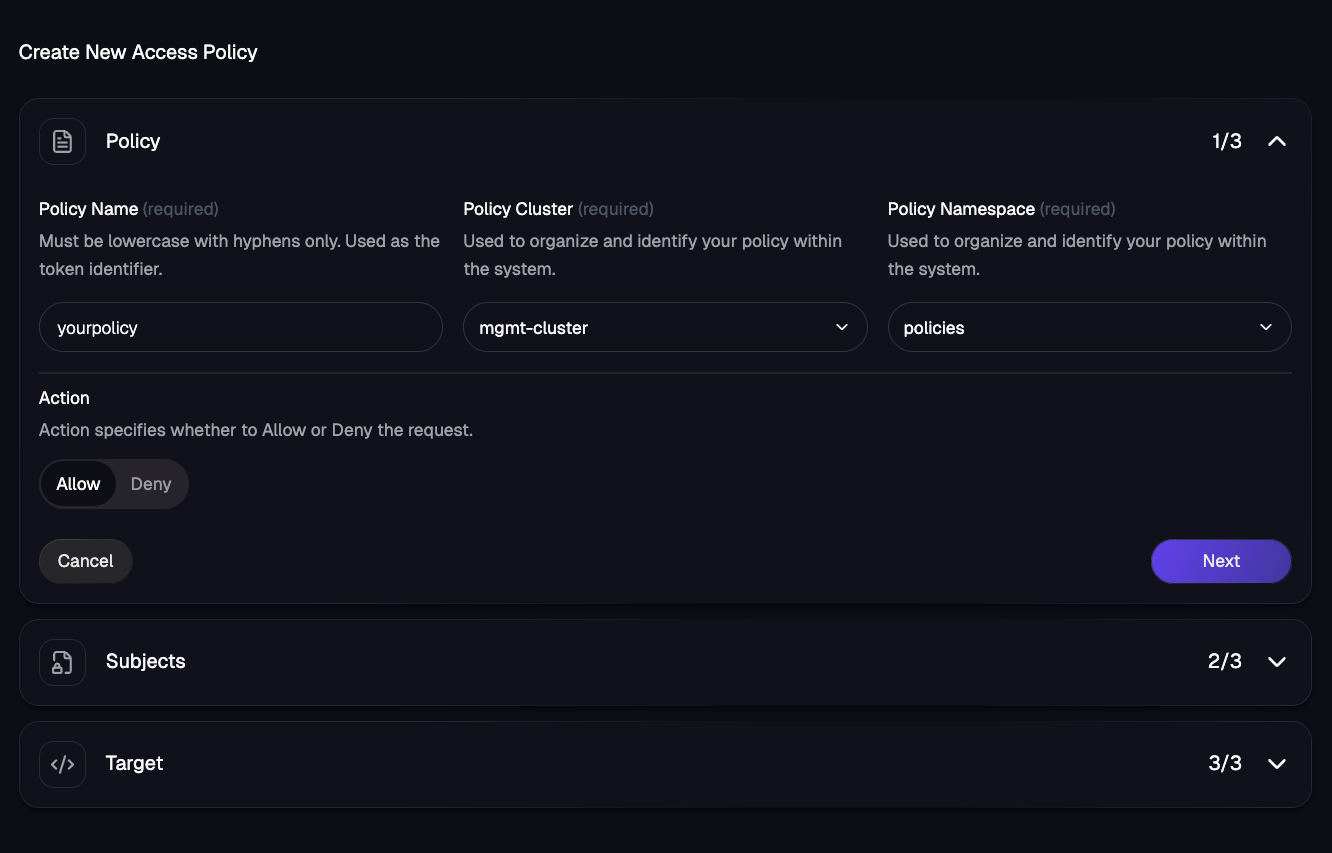
Within the kagent UI, you can create Access Policies as well if you prefer a graphical approach over a declarative approach.
The first step is to specify the policy name, the cluster that the policy will exist in, and the Namespace where the policy exists.
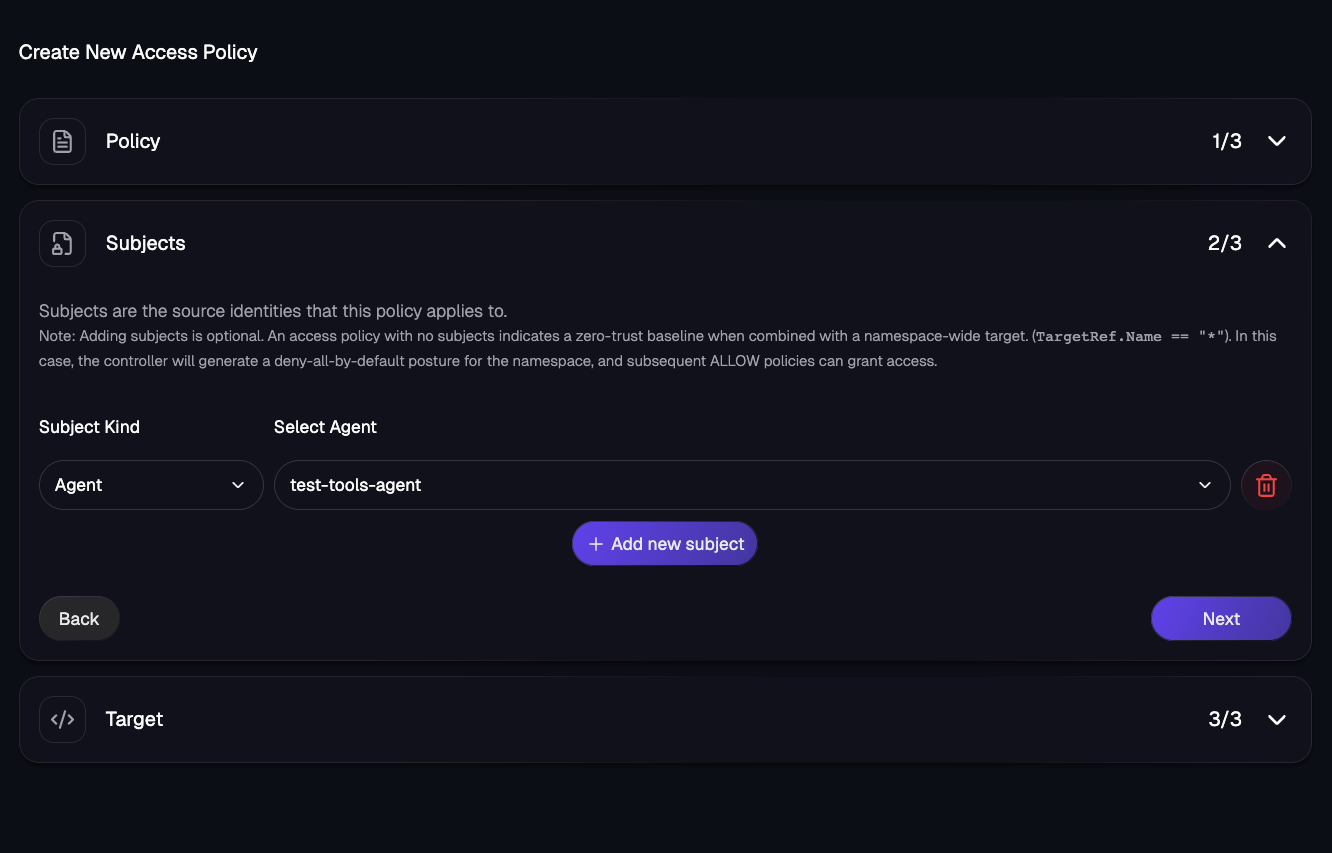
You then specify the source subject and the target (the source being an Agent and the target being an MCP Server like the declarative example).
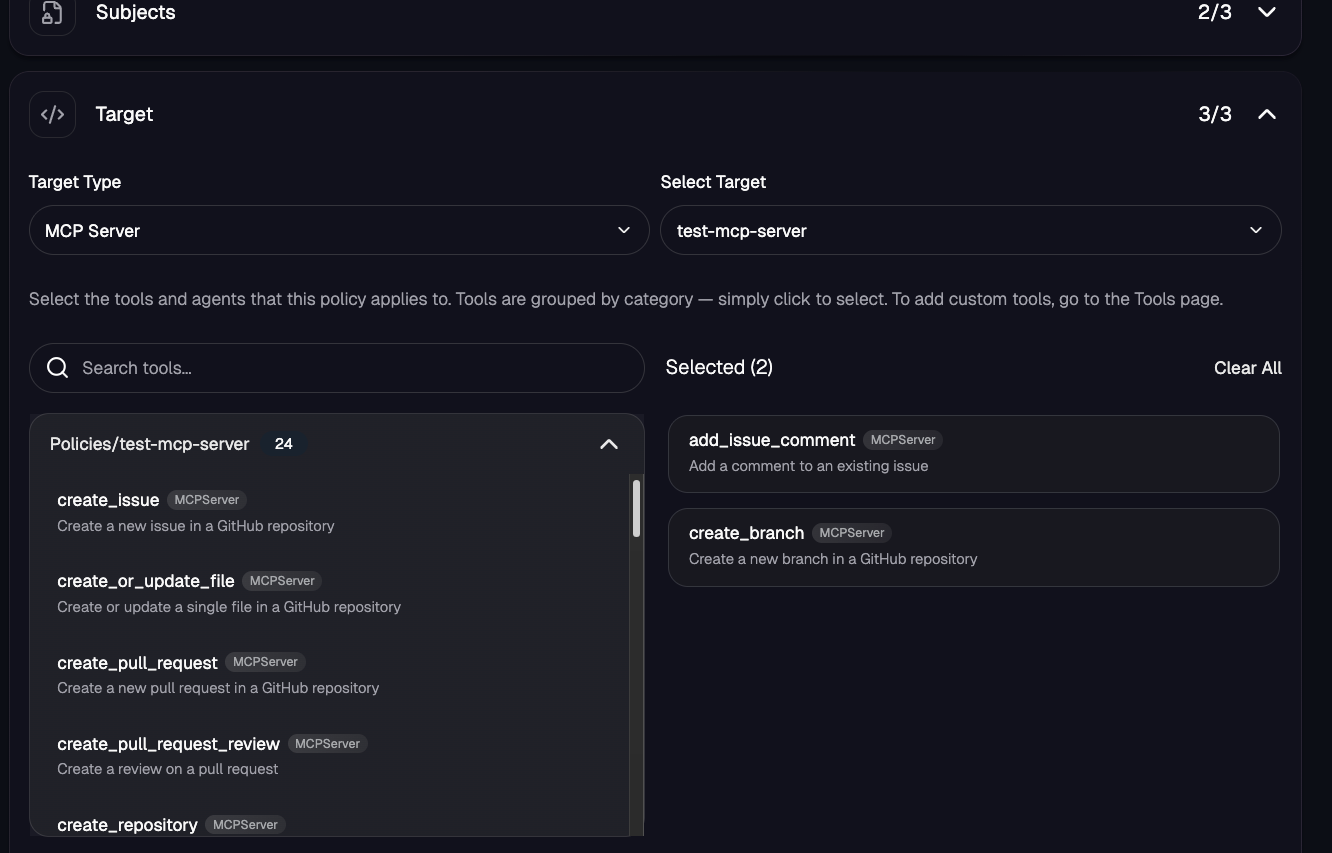
Access Policies allow you to secure access across Agents, user groups, and MCP Servers to ensure that who/what is accessing a specified target should be doing so.
Prompt Guards
With any LLM request, whether it’s to ask the Agent to help troubleshoot a Kubernetes issue or answer a specific question about an environment, you’ll want to ensure that the prompts and words/phrases within a prompt are allowed. Afterall, the last thing any organization wants is an Agent having the ability to go and destroy all Kubernetes clusters.
Within an Enterprise Agentgateway Policy, you can secure the traffic going through your Gateway from any Agent. As an example, the policy below blocks any traffic with the regex/phrasing of “credit card”.
kubectl apply -f - <<EOF
apiVersion: enterpriseagentgateway.solo.io/v1alpha1
kind: EnterpriseAgentgatewayPolicy
metadata:
  name: credit-guard-prompt-guard
  namespace: agentgateway-system
  labels:
    app: agentgateway-route
spec:
  targetRefs:
  - group: gateway.networking.k8s.io
    kind: HTTPRoute
    name: claude
  backend:
    ai:
      promptGuard:
        request:
        - response:
            message: "Rejected due to inappropriate content"
          regex:
            action: Reject
            matches:
            - "credit card"
EOF
If you try to, for example, curl the Gateway/route that this prompt guard is set on, you should see a 403 error.
curl "$INGRESS_GW_ADDRESS:8080/anthropic" -v -H content-type:application/json -H "anthropic-version: 2023-06-01" -d '{
  "messages": [
    {
      "role": "system",
      "content": "You are a skilled cloud-native network engineer."
    },
    {
      "role": "user",
      "content": "What is a credit card?"
    }
  ]
}' | jq
Example output below of the 403 that you’ll see when testing.
* upload completely sent off: 204 bytes
< HTTP/1.1 403 Forbidden
< content-length: 37
< date: Mon, 19 Jan 2026 12:56:34 GMT
MCP oAuth
The running joke within the industry is “The S in MCP stands for security” and the reason why is because out of the box, there’s no security configurations that exist in MCP aside from a few implementations for general AuthN/Z with API keys and Personal Access tokens (PAT). In terms of true, granular control around authentication and authorization/RBAC/permissions, it doesn’t exist in the general sense.
oAuth allows you to grant third-party app access for another service. An example of oAuth is if you use your Google account to sign into a tool you’re using. Within agentgateway, you can use oAuth for authentication to MCP Servers.
Within an Enterprise Agentgateway Policy, you can specify your oAuth provider (in this example, Auth0) is used to ensure that when you attempt to authenticate to an MCP Server in whatever way, whether it’s from an Agent or an MCP client, authentication will be necessary to access any MCP Server and MCP Server tool that’s used within your environment. You’ll also be able to specify what tools require authentication and which ones don’t.
apiVersion: enterpriseagentgateway.solo.io/v1alpha1
kind: EnterpriseAgentgatewayPolicy
metadata:
  name: mcp-oauth-policy
  namespace: agentgateway-system
  labels:
    app: mcp-gateway
spec:
  targetRefs:
    - group: gateway.networking.k8s.io
      kind: Gateway
      name: mcp-gateway
  traffic:
    cors:
      allowOrigins:
        - "*"
      allowMethods:
        - GET
        - POST
        - OPTIONS
      allowHeaders:
        - "*"
      exposeHeaders:
        - "*"
      maxAge: 86400
    jwtAuthentication:
      providers:
        - issuer: "<https://$>{AUTH0_DOMAIN}/"
          audiences:
            - "${API_IDENTIFIER}"
          jwks:
            remote:
              jwksPath: ".well-known/jwks.json"
              backendRef:
                group: ""
                kind: Service
                name: auth0-jwks
                namespace: agentgateway-system
                port: 8443
  backend:
    mcp:
      authorization:
        action: Allow
        policy:
          matchExpressions:
            # Public tool - any authenticated user can call
            - 'mcp.tool.name == "echo"'

            # Any authenticated user can get their own info
            - 'mcp.tool.name == "get_user_info"'

            # Requires files:read scope
            # Auth0 scopes are in the 'scope' claim as a space-separated string
            - 'mcp.tool.name == "list_files" && jwt.scope.contains("files:read")'

            # Requires files:delete scope AND admin role (custom claim)
            # Auth0 custom claims must be namespaced (e.g., <https://mcp-demo/roles>)
            # Access namespaced claims using bracket notation: jwt["claim-name"]
            - 'mcp.tool.name == "delete_file" && jwt.scope.contains("files:delete") && jwt["<https://mcp-demo/roles"].contains("admin>")'

            # Requires admin role only (custom claim)
            - 'mcp.tool.name == "system_status" && jwt["<https://mcp-demo/roles"].contains("admin>")'
If you try to use an MCP Server tool that requires authentication without providing your bearer token, it won’t work.

However, if you test out connecting to the MCP Server and using a tool within, for example, a client like MCP Inspector, it will work if you provide a proper token for authentication.
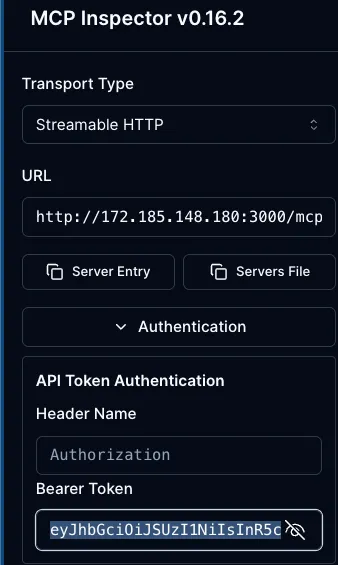
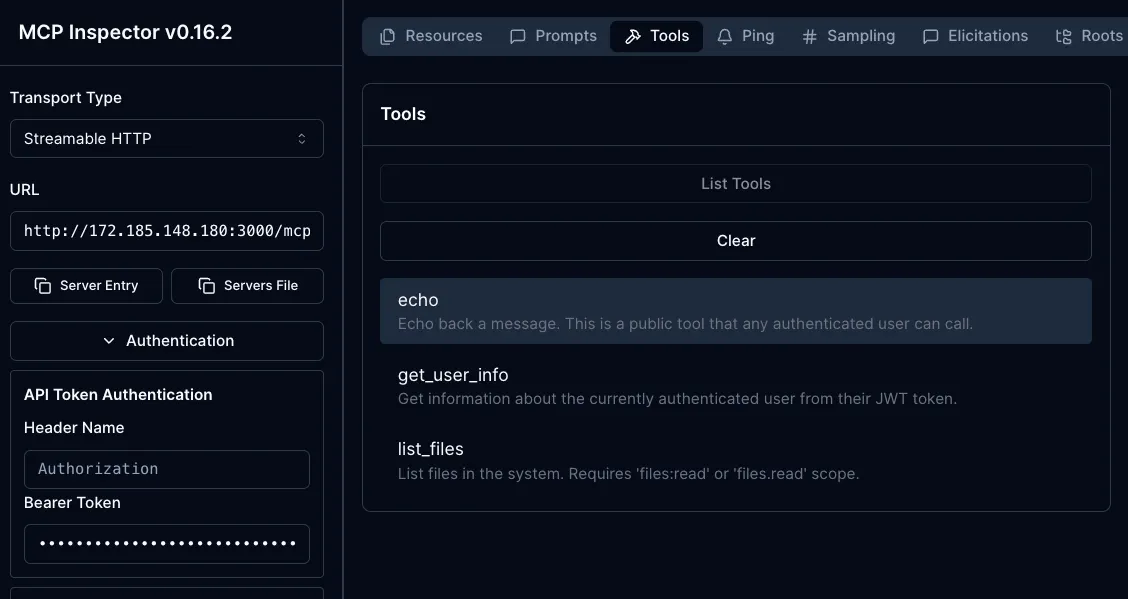
If you’d like to run through the entire setup from start to finish for MCP oAuth security with all of the code, MCP, and Auth0 configurations that you’ll need to get oAuth up and running, you can go to the following GitHub repo for a step-by-step guide: https://github.com/AdminTurnedDevOps/agentic-demo-repo/tree/main/mcp/mcp-oauth-demos
Kubernetes RBAC
If you’re using a Kubernetes environment, the chances are highly likely that you’re Kubernetes RBAC somewhere. Even if an OIDC provider is used, there will be an RBAC object applied somewhere. Because of that, it’s important to point out that all of the objects provided by the kagent CRDs ranging from the Agent object to the MCPServer object to ModelConfig can be secured like any other k8s object.
First step is to create a ServiceAccount to test with as by default, Kubernetes doesn’t give you a way to manage user objects out of the box.
kubectl create serviceaccount test-reader -n kagentFor the new Service Account, create a ClusterRole (the permissions) and a ClusterRoleBinding (attach the ClusterRole to the Service Account).
kubectl apply -f - <<EOF
apiVersion: rbac.authorization.k8s.io/v1
kind: ClusterRole
metadata:
  name: kagent-crd-viewer
rules:
  - apiGroups: ["kagent.dev"]
    resources: ["agents", "mcpservers", "modelconfigs"]
    verbs: ["get", "list", "watch"]
---
apiVersion: rbac.authorization.k8s.io/v1
kind: ClusterRoleBinding
metadata:
  name: kagent-viewer-binding
subjects:
  - kind: ServiceAccount
    name: test-reader
    namespace: kagent
roleRef:
  kind: ClusterRole
  name: kagent-crd-viewer
  apiGroup: rbac.authorization.k8s.io
EOF
Verify that read access works.
kubectl auth can-i get mcpservers.kagent.dev --as=system:serviceaccount:kagent:test-readerIf you check the “create” access, it should not work.
kubectl auth can-i create mcpservers.kagent.dev --as=system:serviceaccount:kagent:test-readerAs an example, try creating the MCP Server below using the Service Account that you created in step 1.
kubectl apply -f - <<EOF --as=system:serviceaccount:kagent:test-reader
apiVersion: kagent.dev/v1alpha1
kind: MCPServer
metadata:
  name: test-reader-only
  namespace: kagent
  labels:
    kagent.solo.io/waypoint: "true"
spec:
  deployment:
    image: mcp/everything
    port: 3000
    cmd: npx
    args:
      - "-y"
      - "@modelcontextprotocol/server-github"
  transportType: stdio
EOF
You should see an error similar to the one below.
Error from server (Forbidden): error when creating "STDIN": mcpservers.kagent.dev is forbidden: User "system:serviceaccount:kagent:test-reader" cannot create resource "mcpservers" in API group "kagent.dev" in the namespace "kagent"Conclusion
As security needs become more apparent in the world of Agentic AI, your solutions around Agents and what Agents are community with over an AI Gateway (other Agents, MCP Servers, LLMs), need fine-grained security that you can receive in a high level or incredibly granular format. Implement kagent and agentgateway, you get to choose and get the best of both worlds.


%20(1).png)





%20a%20Bad%20Idea.png)