

How It Works
One Daemon.
Three Control Points.
Click a control point to see what agentdesktop does on every workstation.
Find every harness on every machine
Detect AI tools across macOS, Windows, and Linux, wherever each one hides its config. JSON, JSONC, TOML. One inventory, no scripts to maintain.
Attribute everything to a person
Every record ties to an enrolled device and an authenticated user. Inventory you can act on, not a list of hostnames.
Inventory MCP servers and skills
See which MCP servers and skills each tool has loaded, attributed to a device and a user. Collected without pulling secrets along with them.
Report on applied state
The daemon reports whether each configuration revision actually landed. Know the difference between policy declared and policy in effect.
Track models in use
Know which models are configured where. When a team switches providers or points at something unapproved, it shows up in the inventory.
Write sandbox policy one time
Define writable paths, denied paths, and allowed domains in one block. agentdesktop translates that intent into each harness's native sandbox settings.
Version every change
Controller-managed configuration is versioned and rolled out by revision. Roll forward, roll back, and see which devices are on which revision.
Preview before you apply
Run with --dry-run to see exactly what would change on a workstation. No surprise reconciliation across the fleet.
Keep MDM doing its job
MDM enrolls the device, deploys the daemon, and enforces OS posture. agentdesktop handles the harness-aware layer above it.
Reconcile drift continuously
Local edits, tool upgrades, and schema changes pull configuration off baseline. agentdesktop merges managed settings back and keeps posture uniform.
Bind devices to real users
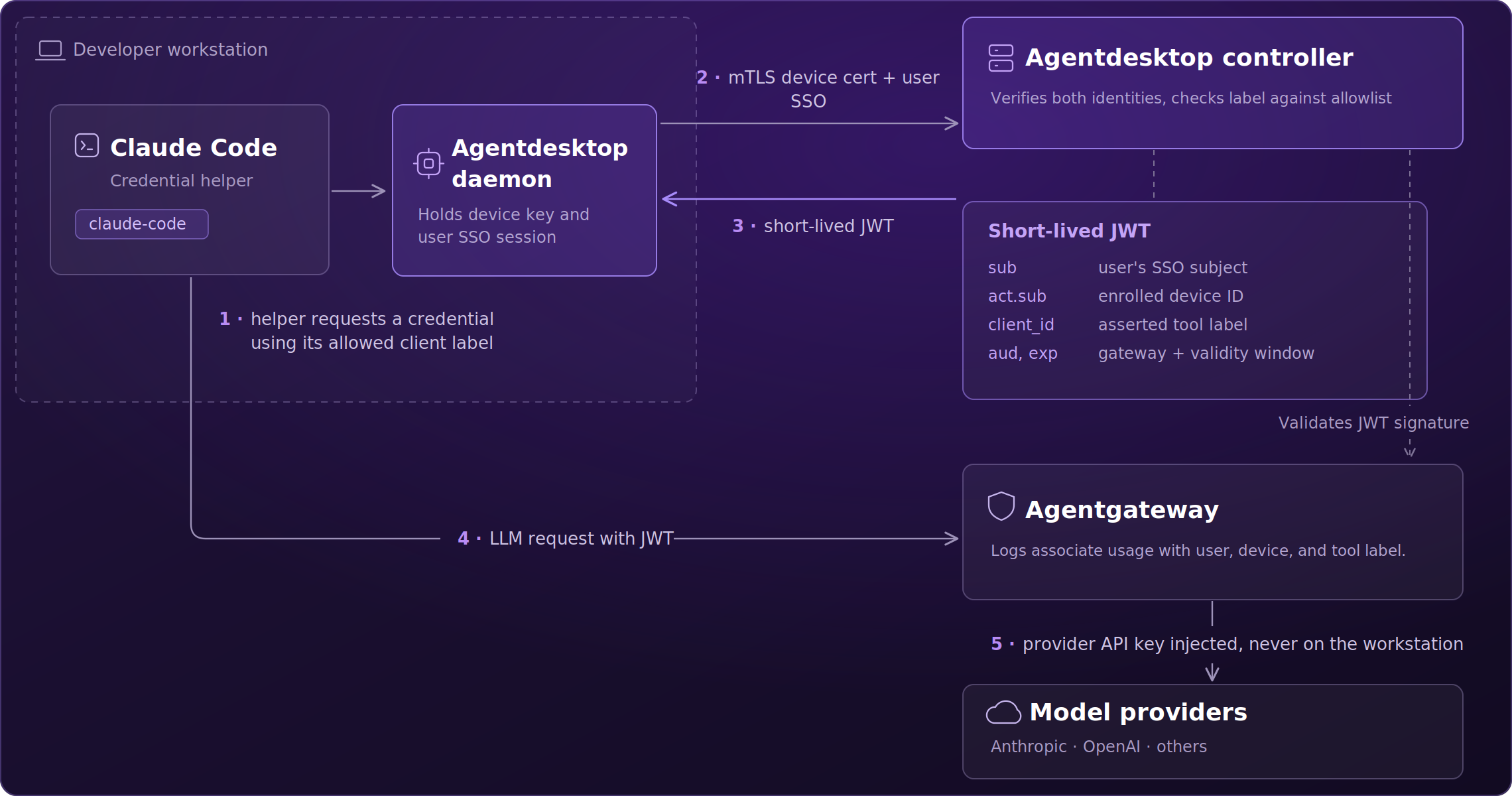
Each device generates a private key locally and enrolls through your existing SSO. The private key never leaves the workstation.
Route through your LLM gateway
Managed tools are configured to call your gateway with identity attached, giving it the context it needs for routing, policy, and logging.
Issue short-lived credentials
Tools request credentials from the local daemon and get a short-lived JWT carrying the enrolled user, the device ID, and the client label.
Attribute model and token spend
Gateway telemetry carries user, device, and client label. Model usage and token consumption tie back to a person, not an API key.
Keep provider keys at the gateway
Model provider API keys stay on agentgateway and are injected there. Nothing long-lived gets distributed to workstations.
The Production Gap
Most organizations think they already have this covered.
MDM and firewalls cover devices and network paths. They do not see which agent harnesses are installed, what those harnesses are configured to reach, or whose credentials they are using. Confidence and coverage are not the same thing.
90%
Sure they know what's running.
Confident
in
AI visibility
52%
The reality on the ground.
Employees
using
unapproved AI tools
86%
Identities with nothing enforcing them.
Enterprises
not enforcing
AI identity policy
2 modes
Start on one laptop. Scale to the fleet.
Standalone
•
Controller-managed
Short-lived
Nothing long-lived on the workstation.
User
+ Device
+ Client
Apache 2.0
No vendor lock-in. Ever.
Inspectable
•
No bundled platform
90%
Sure they know what's running.
Confident
in
AI visibility
52%
The reality on the ground.
Employees
using
unapproved AI tools
86%
Identities with nothing enforcing them.
Enterprises
not enforcing
AI identity policy
2 modes
Start on one laptop. Scale to the fleet.
Standalone
•
Controller-managed
Short-lived
Nothing long-lived on the workstation.
User
+ Device
+ Client
Apache 2.0
No vendor lock-in. Ever.
Inspectable
•
No bundled platform
Why is now different?
The desktop became a production environment. Governance didn't follow.
Agent harnesses on laptops now connect to production data, APIs, and systems. The tools that manage those laptops were built for devices and operating systems, not for AI harnesses, MCP servers, and non-human identity.
Discovery
Problem: MDM enrolls devices and reports on operating systems. It cannot tell you which AI harnesses are installed, which MCP servers they load, or which models they call.

Configuration
Problem: Configuration profiles and scripts can push settings for one tool. Every path, schema, or behavior change breaks them, and the maintenance never ends.

Identity & Credentials
Problem: Every tool and provider brings its own credential model. Long-lived keys and tokens scatter across environment variables, config files, and keychains, and a leaked one keeps working.

Observability
Problem: Gateway logs show model calls without showing who made them. Session and tool activity on the workstation stays invisible to the platform team.

Open Source
Problem: Endpoint tooling that watches developer activity has to be trustworthy. A closed platform asks you to take its collection and credential boundaries on faith.

Discover more
Resources to help you govern AI across your orgainzation.
Ready to Govern AI on the Desktop?
Start on one workstation in standalone mode. Add the controller when you need fleet inventory, identity, and reporting. Open source under Apache 2.0.